Originaldokument
GPT Image 2 · en
{
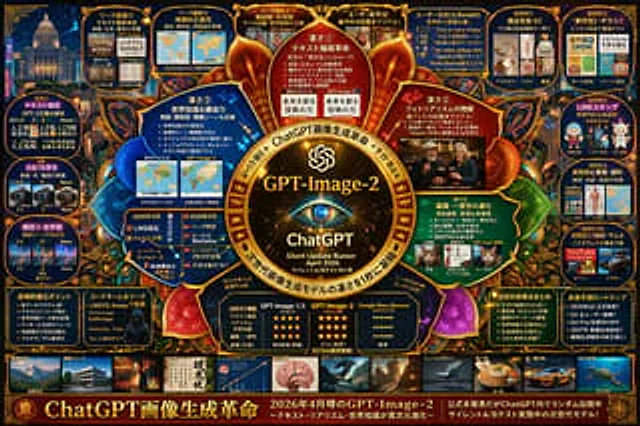
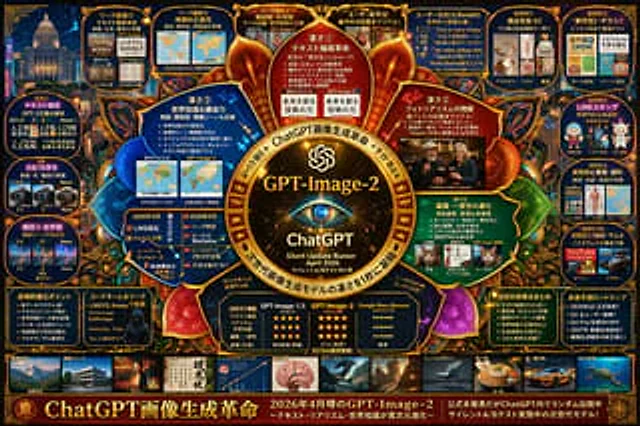
  "type": "Complex Technology Speculation Infographic",
  "style": "{argument name=\"color palette\" default=\"Dark blue background, accented with gold, red and cyan luminous details.\"} High-density online survey project, mind map layout",
  "centerpiece": {
    "description": "{argument name=\"central emblem\" default=\"Glowing gold round badge with eye pattern\"}",
    "text": [
      "{argument name=\"main title\" default=\"GPT-Image-2\"}",
      "ChatGPT",
      "{argument name=\"subtitle\" default=\"Rumors of a silent update in April 2026\"}"
    ]
  },
  "layout": {
    "sections": [
      {
        "title": "Internal nodes",
        "position": "Around the center",
        "count": 4,
        "labels": [
          "Core Advantages ①",
          "Core Advantage ②",
          "Core Advantage ③",
          "Core Advantage ④"
        ],
        "description": "Glowing circular text nodes highlighting core advantages"
      },
      {
        "title": "Top Leak Panel",
        "position": "Top row",
        "count": 4,
        "labels": [
          "Leaked Image ①",
          "Leaked Images ②",
          "Leaked Images ③",
          "User déjà vu (X)"
        ],
        "description": "Before and after comparison images"
      },
      {
        "title": "User Feedback",
        "position": "Top right corner",
        "count": 1,
        "labels": [
          "User reactions (X/Reddit)"
        ],
        "description": "A panel containing 5 reference bubbles"
      },
      {
        "title": "Practical Cases",
        "position": "Rightmost column",
        "count": 5,
        "labels": [
          "Practical Case ①",
          "Practical Case ②",
          "Practical Case ③",
          "Practical Case 4",
          "Practical Case ⑤"
        ],
        "description": "Image grids encompassing application scenarios such as e-commerce, flyers, LINE stickers, education, and thumbnails."
      },
      {
        "title": "Comparative analysis",
        "position": "Leftmost column",
        "count": 3,
        "labels": [
          "Comparison ①",
          "Comparison ②",
          "Composition ③ • Worldview"
        ],
        "description": "Version comparison images"
      },
      {
        "title": "Bottom Data Panel",
        "position": "The bottom row above the gallery",
        "count": 5,
        "labels": [
          "Technological Evolution Points",
          "Codenames and leaks",
          "Comparison Table",
          "Summary of key improvements",
          "Future Prediction Roadmap"
        ],
        "description": "Includes a bulleted list, a hacker portrait, and a 3-column star rating comparison table."
      },
      {
        "title": "Style Gallery",
        "position": "Bottom bar",
        "count": 10,
        "labels": [
          "Architecture and Perspective",
          "poster",
          "Japanese text",
          "Infographic",
          "Fantasy",
          "Steampunk",
          "Minimalist design",
          "food",
          "Automobiles and vehicles",
          "Underwater Universe"
        ],
        "description": "Showing horizontal thumbnail rows with different generation styles"
      }
    ],
    "footer": {
      "text": "{argument name=\"footer text\" default=\"ChatGPT: The Image Generation Revolution\"}",
      "position": "bottom edge"
    }
  }
}
Verwendung
- Den vollständigen Original-Prompt einschließlich Parametern kopieren.
- Motiv, Text und Komposition an die eigenen Anforderungen anpassen.
- Ein kompatibles externes Werkzeug nutzen; Zugangsbedingungen und Ergebnis prüfen.
Vor dem Start
- Prüfen, ob ein Referenzbild nötig ist. Kompatibilität belegt nicht das tatsächlich verwendete Modell.
- Namen, Zahlen und Bildtexte prüfen; Modellversionen können andere Ergebnisse liefern.