Originaldokument
GPT Image 2 · en
{
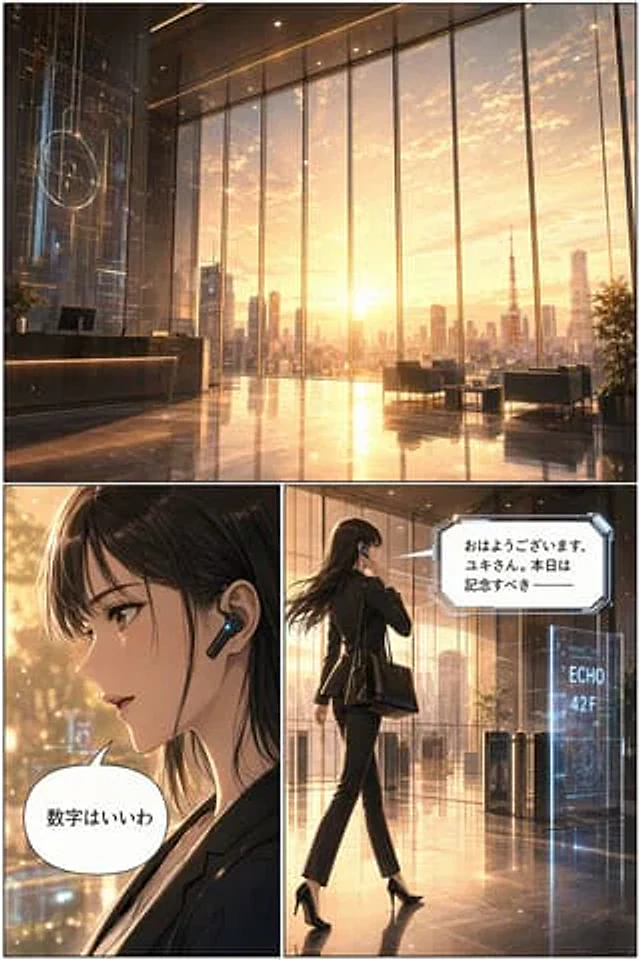
  "type": "3-panel comic strip",
  "style": "Anime-style design, high detail, cinematic lighting effects, futuristic corporate style.",
  "layout": {
    "structure": "One wide grid at the top, and two square grids at the bottom."
  },
  "panels": [
    {
      "position": "Above",
      "shot": "Wide-angle horizontal lens",
      "scene": "Futuristic corporate lobby with floor-to-ceiling windows",
      "lighting": "{argument name=\"time of day\" default=\"sunrise\"}",
      "background": "City skyline, including{argument name=\"landmark\" default=\"Tokyo Tower\"}",
      "details": "Holographic display screen, polished reflective floor, reception desk, lounge chairs"
    },
    {
      "position": "Lower left",
      "shot": "Side close-up",
      "character": "Young woman, dark hair, wearing a black business suit.",
      "accessories": "Futuristic black headphones with blue LED lights",
      "speech_bubble": {
        "style": "Standard fillet",
        "text": "{argument name=\"character dialogue\" default=\"The numbers are good.\"}"
      }
    },
    {
      "position": "bottom right",
      "shot": "Full-body shot, back view, touching the headphones",
      "character": "The same woman, wearing a black suit, black high heels, and carrying a black tote bag.",
      "environment": "Walking towards the security gate",
      "holographic_sign": "{argument name=\"floor sign\" default=\"ECHO 42F\"}",
      "speech_bubble": {
        "style": "Futuristic sharp angles",
        "text": "{argument name=\"AI dialogue\" default=\"Good morning, Yuki. Today is a momentous day...\"}"
      }
    }
  ]
}
Verwendung
- Den vollständigen Original-Prompt einschließlich Parametern kopieren.
- Motiv, Text und Komposition an die eigenen Anforderungen anpassen.
- Ein kompatibles externes Werkzeug nutzen; Zugangsbedingungen und Ergebnis prüfen.
Vor dem Start
- Prüfen, ob ein Referenzbild nötig ist. Kompatibilität belegt nicht das tatsächlich verwendete Modell.
- Namen, Zahlen und Bildtexte prüfen; Modellversionen können andere Ergebnisse liefern.