Originaldokument
GPT Image 2 · en
{
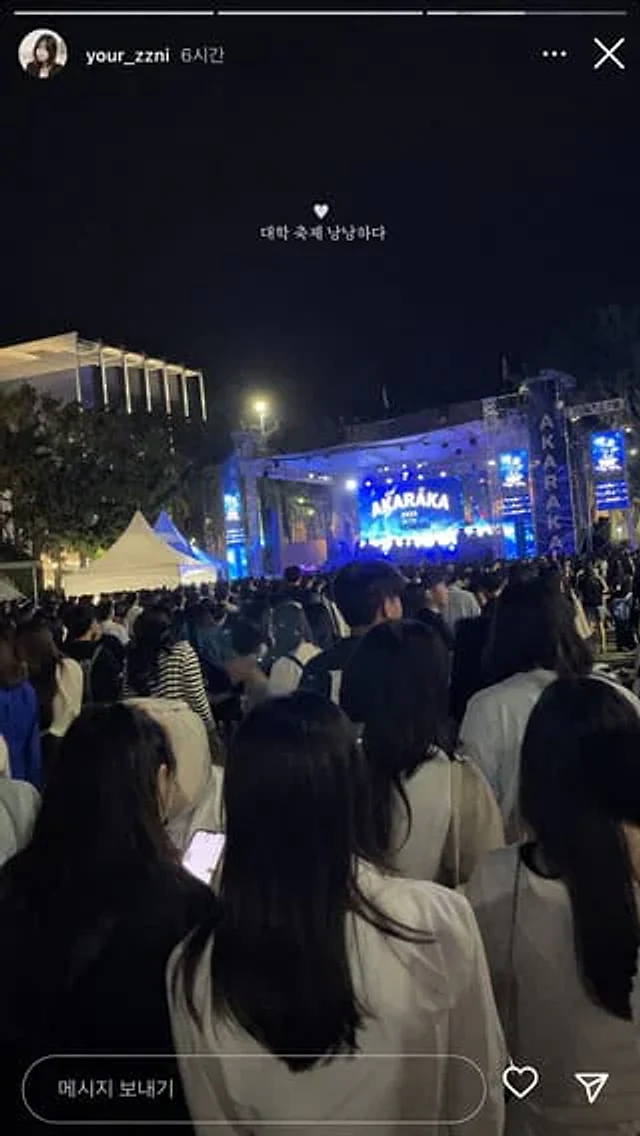
  "type": "Screenshot of social media story",
  "background_photo": {
    "setting": "Nighttime Outdoor University Music Festival",
    "perspective": "A first-person perspective of looking at the bright stage from behind the crowded crowd.",
    "crowd": "A group of young people dressed casually as seen from behind.",
    "stage": "A large outdoor concert stage emitting bright blue light, with the main LED screen displaying \"{argument name=\"stage main text\" default=\"AKARAKA\"} \"and\"{argument name=\"stage sub text\" default=\"2025 YONSEI\"} Vertical banners bearing the word \"AKARAKA\" were hung on both sides.",
    "environment": "A pitch-black night sky, trees, a modern building with vertical light strips on the left, and two white event tents on the left-center."
  },
  "ui_overlay": {
    "top_header": "A young woman's round profile picture, username \"{argument name=\"username\" default=\"your_zzni\"} The timestamp is \"6 hours ago\", and the right side features a standard three-dot menu and an \"X\" close icon.",
    "center_text": "A small white heart icon floats in the center of the screen, followed by the text \"{argument name=\"overlay text\" default=\"The university music festival had a fantastic atmosphere.\"} \"",
    "bottom_bar": "A pill-shaped message input box containing the text \"Send Message,\" accompanied by a heart-shaped icon and a paper airplane icon on the right."
  }
}
Verwendung
- Den vollständigen Original-Prompt einschließlich Parametern kopieren.
- Motiv, Text und Komposition an die eigenen Anforderungen anpassen.
- Ein kompatibles externes Werkzeug nutzen; Zugangsbedingungen und Ergebnis prüfen.
Vor dem Start
- Prüfen, ob ein Referenzbild nötig ist. Kompatibilität belegt nicht das tatsächlich verwendete Modell.
- Namen, Zahlen und Bildtexte prüfen; Modellversionen können andere Ergebnisse liefern.