
Originaldokument
Nano Banana · en
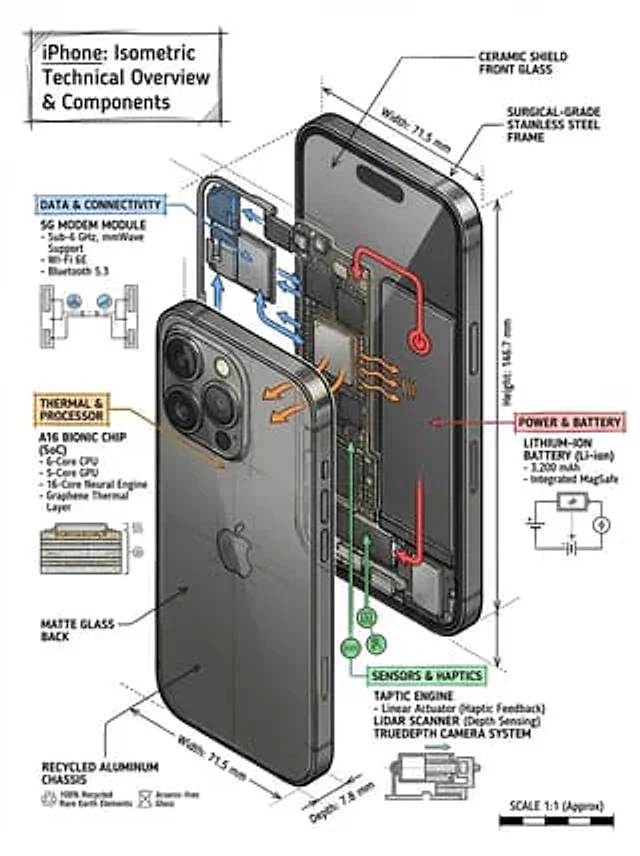
Create a technical infographic of [OBJECT] with a 45-degree isometric 3D perspective showing the device slightly tilted to reveal depth and dimension.
Combine a realistic photoreal render with black ink technical annotations on pure white background. Include:
Key component labels with color-coded callout boxes
Internal component visibility through transparent/cutaway sections
Measurements, dimensions, and precise scale markers
Material callouts and quantities
Color-coded arrows for function/flow: RED (power/battery), BLUE (data/connectivity), ORANGE (thermal/processor), GREEN (sensors/haptics)
Simple schematics or cross-sectional diagrams where relevant

Place “OBJECT” title in a hand-drawn technical box (top-left corner).
Style: Black linework (technical pen/architectural), sketched but precise. Object remains clearly visible. Educational museum-exhibit vibe. Clean composition, balanced negative space.
Perspective: Isometric 3D angle—tilted to show depth, dimension, and internal architecture dramatically. Like a professional product teardown or engineering manual.
Colors: ~10-15% accent density. Black dominant. White background.
Output: 1080×1080, ultra-crisp, social-feed optimized.
Verwendung
- Den vollständigen Original-Prompt einschließlich Parametern kopieren.
- Motiv, Text und Komposition an die eigenen Anforderungen anpassen.
- Ein kompatibles externes Werkzeug nutzen; Zugangsbedingungen und Ergebnis prüfen.
Vor dem Start
- Prüfen, ob ein Referenzbild nötig ist. Kompatibilität belegt nicht das tatsächlich verwendete Modell.
- Namen, Zahlen und Bildtexte prüfen; Modellversionen können andere Ergebnisse liefern.