
Originaldokument
GPT Image 2 · en
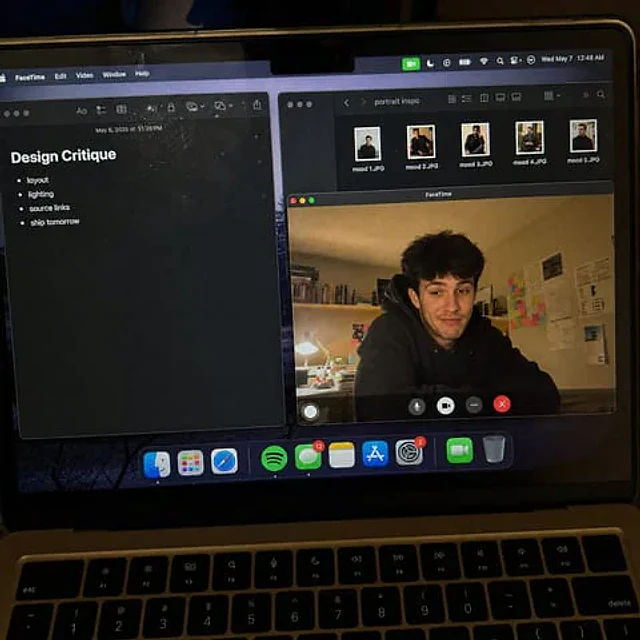
Create a raw smartphone photo of a laptop screen, not a screenshot. Aspect ratio 3:4, high-angle downward POV from someone standing over a desk at night. The laptop display fills most of the frame, with a narrow strip of black keyboard and trackpad visible at the bottom. Strong realism: visible RGB subpixel grid, subtle moire bands, small dust specks, faint fingerprints, uneven glass reflections, handheld phone noise, slight perspective skew, no studio polish. macOS dark mode. Background app: Apple Notes with a late-night study note titled "Design Critique" and short visible bullets: "layout", "lighting", "source links", "ship tomorrow". Foreground app: FaceTime live preview window floating lower-right, showing a fictional adult man in his 20s sitting at a cluttered desk, hoodie, tired but amused expression, warm desk lamp behind him, books and sticky notes in the room. A second small Finder window with image thumbnails is partly visible behind it. Make it feel like an accidental real phone photo of a working laptop screen. No real-person likeness, no beauty filter, no perfect UI, no screenshot, no watermark, no cartoon, no 3D render.Verwendung
- Den vollständigen Original-Prompt einschließlich Parametern kopieren.
- Motiv, Text und Komposition an die eigenen Anforderungen anpassen.
- Ein kompatibles externes Werkzeug nutzen; Zugangsbedingungen und Ergebnis prüfen.
Vor dem Start
- Prüfen, ob ein Referenzbild nötig ist. Kompatibilität belegt nicht das tatsächlich verwendete Modell.
- Namen, Zahlen und Bildtexte prüfen; Modellversionen können andere Ergebnisse liefern.