Originaldokument
GPT Image 2 · en
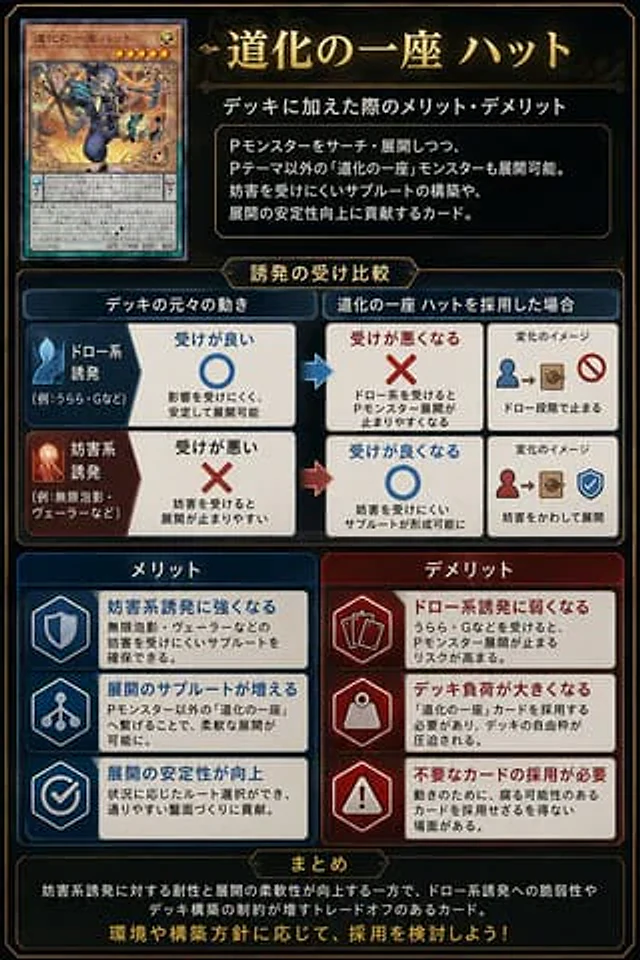
Goal: Create a polished vertical Japanese trading-card-game strategy infographic explaining the pros and cons of adding a specific card to a deck.

Canvas: Portrait 2:3 layout, dark navy-black fantasy UI background with thin gold ornamental borders, beveled panels, subtle glow, and a premium card-game analysis aesthetic. Use gold title typography and white Japanese body text.

Main title area: At top right, place a large ornate gold headline reading {argument name="headline text" default="道化の一座 ハット"}. Beneath it, add the subtitle {argument name="subtitle text" default="デッキに加えた際のメリット・デメリット"}. Under the subtitle, place a dark framed explanation box containing 3 short Japanese lines describing that the card can search/deploy Pendulum monsters, also enables non-theme monsters, supports interruption-resistant subroutes, and improves combo stability.

Card display: At top left, show exactly 1 realistic Yu-Gi-Oh-style monster card mockup, named {argument name="card name" default="道化の一座 ハット"}. The card should have an orange monster-card frame, star icons, a small LIGHT attribute icon, dense Japanese effect text, ATK/DEF line, and fantasy artwork of a jester-like rogue in blue clothing holding a staff amid swirling golden magic. Do not use official logos or exact copyrighted card layout details; make it a close fictional TCG-style homage.

Middle comparison section: Add a centered gold label tab reading “Trigger resilience comparison”. Create exactly 2 horizontal comparison rows under it, each split into a left original-deck behavior column, a middle after-adoption result column, and a right small change-image column. Row 1 is draw-type trigger: blue icon, left box has a large blue circle meaning good resilience; arrow points right to a red X meaning resilience becomes worse; right mini diagram shows a blue person icon leading to a card/box and a prohibition symbol, implying the combo stops at the draw stage. Row 2 is interruption-type trigger: red/orange icon, left box has a large red X meaning poor resilience; arrow points right to a blue circle meaning resilience improves; right mini diagram shows a red person icon leading to a card/box and a blue shield check, implying interruption is avoided and deployment continues.

Lower benefits and drawbacks: Create exactly 6 rectangular cards in two columns, 3 benefits on the left and 3 drawbacks on the right. Left column header: “メリット” in a blue panel. Right column header: “デメリット” in a red panel. Benefit card 1 uses a shield icon and says it becomes stronger against interruption-type triggers. Benefit card 2 uses a branching route icon and says the number of deployment subroutes increases. Benefit card 3 uses a checkmark icon and says combo stability improves. Drawback card 1 uses stacked card icons and says it becomes weaker against draw-type triggers. Drawback card 2 uses a weight/bag icon and says deck burden becomes larger. Drawback card 3 uses a warning triangle icon and says unnecessary cards may need to be adopted. Each of the 6 cards must include a bold colored heading plus two smaller Japanese explanatory lines.

Bottom summary: Add a wide dark framed box with a small gold tab header reading “まとめ”. Inside, write a concise Japanese summary explaining the trade-off: resistance to interruption and flexible deployment improve, but weakness to draw-type triggers and deck-building constraints increase. End with a larger gold call-to-action line reading {argument name="closing line" default="環境や構築方針に応じて、採用を検討しよう!"}.

Style constraints: Use crisp vector-like UI panels mixed with realistic card art, high contrast, clean alignment, thin gold borders, blue for positive elements, red for negative elements, arrows between comparison boxes, no watermark, no extra sections, and keep all text legible as an infographic.
Verwendung
- Den vollständigen Original-Prompt einschließlich Parametern kopieren.
- Motiv, Text und Komposition an die eigenen Anforderungen anpassen.
- Ein kompatibles externes Werkzeug nutzen; Zugangsbedingungen und Ergebnis prüfen.
Vor dem Start
- Prüfen, ob ein Referenzbild nötig ist. Kompatibilität belegt nicht das tatsächlich verwendete Modell.
- Namen, Zahlen und Bildtexte prüfen; Modellversionen können andere Ergebnisse liefern.