Originaldokument
GPT Image 2 · en
{
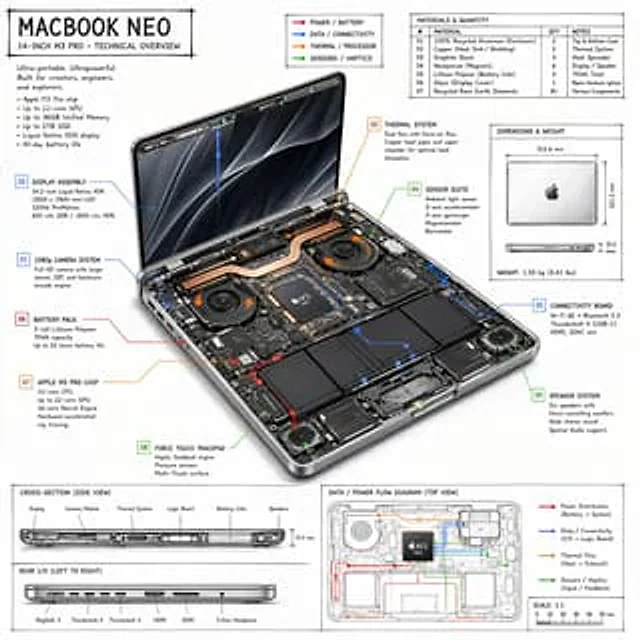
  "type": "Technology Overview Infographic",
  "style": "{argument name=\"visual style\" default=\"Hand-drawn technical sketches with simple layout\"}",
  "product": {
    "name": "{argument name=\"product name\" default=\"MACBOOK NEO\"}",
    "subtitle": "14 inches{argument name=\"processor model\" default=\"M3 PRO\"} - Technology Overview"
  },
  "layout": {
    "centerpiece": {
      "description": "An open isometric view of the laptop reveals internal hardware components such as dual fans, copper heat pipes, battery cells, and logic modules.",
      "callouts_count": 9,
      "callout_labels": [
        "01 1080p Camera System",
        "02 Display Panel Components",
        "03 Cooling System",
        "04 Sensor Kit",
        "05 Connecting Projects",
        "06 Battery Pack",
        "07 {argument name=\"main component\" default=\"Apple M3 Pro chip\"}",
        "08 Force Touch Trackpad",
        "09 Speaker System"
      ]
    },
    "sections": [
      {
        "title": "Title text",
        "position": "Top left",
        "content": "Marketing slogans and a list of 5 specifications"
      },
      {
        "title": "legend",
        "position": "Upper-middle",
        "content": "Four color-coded arrows indicate{argument name=\"accent colors\" default=\"Red, blue, orange, green\"} Power, data, heat, and sensor flow lines"
      },
      {
        "title": "Material and quantity",
        "position": "Top right",
        "type": "sheet",
        "rows_count": 7,
        "columns": [
          "#",
          "Material",
          "quantity",
          "Remark"
        ]
      },
      {
        "title": "Size and weight",
        "position": "center right",
        "content": "Top and side views of a laptop computer in its closed state, with measurement data labeled."
      },
      {
        "title": "Cross-section (side view)",
        "position": "Bottom left (top half)",
        "content": "The side profile shows the internal component layout, with 6 labels."
      },
      {
        "title": "Backend I/O (from left to right)",
        "position": "Bottom left (lower half)",
        "content": "The side profile shows 6 ports."
      },
      {
        "title": "Data/Power Flow Diagram (Top View)",
        "position": "Bottom right",
        "content": "A wireframe top view with colored flow lines, a legend, and a scale bar."
      }
    ]
  }
}
Verwendung
- Den vollständigen Original-Prompt einschließlich Parametern kopieren.
- Motiv, Text und Komposition an die eigenen Anforderungen anpassen.
- Ein kompatibles externes Werkzeug nutzen; Zugangsbedingungen und Ergebnis prüfen.
Vor dem Start
- Prüfen, ob ein Referenzbild nötig ist. Kompatibilität belegt nicht das tatsächlich verwendete Modell.
- Namen, Zahlen und Bildtexte prüfen; Modellversionen können andere Ergebnisse liefern.