Documento original
GPT Image 2 · en
{
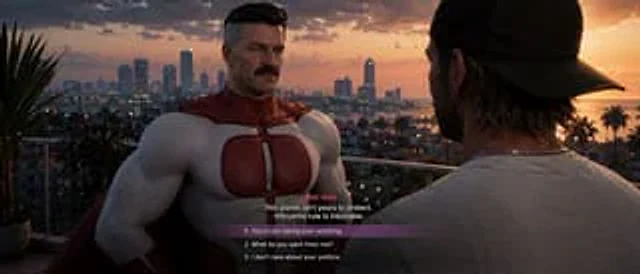
  "type": "Video game screenshots",
  "style": "{argument name=\"art style\" default=\"Grand Theft Auto VI: Aesthetics, Realistic 3D Graphics\"}",
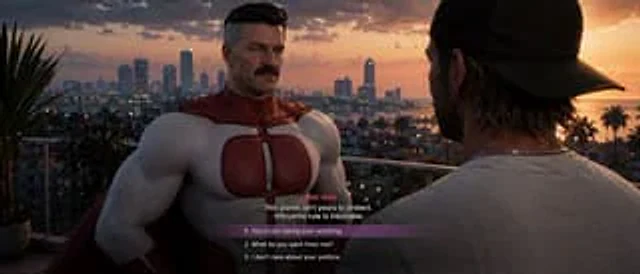
  "setting": "A balcony overlooking the coastal city at sunset, with palm trees, skyscrapers, and warm lights.",
  "characters": [
    {
      "role": "NPC",
      "description": "{argument name=\"npc description\" default=\"Omni-Man is a muscular, middle-aged man with a beard, graying sideburns, and wearing a red and white superhero suit.\"}",
      "position": "Center left, facing the camera"
    },
    {
      "role": "Players",
      "description": "A man wearing a dark baseball cap backwards and a light gray T-shirt",
      "position": "Right foreground, facing away from the camera"
    }
  ],
  "ui_elements": {
    "type": "Dialogue Menu",
    "position": "Bottom Center",
    "speaker_name": "{argument name=\"speaker name\" default=\"OMNI-MAN\"}",
    "dialogue_text": "{argument name=\"npc dialogue\" default=\"This planet is not your responsibility to protect. The rule of the Viltrum is inevitable.\"}",
    "choices_count": 3,
    "choices": [
      "1. {argument name=\"choice 1\" default=\"You can forget about taking over anything.\"}",
      "2. What exactly do you want from me?",
      "3. I don't care about your politics."
    ],
    "highlight": "Option 1 has a semi-transparent purple background bar."
  }
}
Cómo usar
- Copia el prompt original completo, incluidos los parámetros.
- Adapta el tema, el texto y la composición a tus necesidades.
- Usa una herramienta externa compatible; comprueba el acceso y el resultado.
Antes de empezar
- Comprueba si necesita una imagen de referencia. La compatibilidad no demuestra qué modelo generó el ejemplo.
- Revisa nombres, cifras y textos; el resultado puede variar entre versiones del modelo.