Documento original
GPT Image 2 · en
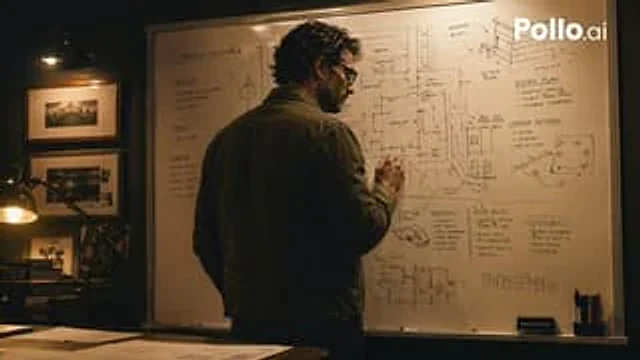
A cinematic, somber scene depicting the planning of a heist, set in a dimly lit office late at night, shot in a realistic thriller style. A grown man stands with his back to the camera, writing on a large whiteboard covered in tactical notes, architectural sketches, floor plans, arrows, routes, and hand-drawn diagrams. He has dark curly hair and wears a dark olive or charcoal gray casual jacket paired with dark trousers, projecting the image of a master planner. The whiteboard is the visual focal point, containing several readable planning areas: the top left corner is titled "OPERATION NIGHTHAWK"; the left sidebar is divided into three sections, labeled "OBJECTIVE," "TARGET," and "TIMELINE"; the top right corner has two labeled chart areas, "ENTRY PLAN" and "CAMERA NETWORK"; the lower right center has four labeled planning blocks, "TRANSIT," "EQUIPMENT," "HOTEL ROUTE," and "CONTINGENCIES." It includes architectural facade sketches, rooftop access diagrams, loading/unloading area notes, room labels, arrows drawn in black and red markers, and a sketch of a small van near the center at the bottom. The room is warmly lit with deep shadows and amber-colored practical lighting. A desk lamp illuminates a dark wooden desk cluttered with documents on the left, and three black-and-white photographs hang vertically on the wall. The composition is a mid-to-long-range over-the-shoulder shot, with the man positioned slightly to the left center of the frame, and a whiteboard dominating the background. High contrast, a soft cinematic grain, a tense atmosphere, and a realistic texture create an aesthetic reminiscent of a mastermind planning a heist—a refined crime drama aesthetic—but it doesn't depict any specific copyrighted characters. A white "Pollo.ai" watermark is added to the upper right corner.Cómo usar
- Copia el prompt original completo, incluidos los parámetros.
- Adapta el tema, el texto y la composición a tus necesidades.
- Usa una herramienta externa compatible; comprueba el acceso y el resultado.
Antes de empezar
- Comprueba si necesita una imagen de referencia. La compatibilidad no demuestra qué modelo generó el ejemplo.
- Revisa nombres, cifras y textos; el resultado puede variar entre versiones del modelo.