Documento original
GPT Image 2 · en
{
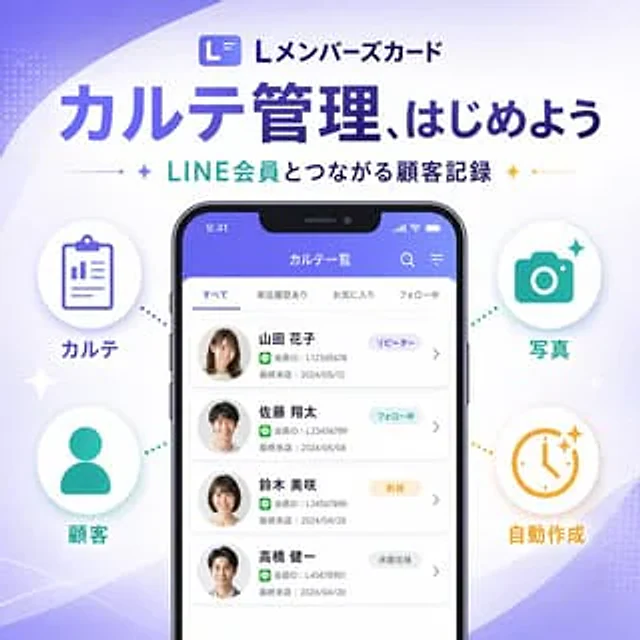
  "type": "SaaS feature update promotional banner",
  "style": "A clean and modern Japanese tech marketing style, high-quality infographics, soft gradient backgrounds, and exquisite UI mockups—simple yet trustworthy.",
  "canvas": {
    "aspect_ratio": "1:1",
    "background": "A white background with flowing pale purple and light purple abstract wave shapes in the corners, a subtle halftone texture, and delicate shimmering accents."
  },
  "branding": {
    "top_logo": {
      "icon": "Rounded square app icon, with a stylized white L on a purple gradient background.",
      "text": "L Member Card"
    },
    "headline": "{argument name=\"headline text\" default=\"Start a new experience in medical record management\"}",
    "subheadline": "{argument name=\"subheadline text\" default=\"Customer records linked to LINE members\"}",
    "headline_style": "Large, bold, dark purple Japanese sans-serif font",
    "subheadline_style": "Medium-sized bold Japanese sans-serif font with cyan and dark navy blue accents, flanked by small star icons and thin dividing lines."
  },
  "layout": {
    "centerpiece": "A large, vertically centered smartphone front model, positioned slightly below the title.",
    "sections": [
      {
        "title": "Left side function",
        "position": "Left side of the phone",
        "count": 2,
        "labels": [
          "Medical records",
          "client"
        ],
        "items": [
          {
            "shape": "White circular badge with soft shadow",
            "icon": "Purple clipboard line icon",
            "label": "Medical records",
            "accent": "The purple dotted line connecting the phone"
          },
          {
            "shape": "White circular badge with soft shadow",
            "icon": "Cyan silhouette icon",
            "label": "client",
            "accent": "The cyan dotted line connecting the phone"
          }
        ]
      },
      {
        "title": "right-side functions",
        "position": "right side of the phone",
        "count": 2,
        "labels": [
          "photo",
          "Automatically generated"
        ],
        "items": [
          {
            "shape": "White circular badge with soft shadow",
            "icon": "Cyan camera icon",
            "label": "photo",
            "accent": "The cyan dotted line connecting the phone"
          },
          {
            "shape": "White circular badge with soft shadow",
            "icon": "Orange clock icon with a glitter effect",
            "label": "Automatically generated",
            "accent": "The orange dashed line pointing to the phone"
          }
        ]
      }
    ],
    "decorations_count": 6
  },
  "app_screen": {
    "screen_title": "Medical Record List",
    "status_bar": {
      "time": "9:41",
      "battery": true,
      "signal": true
    },
    "top_icons_count": 2,
    "top_icons": [
      "search",
      "menu"
    ],
    "tabs": {
      "count": 4,
      "labels": [
        "all",
        "Store visit record",
        "collect",
        "Following"
      ],
      "active": "all"
    },
    "customer_cards": {
      "count": 4,
      "items": [
        {
          "name": "{argument name=\"customer name 1\" default=\"Hanako Yamada\"}",
          "member_id": "L12345678",
          "last_visit": "May 12, 2024",
          "tag": "Repeat customers",
          "avatar": "Blurry female head"
        },
        {
          "name": "Shota Sato",
          "member_id": "L123456789",
          "last_visit": "May 8, 2024",
          "tag": "Following",
          "avatar": "Blurry male head"
        },
        {
          "name": "Misaki Suzuki",
          "member_id": "L34567890",
          "last_visit": "April 28, 2024",
          "tag": "New users",
          "avatar": "Blurry female head"
        },
        {
          "name": "Kenichi Takahashi",
          "member_id": "L45678901",
          "last_visit": "April 20, 2024",
          "tag": "dormant users",
          "avatar": "Blurry male head"
        }
      ]
    },
    "ui_style": "Rounded white list cards on a light gray background, purple application title bar, subtle shadows, Japanese sans-serif typography."
  },
  "color_palette": {
    "primary": "#5B5CEB to #6C63FF",
    "secondary": "#22C7B8",
    "accent": "#F4B23A",
    "text_dark": "#2B2E5B",
    "white": "#FFFFFF"
  },
  "rendering": "Clear vector-style marketing graphics with realistic smartphone bezels, balanced and centered composition, showcasing premium SaaS launch banner aesthetics."
}
Cómo usar
- Copia el prompt original completo, incluidos los parámetros.
- Adapta el tema, el texto y la composición a tus necesidades.
- Usa una herramienta externa compatible; comprueba el acceso y el resultado.
Antes de empezar
- Comprueba si necesita una imagen de referencia. La compatibilidad no demuestra qué modelo generó el ejemplo.
- Revisa nombres, cifras y textos; el resultado puede variar entre versiones del modelo.