Documento original
GPT Image 2 · en
{
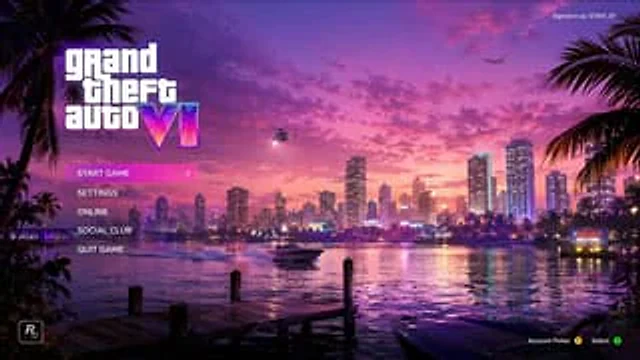
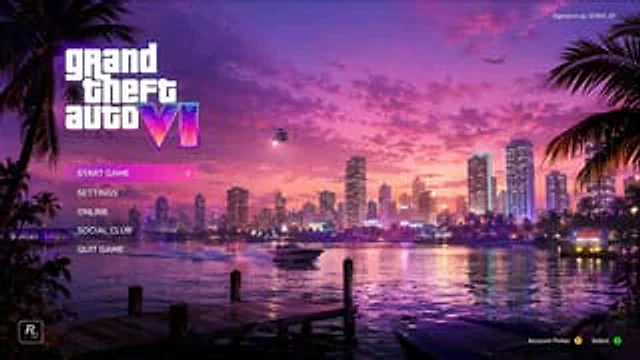
  "type": "Video game main menu UI model",
  "background_scene": {
    "setting": "The seaside city skyline at sunset, reminiscent of Miami, features vibrant pink and purple skies, with city lights reflected on the calm water.",
    "foreground": "There's a wooden dock in the lower left corner, a dark-colored speedboat is moored in the lower right corner, and palm tree silhouettes frame the area on both sides.",
    "midground": "The speedboat sped across the water, leaving a trail, while a neon sign on the right bank displayed '{argument name=\"city sign\" default=\"VICE CITY WELCOME\"} '",
    "sky": "Scattered clouds, helicopters with bright searchlights, and airplanes in the distance."
  },
  "ui_elements": {
    "main_logo": {
      "position": "Top left corner",
      "text": "{argument name=\"game title\" default=\"grand theft auto VI\"}",
      "style": "The main title uses a classic white lowercase font with large Roman numerals, and features a neon pink/purple/orange gradient and a palm tree silhouette."
    },
    "main_menu": {
      "position": "Left side center, below the main logo",
      "count": 5,
      "items": [
        "{argument name=\"menu option 1\" default=\"START GAME\"}(Highlighted with a bright pink background and a white right-pointing arrow)",
        "{argument name=\"menu option 2\" default=\"SETTINGS\"}",
        "ONLINE",
        "SOCIAL CLUB",
        "QUIT GAME"
      ]
    },
    "user_info": {
      "position": "Top right corner",
      "text": "Currently logged-in user:{argument name=\"username\" default=\"GTAVI_01\"}"
    },
    "developer_logo": {
      "position": "bottom left corner",
      "description": "R* Logo (R with a star)"
    },
    "button_prompts": {
      "position": "bottom right corner",
      "count": 2,
      "items": [
        "Account selection (with a yellow Y button icon)",
        "Select (with the green \"A\" button icon)"
      ]
    }
  }
}
Cómo usar
- Copia el prompt original completo, incluidos los parámetros.
- Adapta el tema, el texto y la composición a tus necesidades.
- Usa una herramienta externa compatible; comprueba el acceso y el resultado.
Antes de empezar
- Comprueba si necesita una imagen de referencia. La compatibilidad no demuestra qué modelo generó el ejemplo.
- Revisa nombres, cifras y textos; el resultado puede variar entre versiones del modelo.