Documento original
GPT Image 2 · en
{
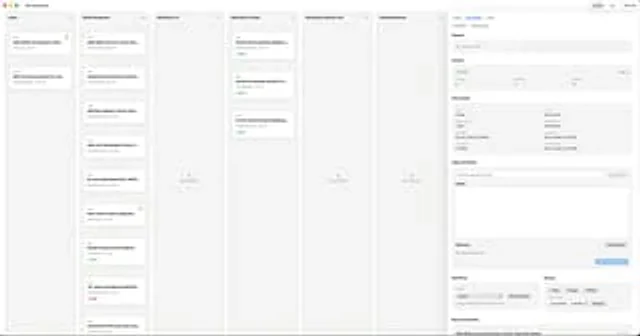
  "type": "Desktop application UI model",
  "platform": "macOS",
  "style": "A clean, light-colored productivity dashboard with a soft gray background, rounded cards, subtle shadows, and fine dividing lines—a minimalist, modern SaaS aesthetic with a compact yet uncluttered layout.",
  "app": {
    "name": "ReviewBoard",
    "window_controls": "Top left macOS red, yellow, and green traffic light button"
  },
  "layout": {
    "structure": "A single widescreen application window, divided into 7 vertical columns and a right-side inspector panel.",
    "sections": [
      {
        "title": "Inbox",
        "position": "Leftmost column",
        "count": 2,
        "labels": [
          "Add wallet and reorder to the side...",
          "Add Tor proxy support to enable node..."
        ]
      },
      {
        "title": "Response required",
        "position": "Second column from the left",
        "count": 7,
        "labels": [
          "Add wallet to restore mnemonic phrase status...",
          "Implement transaction monitoring...",
          "Add Key Teleport receiving process...",
          "Add cove-keyteleport crate: K...",
          "Allow users to download its TAPSI...",
          "Function: Cache the receiving address...",
          "[Features] Custom block explorer"
        ]
      },
      {
        "title": "Waiting for CI",
        "position": "Third column",
        "count": 0,
        "labels": []
      },
      {
        "title": "Waiting for Codex",
        "position": "Fourth column",
        "count": 3,
        "labels": [
          "Detecting silent payment addresses...",
          "Extracting pi and pjs parameters from...",
          "Fixed the issue of truncation when pasting fiat currency amounts..."
        ]
      },
      {
        "title": "Waiting for manual testing",
        "position": "Fifth column",
        "count": 0,
        "labels": []
      },
      {
        "title": "Observation and Merging",
        "position": "Column 6",
        "count": 0,
        "labels": []
      },
      {
        "title": "Inspector",
        "position": "Rightmost sidebar",
        "count": 8,
        "labels": [
          "Signal",
          "examine",
          "PR context",
          "Tags and Notes",
          "Remark",
          "Blocking items",
          "Workflow",
          "Recent submissions"
        ]
      }
    ],
    "top_right_controls": {
      "count": 3,
      "labels": [
        "project",
        "List",
        "refresh"
      ]
    }
  },
  "board": {
    "column_style": "The tall, light gray Kanban aisle features title labels, miniature counting arrows, and a centrally located empty target within the aisle.",
    "cards": {
      "shape": "Small white rounded rectangle with subtle shadows and thin borders",
      "metadata": "The top left corner displays the issue or PR number, with a bold truncated title. Below are the author and date lines, and occasionally small colored status capsules (such as green Code or red Codex). Some cards have a tiny orange notification dot in the top right corner."
    }
  },
  "inspector": {
    "tabs": {
      "count": 3,
      "labels": [
        "Open",
        "Design required",
        "draft"
      ],
      "active": "Design required"
    },
    "signals": "An empty light gray panel displays text indicating no blocking signal.",
    "checks": {
      "summary": "The horizontal status card contains three columns: Pass, Pending, and Failed, with a total of 9 items displayed on the right.",
      "counts": {
        "Passing": 9,
        "Pending": 0,
        "Failing": 0
      }
    },
    "pr_context": {
      "fields": [
        "Baseline branch",
        "Head branch",
        "Merged status",
        "CI Approval",
        "Cleaned",
        "Last request",
        "Update time",
        "April 21, 2026, 2:36 PM",
        "Last post",
        "April 20, 2026, 2:03 PM",
        "SHA",
        "a7c48b5a"
      ]
    },
    "tags_and_notes": {
      "elements": 3,
      "labels": [
        "Comma-separated tags",
        "Save tags",
        "Remark"
      ]
    },
    "blockers": {
      "elements": 3,
      "labels": [
        "No saved blocked items",
        "Add blocking item",
        "Save review notes"
      ]
    },
    "workflow": {
      "groups": 2,
      "labels": [
        "Inbox",
        "nap"
      ],
      "buttons": [
        "Marked as unread",
        "1 day",
        "3 days",
        "1 week",
        "nap"
      ]
    },
    "recent_commits": {
      "visible_count": 1,
      "labels": [
        "Add the ability to send directly to other imported wallets"
      ]
    }
  },
  "camera": "Forward full window screenshot",
  "text_rendering": "Tiny, clear UI text, realistic product design presentation.",
  "color_palette": {
    "background": "Very light warm gray",
    "columns": "Light gray",
    "cards": "White",
    "accent": "Green active status, light blue selected label, orange notification dot, soft black text."
  }
}
Cómo usar
- Copia el prompt original completo, incluidos los parámetros.
- Adapta el tema, el texto y la composición a tus necesidades.
- Usa una herramienta externa compatible; comprueba el acceso y el resultado.
Antes de empezar
- Comprueba si necesita una imagen de referencia. La compatibilidad no demuestra qué modelo generó el ejemplo.
- Revisa nombres, cifras y textos; el resultado puede variar entre versiones del modelo.