Documento original
GPT Image 2 · mixed
{
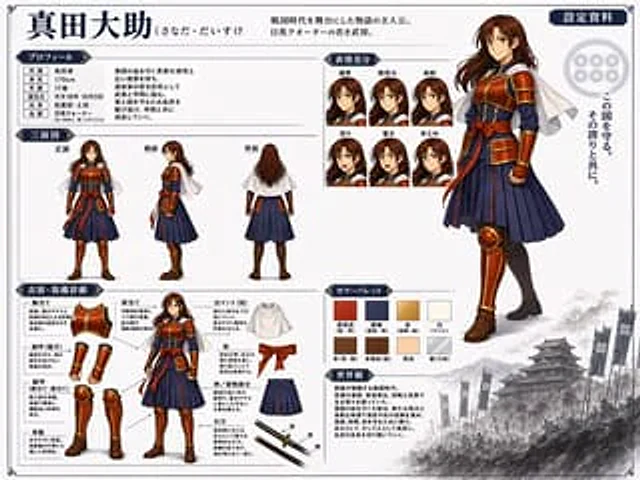
  "type": "anime character reference sheet",
  "character": {
    "name": "{argument name=\"character name\" default=\"真田大助\"}",
    "appearance": "young warrior with long brown hair, wearing samurai-inspired armor, {argument name=\"main color\" default=\"red\"} chest plate and guards, {argument name=\"secondary color\" default=\"navy blue\"} pleated hakama, white short cape"
  },
  "layout": {
    "header": {
      "title": "{argument name=\"character name\" default=\"真田大助\"}",
      "subtitle": "{argument name=\"character concept\" default=\"戦国時代を舞台にした物語の主人公。日英クォーターの若き武将。\"}",
      "badge": "設定資料"
    },
    "right_side": {
      "main_portrait": "large full-body standing pose, confident smile",
      "background_elements": {
        "emblem": "six-coin crest",
        "quote": "{argument name=\"catchphrase\" default=\"この国を守る。その誇りと共に。\"}",
        "scenery": "monochrome Japanese castle with army banners at the bottom right"
      }
    },
    "sections": [
      {
        "title": "プロフィール",
        "position": "top-left",
        "content": "table with 6 rows and descriptive text"
      },
      {
        "title": "三面図",
        "position": "mid-left",
        "count": 3,
        "labels": ["正面", "側面", "背面"]
      },
      {
        "title": "表情差分",
        "position": "top-center",
        "count": 6,
        "labels": ["通常", "微笑み", "真剣", "怒り", "驚き", "考え中"]
      },
      {
        "title": "衣装・装備詳細",
        "position": "bottom-left",
        "count": 9,
        "labels": ["胸当て", "肩当て", "腕甲(籠手)", "脚甲(脛当て・膝当て)", "革靴", "白マント(短)", "帯", "袴/着物部分", "打刀"]
      },
      {
        "title": "カラーパレット",
        "position": "bottom-center",
        "count": 8,
        "labels": ["真田赤", "濃紺", "金", "白", "茶", "茶褐色", "肌色", "銀"]
      },
      {
        "title": "世界観",
        "position": "bottom-center-right",
        "content": "paragraph of text describing the setting"
      }
    ]
  }
}
Cómo usar
- Copia el prompt original completo, incluidos los parámetros.
- Adapta el tema, el texto y la composición a tus necesidades.
- Usa una herramienta externa compatible; comprueba el acceso y el resultado.
Antes de empezar
- Comprueba si necesita una imagen de referencia. La compatibilidad no demuestra qué modelo generó el ejemplo.
- Revisa nombres, cifras y textos; el resultado puede variar entre versiones del modelo.