Documento original
GPT Image 2 · en
{
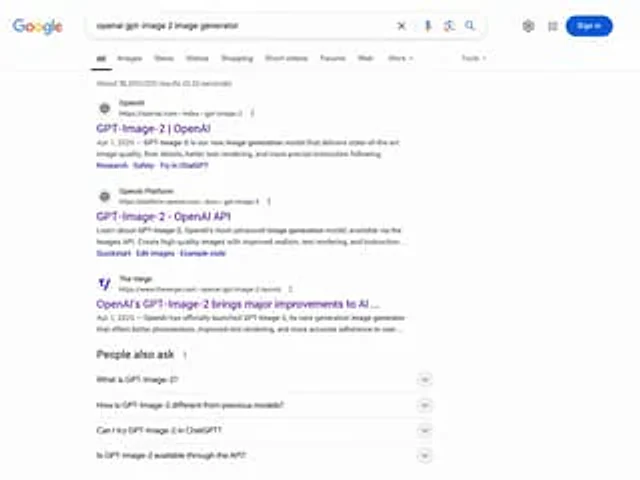
  "type": "Web browser screenshot",
  "interface": "Google search results page",
  "header": {
    "logo": "Google",
    "search_bar": {
      "query": "{argument name=\"search query\" default=\"openai gpt-image 2 image generator\"}",
      "icons": [
        "Clear",
        "microphone",
        "camera",
        "search"
      ]
    },
    "right_actions": [
      "Set gears",
      "Application Grid",
      "Blue login button"
    ]
  },
  "navigation_tabs": [
    "all",
    "picture",
    "news",
    "video",
    "Shopping",
    "short videos",
    "forum",
    "Web page",
    "More",
    "tool"
  ],
  "results_stats": "Approximately 18,200,000 results were found (in 0.32 seconds).",
  "search_results": {
    "count": 3,
    "items": [
      {
        "source": "OpenAI",
        "url": "https://openai.com > index > gpt-image-2",
        "title": "{argument name=\"result 1 title\" default=\"GPT-Image-2 | OpenAI\"}",
        "snippet": "{argument name=\"date\" default=\"April 1, 2025\"}— GPT-Image-2 is our brand-new image generation model, providing top-notch image quality, finer details, better text rendering, and more precise instruction following capabilities.",
        "sitelinks": [
          "Research",
          "Safety",
          "Try in ChatGPT"
        ]
      },
      {
        "source": "OpenAI Platform",
        "url": "https://platform.openai.com > docs > gpt-image-2",
        "title": "GPT-Image-2 - OpenAI API",
        "snippet": "Learn about OpenAI's state-of-the-art image generation model, GPT-Image-2, available through the Images API. Create high-quality images with greater realism, better text rendering, and improved instruction compliance…",
        "sitelinks": [
          "Quick Start",
          "Edit Image",
          "Example code"
        ]
      },
      {
        "source": "The Verge",
        "url": "https://www.theverge.com > openai-gpt-image-2-launch",
        "title": "OpenAI's GPT-Image-2 has brought significant improvements to AI...",
        "snippet": "April 1, 2025 — OpenAI officially released GPT-Image-2, its next-generation image generator, offering better photorealism, improved text rendering, and more accurate user instruction compliance…"
      }
    ]
  },
  "people_also_ask": {
    "title": "Related issues",
    "count": 4,
    "questions": [
      "What is GPT-Image-2?",
      "How does GPT-Image-2 differ from previous models?",
      "Can I try GPT-Image-2 in ChatGPT?",
      "Is GPT-Image-2 usable via API?"
    ]
  }
}
Cómo usar
- Copia el prompt original completo, incluidos los parámetros.
- Adapta el tema, el texto y la composición a tus necesidades.
- Usa una herramienta externa compatible; comprueba el acceso y el resultado.
Antes de empezar
- Comprueba si necesita una imagen de referencia. La compatibilidad no demuestra qué modelo generó el ejemplo.
- Revisa nombres, cifras y textos; el resultado puede variar entre versiones del modelo.