
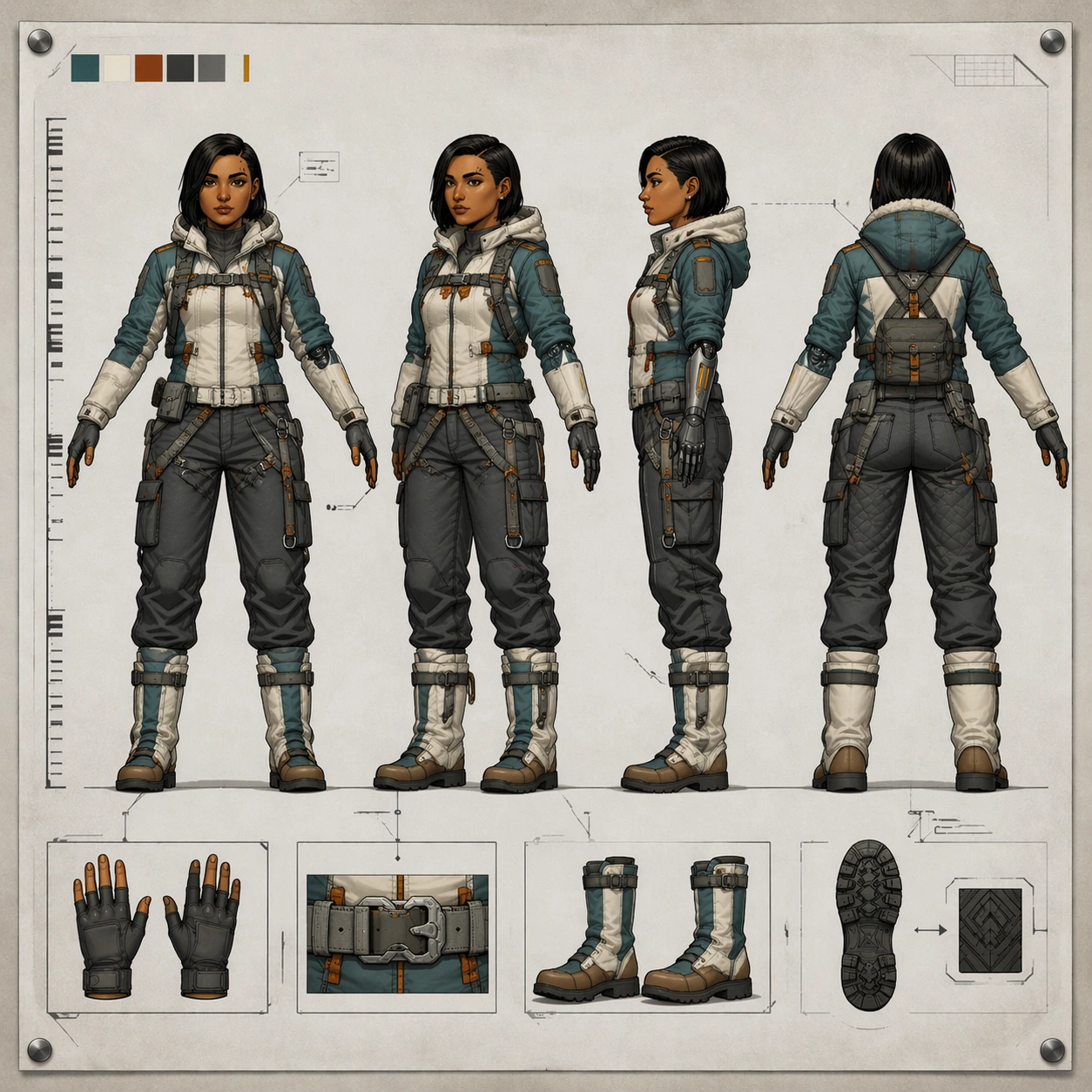
Documento original
GPT Image 2 · en
Scene:
A square production turnaround sheet using the exact same clean concept-art layout as the reference: flat studio board, generous pale background, faint alignment guides, and crisp overhead document lighting. The sheet should feel like it belongs in the same package and was prepared by the same studio artist, with the same spacing, margins, floor baseline, and neutral presentation.

Subject:
Use the reference as the primary identity source. Show the same courier heroine again in four aligned full-body views on one sheet: front, forty-five-degree, side, and back, all in a consistent T-pose. She now wears an arctic-expedition variant of her outfit: insulated teal-white field jacket with orange rescue tabs, thermal neck seal, padded graphite trousers, snow gaiters over the same boot silhouette, compact utility sled harness attachments, and the same slim mechanical left forearm visible through a segmented glove system. Preserve the exact face, haircut, eyebrow notch scar, proportions, stance, and mechanical-arm shape from image 01.

Important details:
This must read as a wardrobe adaptation, not a new person. Keep the same head shape, torso length, shoulder width, knee height, glove proportions, and boot geometry across all views. The arctic clothing should add believable bulk without changing body identity. Maintain technical-sheet cues: a non-readable measurement ruler with ticks only, subtle swatch chips, abstract callout boxes, and tiny gear detail insets. Material logic matters: quilted insulation, matte frost-resistant fabric, brushed metal fasteners, and restrained color blocking.

Use case:
Character Turnaround series study 2/8, testing reference-based identity preservation while adapting the same hero into an arctic field variant.

Constraints:
No readable text, no watermark, no logos, preserve exact 1:1 aspect ratio, no extra poses, no snowstorm background, no new face, no oversized parka obscuring silhouette, no missing mechanical arm details, no asymmetry between views.
Cómo usar
- Copia el prompt original completo, incluidos los parámetros.
- Adapta el tema, el texto y la composición a tus necesidades.
- Usa una herramienta externa compatible; comprueba el acceso y el resultado.
Antes de empezar
- Comprueba si necesita una imagen de referencia. La compatibilidad no demuestra qué modelo generó el ejemplo.
- Revisa nombres, cifras y textos; el resultado puede variar entre versiones del modelo.