

Ver en acción
Repository audit: show the highest-impact fix first
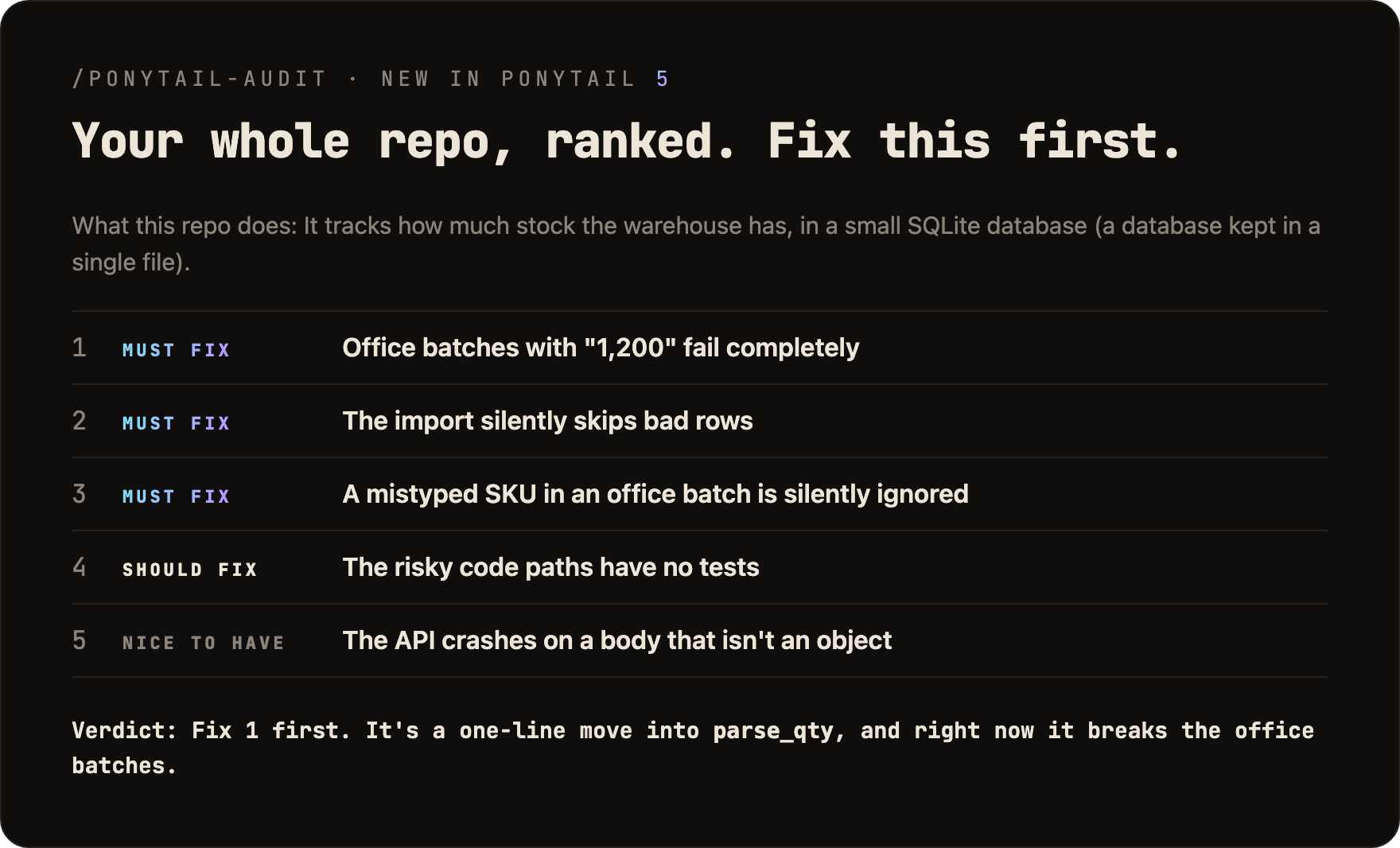
Original author benchmark illustration for a warehouse-stock repository: batch quantity parsing, skipped imports, mistyped SKUs and missing tests are ranked by impact. This is a saved author report, not an audit executed against your project. The command needs repository context; the original benchmark fixture is required to reproduce this report.
Entrada de ejemplo
/ponytail-auditResultado de ejemplo
The illustrated verdict prioritizes the batch quantity parser: values such as "1,200" currently break office batches. The source report ranks five findings and names the first fix.Licencia
Lossless WebP at native resolution; visible pixels and transparency verified identical. Original composition, labels and benchmark/sample context retained; no crop or upscaling.
MIT License

Copyright (c) 2026 DietrichGebert

Permission is hereby granted, free of charge, to any person obtaining a copy
of this software and associated documentation files (the "Software"), to deal
in the Software without restriction, including without limitation the rights
to use, copy, modify, merge, publish, distribute, sublicense, and/or sell
copies of the Software, and to permit persons to whom the Software is
furnished to do so, subject to the following conditions:

The above copyright notice and this permission notice shall be included in all
copies or substantial portions of the Software.

THE SOFTWARE IS PROVIDED "AS IS", WITHOUT WARRANTY OF ANY KIND, EXPRESS OR
IMPLIED, INCLUDING BUT NOT LIMITED TO THE WARRANTIES OF MERCHANTABILITY,
FITNESS FOR A PARTICULAR PURPOSE AND NONINFRINGEMENT. IN NO EVENT SHALL THE
AUTHORS OR COPYRIGHT HOLDERS BE LIABLE FOR ANY CLAIM, DAMAGES OR OTHER
LIABILITY, WHETHER IN AN ACTION OF CONTRACT, TORT OR OTHERWISE, ARISING FROM,
OUT OF OR IN CONNECTION WITH THE SOFTWARE OR THE USE OR OTHER DEALINGS IN THE
SOFTWARE.
Cómo usar
- Copia el comando y revisa el paquete antes de instalarlo en tu entorno de agente.
- Consulta las herramientas, credenciales y entornos necesarios en el documento original.
- Describe las entradas y el resultado deseado; contrasta la salida con las fuentes.
npx skills add https://github.com/dietrichgebert/ponytail --skill ponytail-auditAntes de empezar
- La instalación no incluye suscripción al modelo, cuota API ni permisos sobre tus archivos.
- Las estrellas e instalaciones reflejan actividad, no una prueba independiente de calidad o seguridad.
Contenido del repositorio de origen con títulos, ejemplos, código, tablas, enlaces e imágenes preservados.
Audit the whole repo like the senior developer who just inherited it and will be paged when it breaks. Order of importance: correct, safe, holds under load, tested, fast, lean. Lean still matters: every extra line must be read, tested and fixed later. This is a report the user asked for, so give it in full.
1. Map first
- Audit what the user names: a folder, a package, or the whole repo.
Nothing named: the whole repo.
- Read the README, the deploy and build config, the dependency list, the
entry points (main, routes, handlers, jobs, CLI commands) and the tests.
- Find the expected load: one person running a script, or many users and
processes at once. Judge scale against that, and say which load you assumed.
- Trace the main flows end to end: where data comes in, what is stored,
what goes out. Read those paths fully: input from users, money, auth, data writes, background jobs, anything shared between processes.
- Big repo: go deep where a mistake costs the most, not file by file. Say
which parts you did not read.
2. Look for
- Bug: wrong result, crash, missed edge case (empty, zero, last item,
rounding, time zones), callers that disagree with what a function returns, the same rule applied differently in two places.
- Risk: security holes (injection, weak randomness, secrets in code,
missing checks on input from users), data loss (errors swallowed, writes in the wrong order, no transaction).
- Scale: fine for one user, wrong for many: check-then-write races, the
same work done by every process, memory or lists that only grow, a query per item, O(n^2) on big input, per-process state that must be shared.
- Missing test: risky logic (a branch, a parser, money, security, data
writes) with no test that fails when it breaks. One good test, not coverage.
- Speed: big slowdowns are problems. Small wins (work repeated in a hot
loop) are suggestions; some software counts every millisecond.
- Lean: code that should not exist or should be smaller.
- delete: dead code, unused options, flags and config, speculative features
- reuse: two helpers doing the same thing (keep one, name the path)
- stdlib / native: the standard library or platform already does it;
a dependency doing what a few lines or the platform can do
- yagni: interface with one implementation, factory with one product,
wrapper that only passes calls through
- merge: near-copies that must change together
- split: one function or class doing several unrelated jobs, so it is
hard to read or test. Split by job, never by line count, and never into helpers that exist only to make a function shorter.
3. Check before you report
- Every finding needs a concrete case: "this input or situation leads to this
wrong result". No case, no finding.
- Before calling code unused, grep the whole tree for it, including tests,
fixtures, config, and string or dynamic references.
- A shortcut marked with a
shortcut:(or olderponytail:) comment that names its limit is a
decision, not a finding, unless the expected load already crosses it.
- Propose the smallest fix that works. Prefer fixes that delete code. Never
add layers, frameworks or config the problem does not need.
- No style taste, no "consider", no vague worries.
4. Output
Very simple English: short sentences, everyday words. Explain a technical term the first time you use it. The reader may never have seen this code.
Start with What this repo does: in two or three sentences, and the load you assumed.
Then the findings in three groups, most important first, skip empty groups:
- Must fix: bug, security, data loss, breaks at the expected load.
- Should fix: risky code without a test, real slowness, duplication, a
function that mixes jobs, code that should not exist.
- Nice to have: small speed-ups, shorter forms.
Number findings across all groups, so the user can say "fix 2 and 5". At most 20 findings; if you left smaller ones out, say how many. Every finding has all four parts, each one or two short sentences:
- Orders land on the wrong day (
billing/close_day.py:L40-52)
- What this is: At midnight this job closes the day and bills all orders of that day.
- Problem: It takes "today" from the server clock, which runs in UTC. An order placed
at 00:30 in Berlin is billed on the day before.
- Fix: Compute the day once in the shop's time zone:
datetime.now(ZoneInfo("Europe/Berlin")).date(). One line, nothing else changes.
- If we skip it: Late orders show the wrong date, and accounting fixes them by hand.
End with:
Verdict:one line: healthy, or what to fix first.Lean: -<N> lines, -<M> dependencies possible.when lean findings exist.Not checked:the parts you did not read or could not run.
Nothing found: What this repo does:, then Healthy. Nothing to fix. and one line on what you checked.
One-shot report, changes no code.


