

Ver en acción
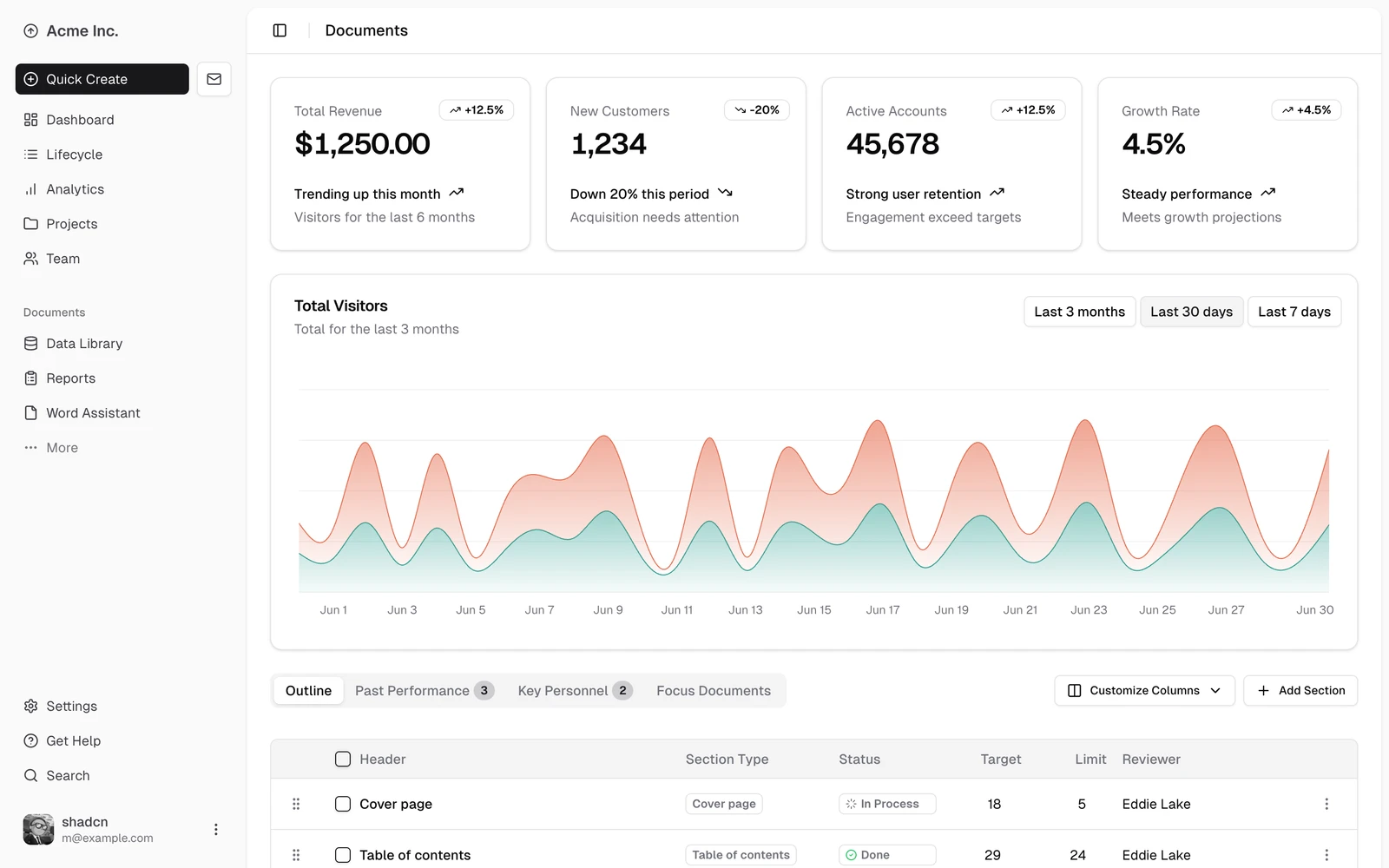
Dashboard block: charts, cards and data table
Original dashboard-01 component example with a sidebar, summary cards, an area chart and a data table. Displayed figures are sample data.
Licencia
Original source image converted to WebP; no crop, content edit or upscaling.
MIT License

Copyright (c) 2023 shadcn

Permission is hereby granted, free of charge, to any person obtaining a copy
of this software and associated documentation files (the "Software"), to deal
in the Software without restriction, including without limitation the rights
to use, copy, modify, merge, publish, distribute, sublicense, and/or sell
copies of the Software, and to permit persons to whom the Software is
furnished to do so, subject to the following conditions:

The above copyright notice and this permission notice shall be included in all
copies or substantial portions of the Software.

THE SOFTWARE IS PROVIDED "AS IS", WITHOUT WARRANTY OF ANY KIND, EXPRESS OR
IMPLIED, INCLUDING BUT NOT LIMITED TO THE WARRANTIES OF MERCHANTABILITY,
FITNESS FOR A PARTICULAR PURPOSE AND NONINFRINGEMENT. IN NO EVENT SHALL THE
AUTHORS OR COPYRIGHT HOLDERS BE LIABLE FOR ANY CLAIM, DAMAGES OR OTHER
LIABILITY, WHETHER IN AN ACTION OF CONTRACT, TORT OR OTHERWISE, ARISING FROM,
OUT OF OR IN CONNECTION WITH THE SOFTWARE OR THE USE OR OTHER DEALINGS IN THE
SOFTWARE.
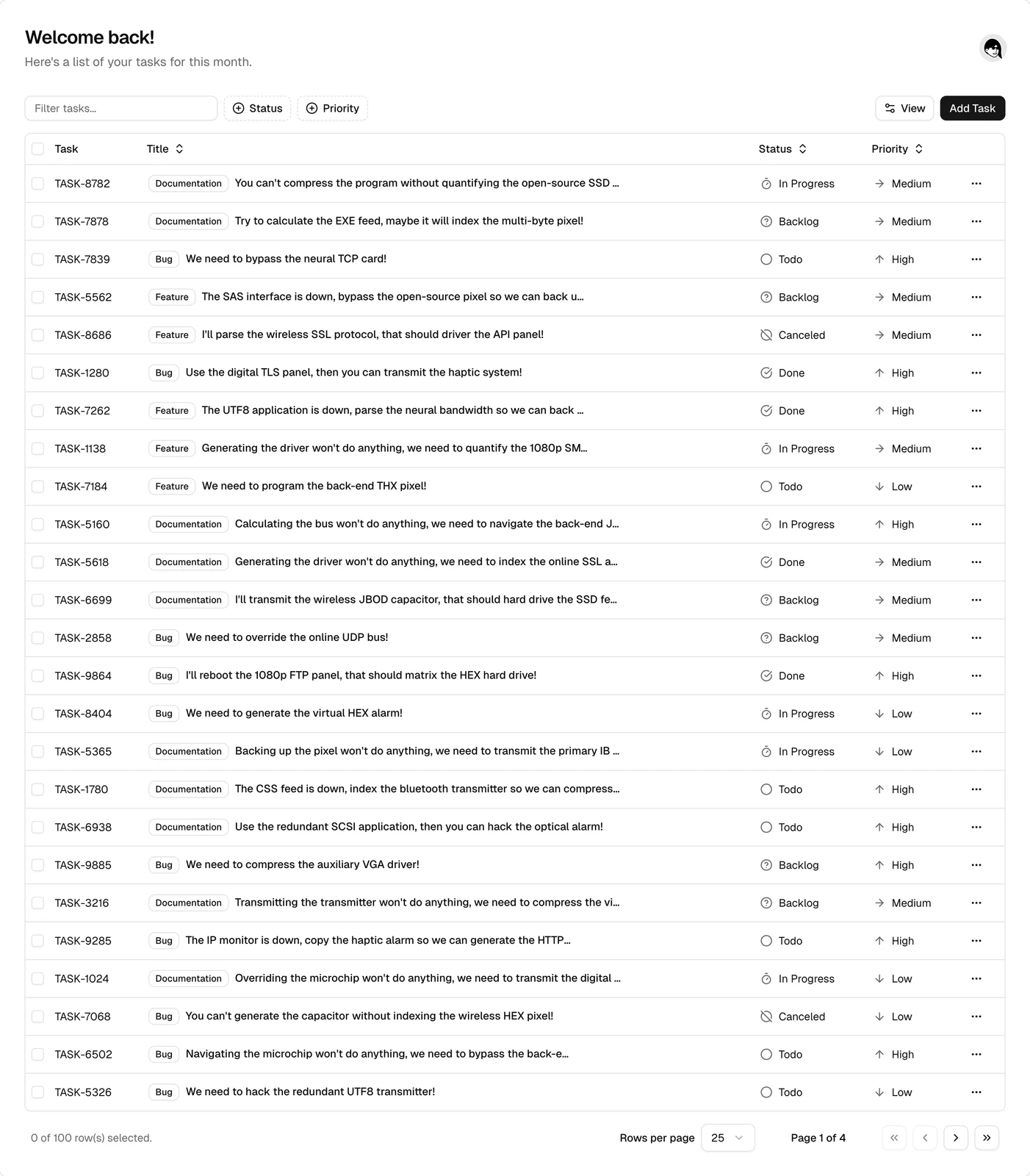
Task table: search, filters and row selection
Original task-table component example with search, status and priority filters, row selection and pagination.
Licencia
Original source image converted to WebP; no crop, content edit or upscaling.
MIT License

Copyright (c) 2023 shadcn

Permission is hereby granted, free of charge, to any person obtaining a copy
of this software and associated documentation files (the "Software"), to deal
in the Software without restriction, including without limitation the rights
to use, copy, modify, merge, publish, distribute, sublicense, and/or sell
copies of the Software, and to permit persons to whom the Software is
furnished to do so, subject to the following conditions:

The above copyright notice and this permission notice shall be included in all
copies or substantial portions of the Software.

THE SOFTWARE IS PROVIDED "AS IS", WITHOUT WARRANTY OF ANY KIND, EXPRESS OR
IMPLIED, INCLUDING BUT NOT LIMITED TO THE WARRANTIES OF MERCHANTABILITY,
FITNESS FOR A PARTICULAR PURPOSE AND NONINFRINGEMENT. IN NO EVENT SHALL THE
AUTHORS OR COPYRIGHT HOLDERS BE LIABLE FOR ANY CLAIM, DAMAGES OR OTHER
LIABILITY, WHETHER IN AN ACTION OF CONTRACT, TORT OR OTHERWISE, ARISING FROM,
OUT OF OR IN CONNECTION WITH THE SOFTWARE OR THE USE OR OTHER DEALINGS IN THE
SOFTWARE.
Cómo usar
- Copia el comando y revisa el paquete antes de instalarlo en tu entorno de agente.
- Consulta las herramientas, credenciales y entornos necesarios en el documento original.
- Describe las entradas y el resultado deseado; contrasta la salida con las fuentes.
npx skills add https://github.com/shadcn-ui/ui --skill shadcnAntes de empezar
- La instalación no incluye suscripción al modelo, cuota API ni permisos sobre tus archivos.
- Las estrellas e instalaciones reflejan actividad, no una prueba independiente de calidad o seguridad.
Contenido del repositorio de origen con títulos, ejemplos, código, tablas, enlaces e imágenes preservados.
shadcn/ui
A framework for building ui, components and design systems. Components are added as source code to the user's project via the CLI.
IMPORTANT: Run all CLI commands using the project's package runner:npx shadcn@latest,pnpm dlx shadcn@latest, orbunx --bun shadcn@latest— based on the project'spackageManager. Examples below usenpx shadcn@latestbut substitute the correct runner for the project.
Current Project Context
!`npx shadcn@latest info --json`The JSON above contains the project config and installed components. Use npx shadcn@latest docs <component> to get documentation and example URLs for any component.
Principles
- Use existing components first. Use
npx shadcn@latest searchto check registries before writing custom UI. Check community registries too. - Compose, don't reinvent. Settings page = Tabs + Card + form controls. Dashboard = Sidebar + Card + Chart + Table.
- Use built-in variants before custom styles.
variant="outline",size="sm", etc. - Use semantic colors.
bg-primary,text-muted-foreground— never raw values likebg-blue-500.
Critical Rules
These rules are always enforced. Each links to a file with Incorrect/Correct code pairs.
Styling & Tailwind → styling.md
- `className` for layout, not styling. Never override component colors or typography.
- No `space-x-
orspace-y-`. Use `flex` with `gap-. For vertical stacks,flex flex-col gap-*`. - Use `size-
when width and height are equal.**size-10notw-10 h-10`. - Use `truncate` shorthand. Not
overflow-hidden text-ellipsis whitespace-nowrap. - No manual `dark:` color overrides. Use semantic tokens (
bg-background,text-muted-foreground). - Use `cn()` for conditional classes. Don't write manual template literal ternaries.
- No manual `z-index` on overlay components. Dialog, Sheet, Popover, etc. handle their own stacking.
Forms & Inputs → forms.md
- Forms use `FieldGroup` + `Field`. Never use raw
divwithspace-y-*orgrid gap-*for form layout. - `InputGroup` uses `InputGroupInput`/`InputGroupTextarea`. Never raw
Input/TextareainsideInputGroup. - Buttons inside inputs use `InputGroup` + `InputGroupAddon`.
- Option sets (2–7 choices) use `ToggleGroup`. Don't loop
Buttonwith manual active state. - `FieldSet` + `FieldLegend` for grouping related checkboxes/radios. Don't use a
divwith a heading. - Field validation uses `data-invalid` + `aria-invalid`.
data-invalidonField,aria-invalidon the control. For disabled:data-disabledonField,disabledon the control.
Component Structure → composition.md
- Items always inside their Group.
SelectItem→SelectGroup.DropdownMenuItem→DropdownMenuGroup.CommandItem→CommandGroup. - Use `asChild` (radix) or `render` (base) for custom triggers. Check
basefield fromnpx shadcn@latest info. → base-vs-radix.md - Dialog, Sheet, and Drawer always need a Title.
DialogTitle,SheetTitle,DrawerTitlerequired for accessibility. UseclassName="sr-only"if visually hidden. - Use full Card composition.
CardHeader/CardTitle/CardDescription/CardContent/CardFooter. Don't dump everything inCardContent. - Button has no `isPending`/`isLoading`. Compose with
Spinner+data-icon+disabled. - `TabsTrigger` must be inside `TabsList`. Never render triggers directly in
Tabs. - `Avatar` always needs `AvatarFallback`. For when the image fails to load.
Use Components, Not Custom Markup → composition.md
- Use existing components before custom markup. Check if a component exists before writing a styled
div. - Callouts use `Alert`. Don't build custom styled divs.
- Empty states use `Empty`. Don't build custom empty state markup.
- Toast follows the project base. Use
toastfrom thetoastcomponent for
Base UI projects. Use toast() from sonner for Radix and React Aria projects.
- Use `Separator` instead of
<hr>or<div className="border-t">. - Use `Skeleton` for loading placeholders. No custom
animate-pulsedivs. - Use `Badge` instead of custom styled spans.
Icons → icons.md
- Icons in `Button` use `data-icon`.
data-icon="inline-start"ordata-icon="inline-end"on the icon. - No sizing classes on icons inside components. Components handle icon sizing via CSS. No
size-4orw-4 h-4. - Pass icons as objects, not string keys.
icon={CheckIcon}, not a string lookup.
Chat & Messaging → chat.md
- Chat UI composes the chat primitives. Conversations use
MessageScroller, rows useMessage, surfaces useBubble. Never hand-rolled bubbledivs or a raw scroll container. - `MessageScroller` owns scroll behavior. Streaming follow, anchoring, and jump-to-latest (
MessageScrollerButton) are built in. Don't write auseStickToBottom/ResizeObserverhook. - Attachments use `Attachment`; system notes and dividers use `Marker`. Not
Itemcards orSeparator+ a label. - Assistant activity uses `Trace`. Reasoning, tool calls, sources and steps are
TraceLines in aTrace, oneTraceper run of message parts. Behavior wraps the line:TraceCollapsible, a sheet trigger or a link. Not a hand-rolledCollapsibleor aMarker.
CLI
- Never decode preset codes or build preset URLs manually. Use
npx shadcn@latest preset decode <code>,preset url <code>, orpreset open <code>. For project-aware preset detection, usenpx shadcn@latest preset resolve. - Apply preset codes directly with the CLI. Use
npx shadcn@latest apply <code>for existing projects, ornpx shadcn@latest init --preset <code>when initializing.
Key Patterns
These are the most common patterns that differentiate correct shadcn/ui code. For edge cases, see the linked rule files above.
// Form layout: FieldGroup + Field, not div + Label.
<FieldGroup>
  <Field>
    <FieldLabel htmlFor="email">Email</FieldLabel>
    <Input id="email" />
  </Field>
</FieldGroup>

// Validation: data-invalid on Field, aria-invalid on the control.
<Field data-invalid>
  <FieldLabel>Email</FieldLabel>
  <Input aria-invalid />
  <FieldDescription>Invalid email.</FieldDescription>
</Field>

// Icons in buttons: data-icon, no sizing classes.
<Button>
  <SearchIcon data-icon="inline-start" />
  Search
</Button>

// Spacing: gap-*, not space-y-*.
<div className="flex flex-col gap-4">  // correct
<div className="space-y-4">           // wrong

// Equal dimensions: size-*, not w-* h-*.
<Avatar className="size-10">   // correct
<Avatar className="w-10 h-10"> // wrong

// Status colors: Badge variants or semantic tokens, not raw colors.
<Badge variant="secondary">+20.1%</Badge>    // correct
<span className="text-emerald-600">+20.1%</span> // wrong
Component Selection
| Need | Use |
|---|---|
| Button/action | Button with appropriate variant |
| Form inputs | Input, Select, Combobox, Switch, Checkbox, RadioGroup, Textarea, InputOTP, Slider |
| Toggle between 2–5 options | ToggleGroup + ToggleGroupItem |
| Data display | Table, Card, Badge, Avatar |
| Navigation | Sidebar, NavigationMenu, Breadcrumb, Tabs, Pagination |
| Overlays | Dialog (modal), Sheet (side panel), Drawer (bottom sheet), AlertDialog (confirmation) |
| Feedback | toast (Base UI), sonner (Radix/Aria), Alert, Progress, Skeleton, Spinner |
| Command palette | Command inside Dialog |
| Charts | Chart (wraps Recharts) |
| Layout | Card, Separator, Resizable, ScrollArea, Accordion, Collapsible |
| Empty states | Empty |
| Menus | DropdownMenu, ContextMenu, Menubar |
| Tooltips/info | Tooltip, HoverCard, Popover |
| Chat / conversation UI | MessageScroller, Message, Bubble, Attachment, Marker, Trace |
Key Fields
The injected project context contains these key fields:
- `aliases` → use the actual alias prefix for imports (e.g.
@/,~/), never hardcode. - `isRSC` → when
true, components usinguseState,useEffect, event handlers, or browser APIs need"use client"at the top of the file. Always reference this field when advising on the directive. - `tailwindVersion` →
"v4"uses@theme inlineblocks;"v3"usestailwind.config.js. - `tailwindCssFile` → the global CSS file where custom CSS variables are defined. Always edit this file, never create a new one.
- `style` → component visual treatment (e.g.
nova,vega). - `base` → primitive library (
radixorbase). Affects component APIs and available props. - `iconLibrary` → determines icon imports. Use
lucide-reactforlucide,@tabler/icons-reactfortabler, etc. Never assumelucide-react. - `resolvedPaths` → exact file-system destinations for components, utils, hooks, etc.
- `framework` → routing and file conventions (e.g. Next.js App Router vs Vite SPA).
- `packageManager` → use this for any non-shadcn dependency installs (e.g.
pnpm add date-fnsvsnpm install date-fns). - `preset` → resolved preset code and values for the current project. Use
npx shadcn@latest preset resolve --jsonwhen you only need preset information.
See cli.md — `info` command for the full field reference.
Component Docs, Examples, and Usage
Run npx shadcn@latest docs <component> to get the URLs for a component's documentation, examples, and API reference. Fetch these URLs to get the actual content.
npx shadcn@latest docs button dialog selectWhen creating, fixing, debugging, or using a component, always run `npx shadcn@latest docs` and fetch the URLs first. This ensures you're working with the correct API and usage patterns rather than guessing.
Workflow
- Get project context — already injected above. Run
npx shadcn@latest infoagain if you need to refresh. - Check installed components first — before running
add, always check thecomponentslist from project context or list theresolvedPaths.uidirectory. Don't import components that haven't been added, and don't re-add ones already installed. - Find components —
npx shadcn@latest search. - Get docs and examples — run
npx shadcn@latest docs <component>to get URLs, then fetch them. Usenpx shadcn@latest viewto browse registry items you haven't installed. To preview changes to installed components, usenpx shadcn@latest add --diff. - Install or update —
npx shadcn@latest add. When updating existing components, use--dry-runand--diffto preview changes first (see Updating Components below). - Fix imports in third-party components — After adding components from community registries (e.g.
@bundui,@magicui), check the added non-UI files for hardcoded import paths like@/components/ui/.... These won't match the project's actual aliases. Usenpx shadcn@latest infoto get the correctuialias (e.g.@workspace/ui/components) and rewrite the imports accordingly. The CLI rewrites imports for its own UI files, but third-party registry components may use default paths that don't match the project. - Review added components — After adding a component or block from any registry, always read the added files and verify they are correct. Check for missing sub-components (e.g.
SelectItemwithoutSelectGroup), missing imports, incorrect composition, or violations of the Critical Rules. Also replace any icon imports with the project'siconLibraryfrom the project context (e.g. if the registry item useslucide-reactbut the project useshugeicons, swap the imports and icon names accordingly). Fix all issues before moving on. - Registry must be explicit — When the user asks to add a block or component, do not guess the registry. If no registry is specified (e.g. user says "add a login block" without specifying
@shadcn,@tailark,owner/repo, etc.), ask which registry to use. Never default to a registry on behalf of the user. - Switching presets — Ask the user first: overwrite, partial, merge, or skip?
- Inspect current preset:
npx shadcn@latest preset resolve. Use--jsonwhen you need structured values. - Inspect incoming preset:
npx shadcn@latest preset decode <code>. Usepreset url <code>orpreset open <code>to share or open the preset builder. - Overwrite:
npx shadcn@latest apply <code>. Overwrites detected components, fonts, and CSS variables. - Partial:
npx shadcn@latest apply <code> --only theme,font. Updates only the selected preset parts without reinstalling UI components. Supported values arethemeandfont; comma-separated combinations are allowed.iconis intentionally not supported, because icon changes may require full component reinstall and transforms. - Merge:
npx shadcn@latest init --preset <code> --force --no-reinstall, then runnpx shadcn@latest infoto list installed components, then for each installed component use--dry-runand--diffto smart merge it individually. - Skip:
npx shadcn@latest init --preset <code> --force --no-reinstall. Only updates config and CSS, leaves components as-is. - Important: Always run preset commands inside the user's project directory.
applyonly works in an existing project with acomponents.jsonfile. The CLI automatically preserves the current base (basevsradix) fromcomponents.json. If you must use a scratch/temp directory (e.g. for--dry-runcomparisons), pass--base <current-base>explicitly — preset codes do not encode the base.
Design Systems from DESIGN.md
When the user asks for a design system from a DESIGN.md (or a brand spec), with or without a preset, follow design-system.md end to end:
init --preset <code> --template <vite|next> --name <app> --no-monorepo -y. Without a preset code, pick the closest style and pass--base base --preset <style>. Thenadd --all -y.- Read the DESIGN.md frontmatter, Do's and Don'ts, and Known Gaps before editing.
- Map its tokens onto the shadcn variables in
tailwindCssFile. Pin the radius scale, shadows, fonts andtype-*utilities. - Restyle components by editing their
cvavariants. Change control heights together. - Build the design system page per design-system-page.md: contrast-checked color roles, type specimens, pinned state matrices, edge cases, do/don't pairs, recipes. Check coverage with
scripts/showcase-coverage.mjs. - Verify in a browser: typecheck, no console errors, loads at the top, no horizontal overflow, dark mode.
Updating Components
When the user asks to update a component from upstream while keeping their local changes, use --dry-run and --diff to intelligently merge. NEVER fetch raw files from GitHub manually — always use the CLI.
- Run
npx shadcn@latest add <component> --dry-runto see all files that would be affected. - For each file, run
npx shadcn@latest add <component> --diff <file>to see what changed upstream vs local. - Decide per file based on the diff:
- No local changes → safe to overwrite.
- Has local changes → read the local file, analyze the diff, and apply upstream updates while preserving local modifications.
- User says "just update everything" → use
--overwrite, but confirm first.
- Never use `--overwrite` without the user's explicit approval.
Quick Reference
# Create a new project.
npx shadcn@latest init --name my-app --preset base-nova
npx shadcn@latest init --name my-app --preset a2r6bw --template vite

# Create a design system app (then follow design-system.md).
npx shadcn@latest init --name my-ds --preset b0 --template vite --no-monorepo -y
npx shadcn@latest init --name my-ds --base base --preset maia --template vite --no-monorepo -y
npx shadcn@latest add --all -y

# Create a monorepo project.
npx shadcn@latest init --name my-app --preset base-nova --monorepo
npx shadcn@latest init --name my-app --preset base-nova --template next --monorepo

# Initialize existing project.
npx shadcn@latest init --preset base-nova
npx shadcn@latest init --defaults  # shortcut: --template=next --preset=nova (base style implied)

# Apply a preset to an existing project.
npx shadcn@latest apply a2r6bw
npx shadcn@latest apply a2r6bw --only theme
npx shadcn@latest apply a2r6bw --only font
npx shadcn@latest apply a2r6bw --only theme,font

# Inspect preset codes and project preset state.
npx shadcn@latest preset decode a2r6bw
npx shadcn@latest preset url a2r6bw
npx shadcn@latest preset open a2r6bw
npx shadcn@latest preset resolve
npx shadcn@latest preset resolve --json

# Add components.
npx shadcn@latest add button card dialog
npx shadcn@latest add @magicui/shimmer-button
npx shadcn@latest add owner/repo/item
npx shadcn@latest add --all

# Preview changes before adding/updating.
npx shadcn@latest add button --dry-run
npx shadcn@latest add button --diff button.tsx
npx shadcn@latest add @acme/form --view button.tsx
npx shadcn@latest add owner/repo/item --dry-run

# Search registries.
npx shadcn@latest search @shadcn -q "sidebar"
npx shadcn@latest search @tailark -q "stats"
npx shadcn@latest search owner/repo -q "login"
npx shadcn@latest search                          # all configured registries
npx shadcn@latest search @shadcn -q "menu" -t ui  # filter by item type

# Get component docs and example URLs.
npx shadcn@latest docs button dialog select

# View registry item details (for items not yet installed).
npx shadcn@latest view @shadcn/button
npx shadcn@latest view owner/repo/item
Named presets: nova, vega, maia, lyra, mira, luma Templates: next, vite, start, react-router, astro (all support --monorepo) and laravel (not supported for monorepo) Preset codes: Version-prefixed base62 strings (e.g. a2r6bw or b0), from ui.shadcn.com.
Detailed References
- rules/forms.md — FieldGroup, Field, InputGroup, ToggleGroup, FieldSet, validation states
- rules/composition.md — Groups, overlays, Card, Tabs, Avatar, Alert, Empty, Toast, Separator, Skeleton, Badge, Button loading
- rules/chat.md — MessageScroller, Message, Bubble, Attachment, Marker, Trace; streaming, anchoring, jump-to-latest, assistant activity rows
- rules/icons.md — data-icon, icon sizing, passing icons as objects
- rules/styling.md — Semantic colors, variants, className, spacing, size, truncate, dark mode, cn(), z-index
- rules/base-vs-radix.md — asChild vs render, Select, ToggleGroup, Slider, Accordion
- cli.md — Commands, flags, presets, templates
- registry.md — Authoring source registries,
include, item definitions, dependencies, GitHub registry rules - customization.md — Theming, CSS variables, extending components
- design-system.md: DESIGN.md (with or without a preset) to a themed app: style picking, token mapping, radius, fonts, type scale, control heights, showcase traps, verification
- design-system-page.md: What goes on a design system page and how: foundations, component tiers, pinned state matrices, contrast pairs, edge cases, do/don't, recipes


