Document original
GPT Image 2 · en
{
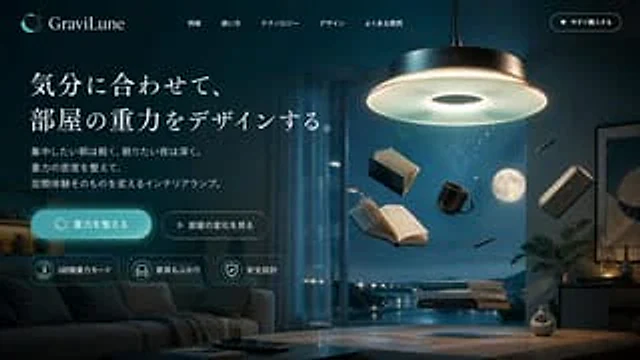
  "type": "Website landing page model",
  "theme": "Dark mode, modern, sci-fi interior style",
  "color_palette": [
    "Deep blue",
    "{argument name=\"primary color\" default=\"blue\"}",
    "cool white",
    "Charcoal gray"
  ],
  "header": {
    "logo": "crescent moon icon with dots",
    "brand_name": "{argument name=\"brand name\" default=\"GraviLune\"}",
    "navigation_links": {
      "count": 5,
      "labels": [
        "Product Features",
        "How to use",
        "Core technologies",
        "Design Concept",
        "Frequently Asked Questions"
      ]
    },
    "cta_button": "Buy it now"
  },
  "hero_content": {
    "position": "Left side",
    "headline": "{argument name=\"headline text\" default=\"Design the gravity of the room as you please.\"}",
    "subtext": "Light and airy when focused in the morning, deep and soothing when falling asleep at night. By adjusting the density of gravity, we create an indoor lighting art that transforms the spatial experience.",
    "buttons": {
      "count": 2,
      "primary": "Adjust gravity (glowing blue, rounded corners)",
      "secondary": "View spatial changes (outline, play icon)"
    },
    "feature_badges": {
      "count": 3,
      "labels": [
        "Three gravity modes",
        "Furniture floating effect",
        "Safety Design"
      ]
    }
  },
  "visual_scene": {
    "position": "Right side and background",
    "setting": "{argument name=\"background setting\" default=\"A modern living room at night, with a full moon outside the window.\"}",
    "main_product": "{argument name=\"product description\" default=\"Large, stylish round chandelier, emitting a cool white light\"}",
    "floating_objects": {
      "count": 7,
      "items": [
        "2 open books",
        "1 Closed book",
        "1 black coffee cup",
        "1 smartphone",
        "2 pens"
      ]
    },
    "table_objects": "Three books are stacked above the wooden coffee table, seemingly floating.",
    "furniture": "Dark sofa on the left, wooden coffee table"
  },
  "footer_element": "The centered SCROLL text and down arrow at the bottom"
}
Mode d’emploi
- Copiez le prompt original complet, paramètres compris.
- Adaptez le sujet, le texte et la composition à vos besoins.
- Utilisez un outil externe compatible ; vérifiez l’accès et le résultat.
Avant de commencer
- Vérifiez si une image de référence est nécessaire. La compatibilité ne prouve pas le modèle utilisé pour cet exemple.
- Vérifiez noms, chiffres et textes ; les versions du modèle peuvent produire des résultats différents.