Document original
GPT Image 2 · en
{
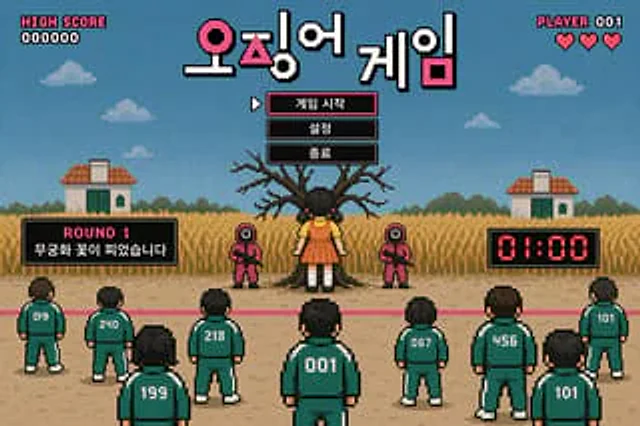
  "type": "Retro pixel-style video game sketches",
  "theme": "Survival Death Game",
  "hud": {
    "top_left": [
      "Highest portion",
      "000000"
    ],
    "top_center_title": "{argument name=\"game title\" default=\"Squid Game\"}",
    "top_right": [
      "Player 001",
      "3 red hearts"
    ]
  },
  "menu": {
    "style": "Centered below the title, with a black background border, white pixel text, and the cursor pointing to the first item.",
    "items": [
      "{argument name=\"menu item 1\" default=\"Start Game\"}",
      "{argument name=\"menu item 2\" default=\"set up\"}",
      "{argument name=\"menu item 3\" default=\"quit\"}"
    ]
  },
  "gameplay_ui": {
    "mid_left_panel": [
      "Round 1",
      "{argument name=\"round description\" default=\"Wooden Man Game\"}"
    ],
    "mid_right_panel": [
      "01:00 Red digital timer"
    ]
  },
  "scene": {
    "background": "Blue sky, pixelated clouds, two small houses, and tall yellow grass.",
    "midground": "A huge, withered tree; a giant doll dressed in a yellow shirt and orange dress facing the tree; and two guards dressed in pink jumpsuits, wearing square masks, and holding rifles.",
    "foreground": "A pink starting line on the dirt track, nine players in green tracksuits with their backs to the audience.",
    "player_numbers": [
      "019",
      "240",
      "199",
      "218",
      "001",
      "067",
      "456",
      "101",
      "101"
    ]
  }
}
Mode d’emploi
- Copiez le prompt original complet, paramètres compris.
- Adaptez le sujet, le texte et la composition à vos besoins.
- Utilisez un outil externe compatible ; vérifiez l’accès et le résultat.
Avant de commencer
- Vérifiez si une image de référence est nécessaire. La compatibilité ne prouve pas le modèle utilisé pour cet exemple.
- Vérifiez noms, chiffres et textes ; les versions du modèle peuvent produire des résultats différents.