Document original
GPT Image 2 · en
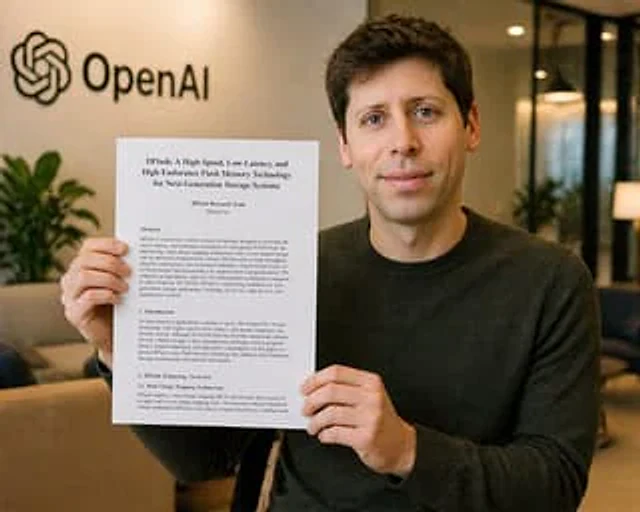
A realistic office photo shows a young man sitting indoors, holding a printed research paper towards the camera. His face is completely obscured by a solid brown rectangle. He has short dark brown hair and wears a solid dark charcoal gray crew neck sweater. The paper in his hands is a vertical, white letter-sized document, clearly visible and positioned in front of his torso. The document is titled "DFlash: A High-Speed, Low-Latency, and High-Endurance Flash Memory Technology for Next-Generation Storage Systems." Below are the author lines "DFlash Research Team" and "DFlash Inc." The page displays four visible text sections: "Abstract," "1. Introduction," "2. DFlash Technology Overview," and "2.1 Dual Charge-Trapping Architecture," formatted in formal academic paper style with dense black serif font. The background is a softly blurred modern office lobby with warm ambient lighting, beige walls, glass partitions, sofas, and indoor plants. A black OpenAI logo and text label are mounted on the upper left wall. The composition is a mid-range shot, with the subject slightly tilted to the right to keep the OpenAI logo visible. It features shallow depth of field, soft natural office lighting, a refined photorealistic style, subtle warm tones, and rich detail in the hands, paper, sweater texture, and interior environment. The overall image is clean and believable, resembling a snapshot of a news or announcement.{argument name="document title" default="DFlash: A High-Speed, Low-Latency, and High-Endurance Flash Memory Technology for Next-Generation Storage Systems"} As the title of the paper,{argument name="company logo text" default="OpenAI"} As a brand logo on the wall.{argument name="sweater color" default="dark charcoal"} As the main color of the clothing, and{argument name="censor block color" default="medium tan"} Used as the color for facial camouflage blocks.Mode d’emploi
- Copiez le prompt original complet, paramètres compris.
- Adaptez le sujet, le texte et la composition à vos besoins.
- Utilisez un outil externe compatible ; vérifiez l’accès et le résultat.
Avant de commencer
- Vérifiez si une image de référence est nécessaire. La compatibilité ne prouve pas le modèle utilisé pour cet exemple.
- Vérifiez noms, chiffres et textes ; les versions du modèle peuvent produire des résultats différents.