Document original
GPT Image 2 · en
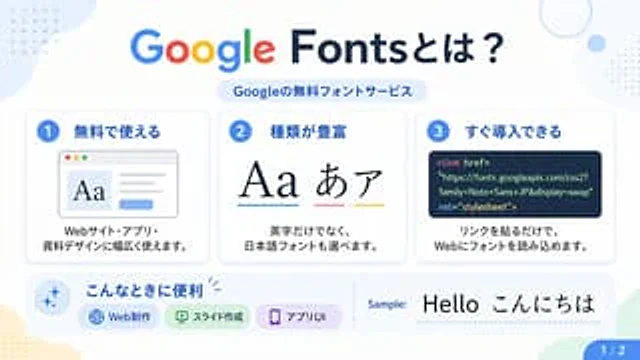
{"type":"Japanese infographic poster","topic":"Google Fonts introduction","style":{"look":"clean flat modern presentation slide","palette":"white background with soft pastel blue, green, yellow, and lavender accents","aspect_ratio":"16:9","lighting":"bright even digital graphic lighting","finish":"crisp vector-like infographic with subtle shadows and rounded cards"},"text":{"headline":"{argument name=\"headline text\" default=\"Google Fontsとは?\"}","subheadline":"Googleの無料フォントサービス","sample_label":"Sample:","sample_text":"{argument name=\"sample text\" default=\"Hello こんにちは\"}","page_indicator":"1 / 2"},"layout":{"sections":[{"title":"top header","position":"top center","count":2,"labels":["Google Fontsとは?","Googleの無料フォントサービス"]},{"title":"feature cards","position":"middle row","count":3,"labels":["1 無料で使える","2 種類が豊富","3 すぐ導入できる"]},{"title":"use cases bar","position":"bottom left to center","count":4,"labels":["こんなときに便利","Web制作","スライド作成","アプリUI"]},{"title":"sample area","position":"bottom right","count":2,"labels":["Sample:","Hello こんにちは"]},{"title":"page marker","position":"bottom right corner","count":1,"labels":["1 / 2"]}],"background_decorations":{"count":7,"items":["pale blue organic blob in top left","small blue dotted grid in top left","thin pale blue ring in top right","small pale blue circle near top right","small blue dotted grid at upper right edge","pale yellow organic blob in bottom left","pale green angular shape in bottom right"]}},"cards":[{"number":"1","title":"無料で使える","description":"Webサイト・アプリ・資料デザインに幅広く使えます。","visual":"rounded white card with light shadow, blue number badge, browser window illustration showing large serif Aa on the left, gray text lines on the right, and a small blue button below"},{"number":"2","title":"種類が豊富","description":"英字だけでなく、日本語フォントも選べます。","visual":"rounded white card with light shadow, blue number badge, large typography samples reading Aa あ ア, each with colored underline in blue, pink, and yellow"},{"number":"3","title":"すぐ導入できる","description":"リンクを貼るだけで、Webにフォントを読み込めます。","visual":"rounded white card with light shadow, blue number badge, dark navy code panel containing HTML link tag for Google Fonts"}],"lower_band":{"left_icon":"blue sparkle icon inside pale blue circle","title":"こんなときに便利","chips":{"count":3,"items":[{"label":"Web制作","color":"light blue","icon":"globe"},{"label":"スライド作成","color":"light green","icon":"presentation board"},{"label":"アプリUI","color":"light purple","icon":"smartphone"}]},"divider":"vertical dotted line","sample_preview":"large black typography sample on white background"},"typography":{"headline_font":"{argument name=\"headline font\" default=\"Google Sans-like rounded sans serif\"}","body_font":"{argument name=\"body font\" default=\"clean Japanese sans serif\"}","notes":"The word Google in the headline uses the official multicolor Google logo style: blue G, red o, yellow o, blue g, green l, red e; the rest of the headline is dark navy."}}Mode d’emploi
- Copiez le prompt original complet, paramètres compris.
- Adaptez le sujet, le texte et la composition à vos besoins.
- Utilisez un outil externe compatible ; vérifiez l’accès et le résultat.
Avant de commencer
- Vérifiez si une image de référence est nécessaire. La compatibilité ne prouve pas le modèle utilisé pour cet exemple.
- Vérifiez noms, chiffres et textes ; les versions du modèle peuvent produire des résultats différents.