Document original
GPT Image 2 · zh
{
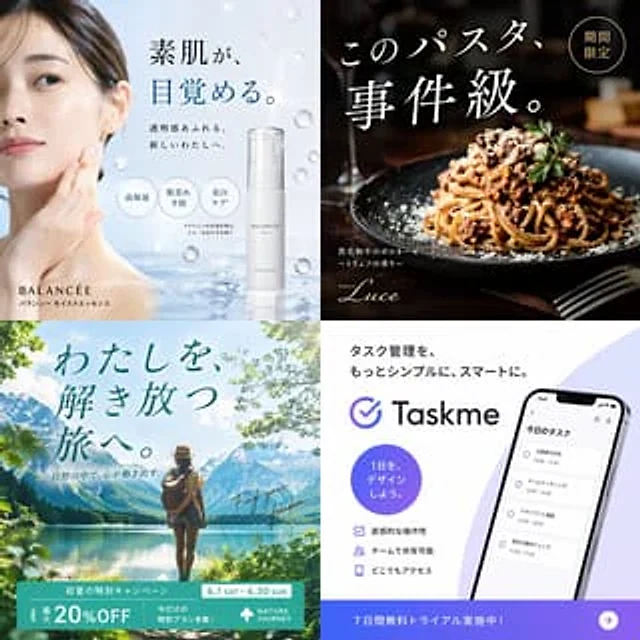
  "type": "2x2 advertising banner grid",
  "layout": "4 distinct quadrants, each featuring a different industry advertisement",
  "quadrants": [
    {
      "position": "top-left",
      "industry": "skincare",
      "visuals": "Asian woman touching cheek, floating water droplets, white pump bottle",
      "brand": "BALANCÉE",
      "copy": {
        "headline": "{argument name=\"skincare headline\" default=\"素肌が、目覚める。\"}",
        "subheadline": "透明感あふれる、新しいわたしへ。",
        "features_count": 3,
        "features_labels": ["高保湿", "肌荒れ予防", "美白ケア*"]
      }
    },
    {
      "position": "top-right",
      "industry": "restaurant food",
      "visuals": "close-up of spaghetti bolognese with grated cheese and parsley, dark moody lighting",
      "brand": "Trattoria Luce",
      "copy": {
        "headline": "{argument name=\"food headline\" default=\"このパスタ、事件級。\"}",
        "badge": "期間限定",
        "description": "黒毛和牛のボロネーゼ 〜トリュフの香り〜"
      }
    },
    {
      "position": "bottom-left",
      "industry": "travel",
      "visuals": "woman with backpack facing a scenic mountain lake, bright daylight",
      "brand": "NATURE JOURNEY",
      "copy": {
        "headline": "{argument name=\"travel headline\" default=\"わたしを、解き放つ旅へ。\"}",
        "subheadline": "自然の中で、心が動き出す。",
        "script": "Find your freedom.",
        "banner_details": ["初夏の特別キャンペーン", "6.1 SAT - 6.30 SUN", "最大 20%OFF", "今だけの特別プラン多数!"]
      }
    },
    {
      "position": "bottom-right",
      "industry": "SaaS app",
      "visuals": "smartphone displaying a task management app interface with 4 schedule items",
      "brand": "{argument name=\"app brand name\" default=\"Taskme\"}",
      "copy": {
        "headline": "{argument name=\"app headline\" default=\"タスク管理を、もっとシンプルに、スマートに。\"}",
        "circle_badge": "1日を、デザインしよう。",
        "features_count": 3,
        "features_labels": ["直感的な操作性", "チームで共有可能", "どこでもアクセス"],
        "bottom_banner": "7日間無料トライアル実施中!"
      }
    }
  ]
}
Mode d’emploi
- Copiez le prompt original complet, paramètres compris.
- Adaptez le sujet, le texte et la composition à vos besoins.
- Utilisez un outil externe compatible ; vérifiez l’accès et le résultat.
Avant de commencer
- Vérifiez si une image de référence est nécessaire. La compatibilité ne prouve pas le modèle utilisé pour cet exemple.
- Vérifiez noms, chiffres et textes ; les versions du modèle peuvent produire des résultats différents.