Document original
GPT Image 2 · en
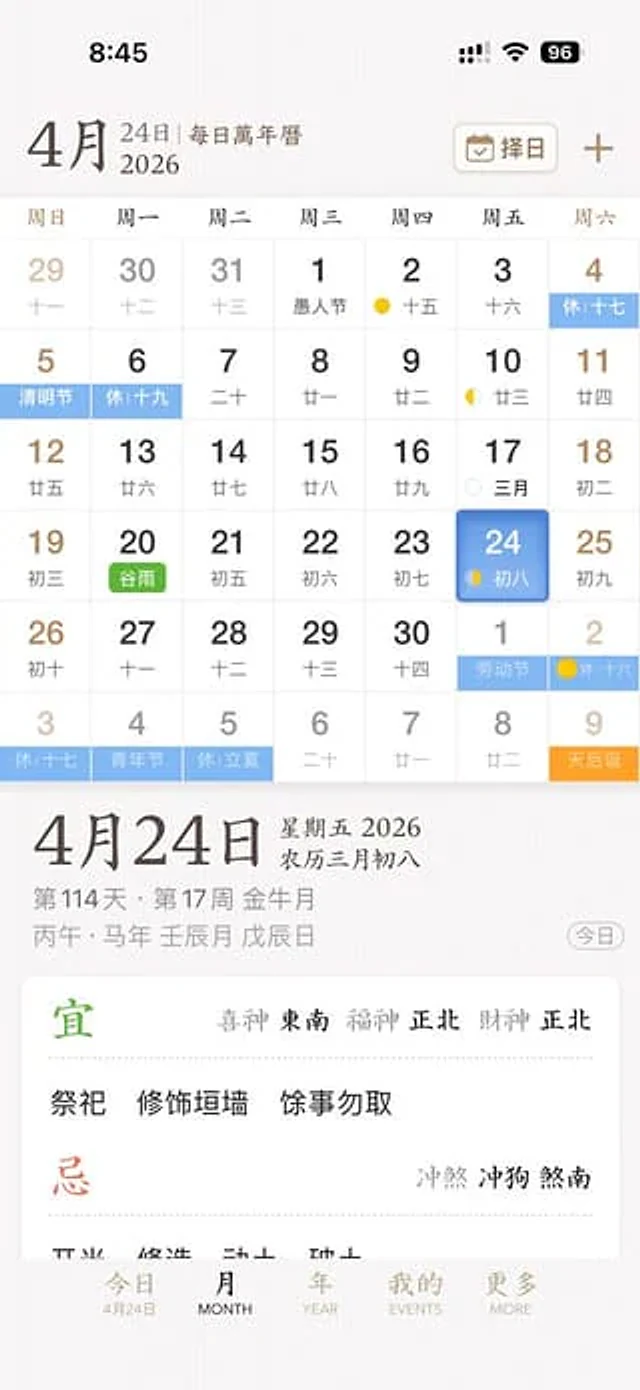
This is a clean and elegant iPhone app UI prototype showcasing a Chinese perpetual calendar and almanac application. The screenshot is a full-screen mobile screenshot with a soft, warm white background that has a delicate paper-like texture, presenting a refined East Asian editorial aesthetic. The interface uses a minimalist mix of serif and sans-serif fonts, with a color scheme including soft brown, gray, black, light blue, green, and gold accents. The layout is spacious with delicate dividing lines. The top displays the iOS status bar, showing the time as 8:45, along with cellular signal, Wi-Fi icons, and a 96% battery level indicator. Below is {argument name="month" default="April"} The title is accompanied by the subtitle "24th | Daily Perpetual Calendar," and on the right is a rounded rectangular date selection button labeled "Choose a Date," accompanied by a calendar icon and a plus sign. The main body is {argument name="year" default="2026"} The yearly calendar grid contains 7 columns of days of the week, labeled in Chinese as: Sunday, Monday, Tuesday, Wednesday, Thursday, Friday, and Saturday. It renders a 6-row month view with 42 date cells, including dates for adjacent months. The visible dates should be: Row 1: 29, 30, 31, 1, 2, 3, 4; Row 2: 5, 6, 7, 8, 9, 10, 11; Row 3: 12, 13, 14, 15, 16, 17, 18; Row 4: 19, 20, 21, 22, 23, 24, 25; Row 5: 26, 27, 28, 29, 30, 1, 2; Row 6: 3, 4, 5, 6, 7, 8, 9. Each date cell contains a larger Gregorian calendar date, with a smaller lunar calendar date or note below. Add colored holiday and solar term labels to specific cells, displaying a total of 10 highlighted labels: "7-day holiday" on the 4th, "Qingming Festival" on the 5th, "19-day holiday" on the 6th, "Grain Rain" (green) on the 20th, "Labor Day" on the 1st of next month, "16-day holiday" on the 2nd of next month, "17-day holiday" on the 3rd in the last row, "Youth Day" on the 4th in the last row, "Start of Summer" on the 5th in the last row, and "Tianhou's Birthday" (orange) on the 9th in the last row. Add tiny moon phase markers to some dates, including a yellow crescent or dot icon around the 2nd, 10th, 17th, 24th, and the 2nd of next month. Add the Friday column {argument name="selected date" default="24"} The cells are highlighted with rounded blue gradient tiles and soft shadows, and the words "Eighth Day of the Lunar Calendar" are displayed in small print inside. Below the calendar, a detailed daily information panel is separated by white space. The left side features the prominent date title "April 24th"; the right side displays "Friday 2026" and "Eighth Day of the Third Lunar Month". Below are smaller gray metadata lines, such as "Day 114, Week 17, Golden Month" and traditional sexagenary cycle year/date strings, such as "Bingwu, Year of the Horse, Month of Renchen, Day of Wuchen". On the far right of this metadata area is a rounded capsule button labeled "Today". Below that is a large white rounded card with almanac guidance. The card contains two main sections with two headings: a green "Suitable" section and a red "Unsuitable" section, separated by a thin dotted line. The "Suitable" section includes the directional fortune lines "God of Happiness Southeast, God of Fortune North, God of Wealth North" and three activities: "Sacrifice", "Repair Walls", and "Avoid Other Activities". The "Taboos" section includes the conflicting line "Clashing with Dog, Facing South". At the bottom is a 5-item iOS-style tab bar, labeled "Today", "Month", "Year", "Effects", and "MORE"; the first tab is active and includes a small sub-tab for "April 24th". Overall style: High-end app design concept, a dignified traditional Chinese calendar aesthetic, high-fidelity mobile product screenshots, a realistic yet idealized interface, perfectly aligned typography, delicate shadows, soft contrast, possessing the sophistication of a startup product.Mode d’emploi
- Copiez le prompt original complet, paramètres compris.
- Adaptez le sujet, le texte et la composition à vos besoins.
- Utilisez un outil externe compatible ; vérifiez l’accès et le résultat.
Avant de commencer
- Vérifiez si une image de référence est nécessaire. La compatibilité ne prouve pas le modèle utilisé pour cet exemple.
- Vérifiez noms, chiffres et textes ; les versions du modèle peuvent produire des résultats différents.