
Document original
GPT Image 2 · en
{
  "type": "wikiHow article simulation",
  "header": {
    "background": "green",
    "elements": [
      "Hamburger menu icon",
      "wikiHow logo",
      "Search bar with text \"Search method...\"",
      "5 navigation icons: PRO/PPRO, Quiz, Edit, Explore, Log In"
    ]
  },
  "breadcrumbs": "Home » Categories » Computers & Electronics » Internet » CHATGPT",
  "article_info": {
    "title": "{argument name=\"article title\" default=\"How to use GPT-Image 2\"}",
    "metadata": "Written by wikiHow staff | Updated: June 10, 2024",
    "sidebar": [
      "PDF Download Article Button",
      "Method box: 1. Use GPT-Image on Arena.ai 2."
    ]
  },
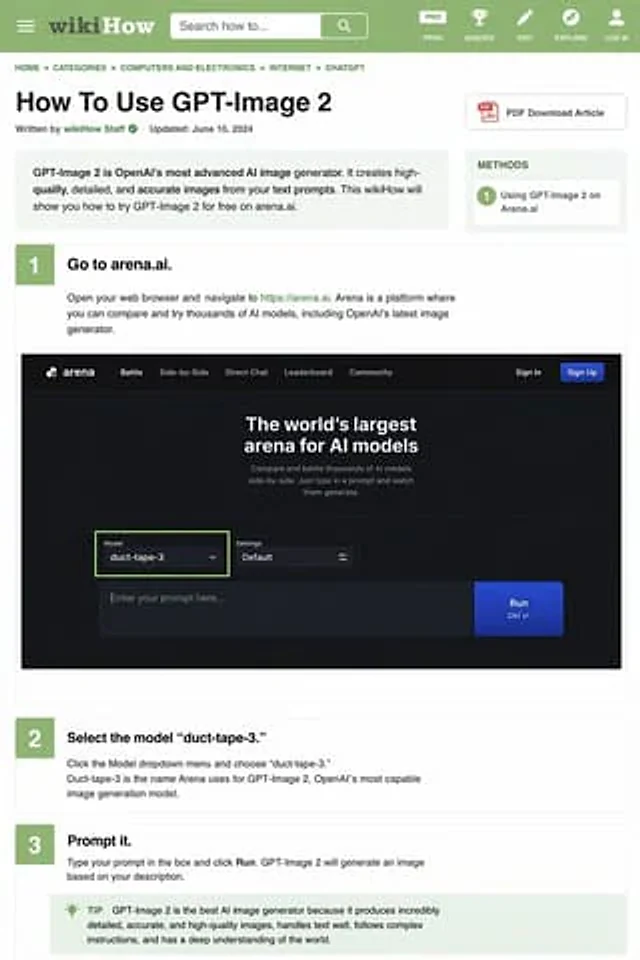
  "intro_box": "GPT-Image 2 is OpenAI's most advanced AI image generator. It can create high-quality, detailed, and accurate images based on your text prompts. This wikiHow will show you how to try GPT-Image 2 for free on arena.ai.",
  "steps": [
    {
      "number": 1,
      "title": "{argument name=\"step 1 title\" default=\"Go to arena.ai.\"}",
      "description": "Open your web browser and visit https://arena.ai. Arena is a platform where you can compare and try out thousands of AI models, including OpenAI's latest image generator.",
      "embedded_image": {
        "type": "Dark Mode Website UI Simulation",
        "logo": "arena",
        "navigation": [
          "battle",
          "Side-by-side comparison",
          "direct dialogue",
          "Rankings",
          "Community",
          "Log in",
          "Register button"
        ],
        "hero_text": "The world's largest AI model arena",
        "input_ui": {
          "model_dropdown": "Model:{argument name=\"model name\" default=\"duct-tape-3\"}",
          "settings": "default",
          "text_input": "Enter your prompt here...",
          "button": "run"
        }
      }
    },
    {
      "number": 2,
      "title": "{argument name=\"step 2 title\" default=\"Select model 'duct-tape-3'.\"}",
      "description": "Click the model drop-down menu and select \"duct-tape-3\". Duct-tape-3 is the name Arena uses for OpenAI's most powerful image generation model, GPT-Image 2."
    },
    {
      "number": 3,
      "title": "{argument name=\"step 3 title\" default=\"Enter the prompt word.\"}",
      "description": "Enter your prompt in the box and click \"Run\". GPT-Image 2 will generate an image based on your description.",
      "tip_box": "Tip: GPT-Image 2 is currently the best AI image generator because it can generate extremely detailed, accurate and high-quality images, excels at text processing, can follow complex instructions, and has a deep understanding of the world."
    }
  ]
}
Mode d’emploi
- Copiez le prompt original complet, paramètres compris.
- Adaptez le sujet, le texte et la composition à vos besoins.
- Utilisez un outil externe compatible ; vérifiez l’accès et le résultat.
Avant de commencer
- Vérifiez si une image de référence est nécessaire. La compatibilité ne prouve pas le modèle utilisé pour cet exemple.
- Vérifiez noms, chiffres et textes ; les versions du modèle peuvent produire des résultats différents.