

Voir en action
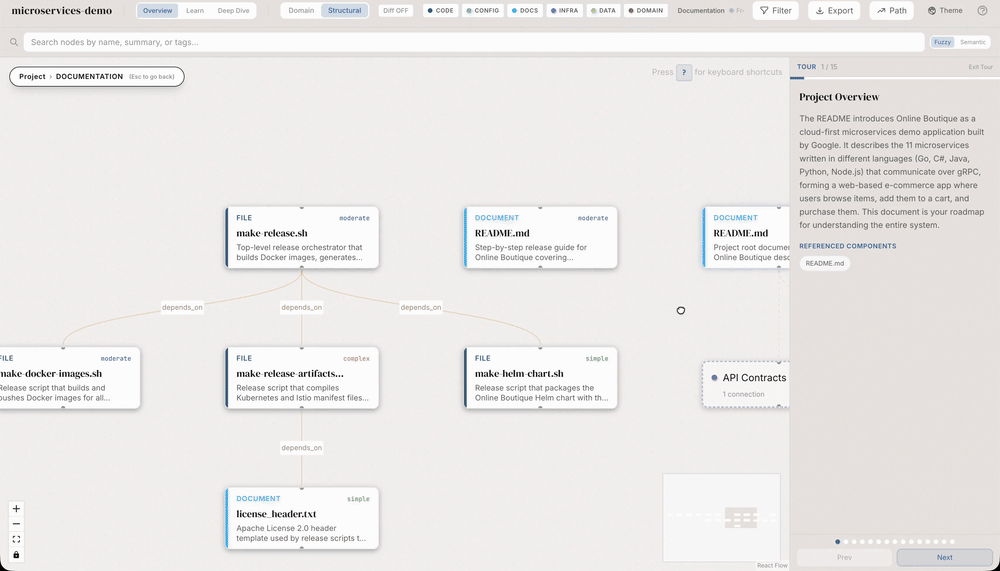
Structural dashboard: a guided documentation tour
Still frame from the publisher’s original structural-demo animation, showing the microservices-demo sample graph with the documentation layer and guided-tour panel. The command is the documented dashboard trigger; an existing local knowledge graph and the sample project are required. The source animation was not rerun by this site.
Exemple d’entrée
/understand-dashboardLicence
Original source GIF, frame 105 of 210, 21000 ms from the start, decoded at native 1000×571 then stored as a lossless still. No crop, upscaling, invented animation or model regeneration.
MIT License

Copyright (c) 2026 Yuxiang Lin
Copyright (c) 2026 Infinite Universe, Inc.

Permission is hereby granted, free of charge, to any person obtaining a copy
of this software and associated documentation files (the "Software"), to deal
in the Software without restriction, including without limitation the rights
to use, copy, modify, merge, publish, distribute, sublicense, and/or sell
copies of the Software, and to permit persons to whom the Software is
furnished to do so, subject to the following conditions:

The above copyright notice and this permission notice shall be included in all
copies or substantial portions of the Software.

THE SOFTWARE IS PROVIDED "AS IS", WITHOUT WARRANTY OF ANY KIND, EXPRESS OR
IMPLIED, INCLUDING BUT NOT LIMITED TO THE WARRANTIES OF MERCHANTABILITY,
FITNESS FOR A PARTICULAR PURPOSE AND NONINFRINGEMENT. IN NO EVENT SHALL THE
AUTHORS OR COPYRIGHT HOLDERS BE LIABLE FOR ANY CLAIM, DAMAGES OR OTHER
LIABILITY, WHETHER IN AN ACTION OF CONTRACT, TORT OR OTHERWISE, ARISING FROM,
OUT OF OR IN CONNECTION WITH THE SOFTWARE OR THE USE OR OTHER DEALINGS IN THE
SOFTWARE.
Before the viewer: the documented missing-graph response
A documented prerequisite response from the original dashboard Skill, not a site-run error log. The viewer needs a previously generated knowledge-graph file; this example explains the next step when it is absent.
Exemple d’entrée
/understand-dashboardExemple de résultat
No knowledge graph found. Run /understand first to analyze this project.Licence
MIT License

Copyright (c) 2026 Yuxiang Lin
Copyright (c) 2026 Infinite Universe, Inc.

Permission is hereby granted, free of charge, to any person obtaining a copy
of this software and associated documentation files (the "Software"), to deal
in the Software without restriction, including without limitation the rights
to use, copy, modify, merge, publish, distribute, sublicense, and/or sell
copies of the Software, and to permit persons to whom the Software is
furnished to do so, subject to the following conditions:

The above copyright notice and this permission notice shall be included in all
copies or substantial portions of the Software.

THE SOFTWARE IS PROVIDED "AS IS", WITHOUT WARRANTY OF ANY KIND, EXPRESS OR
IMPLIED, INCLUDING BUT NOT LIMITED TO THE WARRANTIES OF MERCHANTABILITY,
FITNESS FOR A PARTICULAR PURPOSE AND NONINFRINGEMENT. IN NO EVENT SHALL THE
AUTHORS OR COPYRIGHT HOLDERS BE LIABLE FOR ANY CLAIM, DAMAGES OR OTHER
LIABILITY, WHETHER IN AN ACTION OF CONTRACT, TORT OR OTHERWISE, ARISING FROM,
OUT OF OR IN CONNECTION WITH THE SOFTWARE OR THE USE OR OTHER DEALINGS IN THE
SOFTWARE.
Mode d’emploi
- Copiez la commande et examinez le paquet avant de l’installer dans votre environnement agent.
- Consultez le document original pour les outils, identifiants et environnements requis.
- Décrivez les entrées et le livrable souhaité ; comparez la sortie aux sources.
npx skills add https://github.com/egonex-ai/understand-anything --skill understand-dashboardAvant de commencer
- L’installation n’inclut ni abonnement au modèle, ni quota API, ni accès aux fichiers.
- Étoiles et installations reflètent l’activité, pas un test indépendant de qualité ou de sécurité.
Rendu depuis le dépôt source en conservant titres, exemples, code, tableaux, liens et images.
/understand-dashboard
Start the Understand Anything dashboard to visualize the knowledge graph for the current project.
Instructions
- Determine the project directory and data directory:
- If
$ARGUMENTScontains a path, use that as the project directory - Otherwise, use the current working directory
- Prefer the legacy
.understand-anything/data directory when it exists, otherwise use.ua/
Use the Bash tool to resolve:
   PROJECT_ARG="$ARGUMENTS"
   if [ -n "$PROJECT_ARG" ]; then
     PROJECT_DIR=$(cd "$PROJECT_ARG" 2>/dev/null && pwd -P)
   else
     PROJECT_DIR=$(pwd -P)
   fi

   if [ -z "$PROJECT_DIR" ] || [ ! -d "$PROJECT_DIR" ]; then
     echo "Error: Project directory not found: ${PROJECT_ARG:-$PWD}"
     exit 1
   fi

   if [ -d "$PROJECT_DIR/.understand-anything" ]; then
     UA_DIR="$PROJECT_DIR/.understand-anything"
   else
     UA_DIR="$PROJECT_DIR/.ua"
fi- Check that
$UA_DIR/knowledge-graph.jsonexists in the project directory. If not, tell the user:
No knowledge graph found. Run /understand first to analyze this project.Use the Bash tool to check:
   if [ ! -f "$UA_DIR/knowledge-graph.json" ]; then
     echo "No knowledge graph found. Run /understand first to analyze this project."
     exit 1
fi- Find the dashboard code. The dashboard is at
packages/dashboard/relative to this plugin's root directory. Check these paths in order and use the first that exists:
${CLAUDE_PLUGIN_ROOT}/packages/dashboard/(Claude Code runtime root, highest priority)${DEVIN_PLUGIN_ROOT}/packages/dashboard/(explicit override, when set)- Two levels up from this skill's own directory,
<SKILL_DIR>(the base directory your platform reported when loading this skill — covers plugin installs with no fixed location, such as Devin's) ~/.understand-anything-plugin/packages/dashboard/(universal symlink, all installs)- Two levels up from
~/.agents/skills/understand-dashboardreal path (self-relative fallback) - Two levels up from
~/.copilot/skills/understand-dashboardreal path (Copilot personal skills fallback) - Common clone-based install roots:
~/.codex/understand-anything/understand-anything-plugin/packages/dashboard/~/.opencode/understand-anything/understand-anything-plugin/packages/dashboard/~/.pi/understand-anything/understand-anything-plugin/packages/dashboard/~/understand-anything/understand-anything-plugin/packages/dashboard/
Use the Bash tool to resolve:
   SKILL_DIR_RELATIVE=$(cd -P "<SKILL_DIR>" 2>/dev/null && cd ../.. && pwd || echo "")
   SKILL_REAL=$(realpath ~/.agents/skills/understand-dashboard 2>/dev/null || readlink -f ~/.agents/skills/understand-dashboard 2>/dev/null || echo "")
   SELF_RELATIVE=$([ -n "$SKILL_REAL" ] && cd "$SKILL_REAL/../.." 2>/dev/null && pwd || echo "")
   COPILOT_SKILL_REAL=$(realpath ~/.copilot/skills/understand-dashboard 2>/dev/null || readlink -f ~/.copilot/skills/understand-dashboard 2>/dev/null || echo "")
   COPILOT_SELF_RELATIVE=$([ -n "$COPILOT_SKILL_REAL" ] && cd "$COPILOT_SKILL_REAL/../.." 2>/dev/null && pwd || echo "")

   PLUGIN_ROOT=""
   for candidate in \
     "${CLAUDE_PLUGIN_ROOT}" \
     "${DEVIN_PLUGIN_ROOT}" \
     "$SKILL_DIR_RELATIVE" \
     "$HOME/.understand-anything-plugin" \
     "$SELF_RELATIVE" \
     "$COPILOT_SELF_RELATIVE" \
     "$HOME/.codex/understand-anything/understand-anything-plugin" \
     "$HOME/.opencode/understand-anything/understand-anything-plugin" \
     "$HOME/.pi/understand-anything/understand-anything-plugin" \
     "$HOME/understand-anything/understand-anything-plugin"; do
     if [ -n "$candidate" ] && [ -d "$candidate/packages/dashboard" ]; then
       PLUGIN_ROOT="$candidate"; break
     fi
   done

   if [ -z "$PLUGIN_ROOT" ]; then
     echo "Error: Cannot find the understand-anything plugin root."
     echo "Checked:"
     echo "  - ${CLAUDE_PLUGIN_ROOT:-<unset CLAUDE_PLUGIN_ROOT>}"
     echo "  - ${DEVIN_PLUGIN_ROOT:-<unset DEVIN_PLUGIN_ROOT>}"
     echo "  - ${SKILL_DIR_RELATIVE:-<unresolved path derived from the skill directory>}"
     echo "  - $HOME/.understand-anything-plugin"
     echo "  - ${SELF_RELATIVE:-<unresolved path derived from ~/.agents/skills/understand-dashboard>}"
     echo "  - ${COPILOT_SELF_RELATIVE:-<unresolved path derived from ~/.copilot/skills/understand-dashboard>}"
     echo "  - $HOME/.codex/understand-anything/understand-anything-plugin"
     echo "  - $HOME/.opencode/understand-anything/understand-anything-plugin"
     echo "  - $HOME/.pi/understand-anything/understand-anything-plugin"
     echo "  - $HOME/understand-anything/understand-anything-plugin"
     echo "Make sure you followed the installation instructions for your platform."
     exit 1
   fi

DASHBOARD_DIR="$PLUGIN_ROOT/packages/dashboard"- Fast path — try the prebuilt viewer first (no install, no build). Each release ships a self-contained viewer tarball; run it pinned to the installed plugin version:
   : "${PLUGIN_ROOT:?Run step 3 first so PLUGIN_ROOT is set}"
   : "${PROJECT_DIR:?Run step 1 first so PROJECT_DIR is set}"
   PLUGIN_VERSION=$(node -p "require('$PLUGIN_ROOT/package.json').version")
   VIEWER_URL="https://github.com/Egonex-AI/Understand-Anything/releases/download/v${PLUGIN_VERSION}/understand-anything-viewer.tgz"
   npx --yes "$VIEWER_URL" "$PROJECT_DIR"
Run this in the background. It prints the same 🔑 Dashboard URL line as the dev server:
- If the line appears, skip steps 5-6 and continue at step 7.
- If the process exits without printing it (no release asset for this version, or no network), fall back to steps 5-6.
- Fallback: install dependencies and build if needed:
   : "${PLUGIN_ROOT:?Run step 3 first so PLUGIN_ROOT is set}"
   DASHBOARD_DIR="${DASHBOARD_DIR:-$PLUGIN_ROOT/packages/dashboard}"
   cd "$DASHBOARD_DIR" && (pnpm install --frozen-lockfile 2>/dev/null || pnpm install)
Then ensure the core package is built (the dashboard depends on it):
   : "${PLUGIN_ROOT:?Run step 3 first so PLUGIN_ROOT is set}"
cd "$PLUGIN_ROOT" && pnpm --filter @understand-anything/core build- Fallback: start the Vite dev server pointing at the project's knowledge graph:
   : "${PROJECT_DIR:?Run step 1 first so PROJECT_DIR is set}"
   : "${DASHBOARD_DIR:?Run step 5 first so DASHBOARD_DIR is set}"
   cd "$DASHBOARD_DIR" && GRAPH_DIR="$PROJECT_DIR" npx vite --host 127.0.0.1
Run this in the background so the user can continue working.
- Capture the access token URL from the server output. The server (viewer or Vite) prints a line like:
🔑 Dashboard URL: http://127.0.0.1:<PORT>?token=<TOKEN>Extract the full URL including the ?token= parameter. The token is required to access the knowledge graph data — without it the dashboard will show an "Access Token Required" gate.
- Report to the user, including the full tokenized URL:
   Dashboard started at http://127.0.0.1:<PORT>?token=<TOKEN>
   Viewing: $UA_DIR/knowledge-graph.json

   The dashboard is running in the background. Press Ctrl+C in the terminal to stop it.
Important: Always include the ?token= parameter in the URL you share. If you omit it, the user will be blocked by the token gate and have to manually find the token in the terminal output.
Notes
- The fast path (step 4) downloads a version-pinned, self-contained viewer from the GitHub release — nothing is installed into the plugin directory and no build runs
- The dashboard auto-opens in the default browser (both the viewer and Vite's
--open) - If port 5173 is already in use, the next available port is picked (both paths)
- In the fallback, the
GRAPH_DIRenvironment variable tells the dev server where to find the knowledge graph
