
Voir en action
crewAI: connect a researcher and reporting analyst
The official README supplies a complete sequential project example: create the project, configure both JSONC agents and dependent tasks, provide model/search credentials, and run it. The source selects openai/gpt-4o and writes to output/report.md. These are source settings and an intended file path, not a generated report or an independently tested run.
Exemple d’entrée
#### Example of a simple crew with a sequential process:

```shell
crewai create crew latest-ai-development
cd latest_ai_development
```

Then edit the generated files:

**agents/researcher.jsonc**

```jsonc
{
  "role": "{topic} Senior Data Researcher",
  "goal": "Uncover cutting-edge developments in {topic}",
  "backstory": "You're a seasoned researcher who finds relevant information and presents it clearly.",
  "llm": "openai/gpt-4o",
  "tools": ["SerperDevTool"],
  "settings": {
    "verbose": true
  }
}
```

**agents/reporting_analyst.jsonc**

```jsonc
{
  "role": "{topic} Reporting Analyst",
  "goal": "Create detailed reports based on {topic} data analysis and research findings",
  "backstory": "You're a meticulous analyst who turns complex data into clear, concise reports.",
  "llm": "openai/gpt-4o",
  "settings": {
    "verbose": true
  }
}
```

**crew.jsonc**

```jsonc
{
  "name": "Latest AI Development",
  "agents": ["researcher", "reporting_analyst"],
  "tasks": [
    {
      "name": "research_task",
      "description": "Conduct thorough research about {topic}. Find recent, relevant information.",
      "expected_output": "A list with 10 bullet points of the most relevant information about {topic}.",
      "agent": "researcher"
    },
    {
      "name": "reporting_task",
      "description": "Review the research and expand each topic into a full section for a report.",
      "expected_output": "A markdown report with the main topics, each with a full section of information. No fenced code blocks around the whole document.",
      "agent": "reporting_analyst",
      "context": ["research_task"],
      "output_file": "output/report.md",
      "markdown": true
    }
  ],
  "process": "sequential",
  "verbose": true,
  "inputs": {
    "topic": "AI Agents"
  }
}
```

### 3. Running Your Crew

Before running your crew, set the required keys in your `.env` file:

- Your model provider API key — see [LLM setup](https://docs.crewai.com/en/concepts/llms#setting-up-your-llm)
- A [Serper.dev](https://serper.dev/) API key if you use web search: `SERPER_API_KEY=YOUR_KEY_HERE`

Then install dependencies and run from the project directory:

```shell
crewai install
crewai run
```Licence
Full original source license/copyright retained. Complete selected inputs preserve source values; narrative headings are editorially explained. No source script, model request, browser crawl or installation executed. Recovery tutorial MDX wrappers become readable step labels and common code indentation is normalized, without deleting Python statements. Checkpoint screenshot and tutorial are separate documented examples, not a proven common run.
Copyright (c) 2025 crewAI, Inc.

Permission is hereby granted, free of charge, to any person obtaining a copy
of this software and associated documentation files (the "Software"), to deal
in the Software without restriction, including without limitation the rights
to use, copy, modify, merge, publish, distribute, sublicense, and/or sell
copies of the Software, and to permit persons to whom the Software is
furnished to do so, subject to the following conditions:

The above copyright notice and this permission notice shall be included in all
copies or substantial portions of the Software.

THE SOFTWARE IS PROVIDED "AS IS", WITHOUT WARRANTY OF ANY KIND, EXPRESS OR
IMPLIED, INCLUDING BUT NOT LIMITED TO THE WARRANTIES OF MERCHANTABILITY,
FITNESS FOR A PARTICULAR PURPOSE AND NONINFRINGEMENT. IN NO EVENT SHALL THE
AUTHORS OR COPYRIGHT HOLDERS BE LIABLE FOR ANY CLAIM, DAMAGES OR OTHER
LIABILITY, WHETHER IN AN ACTION OF CONTRACT, TORT OR OTHERWISE, ARISING FROM,
OUT OF OR IN CONNECTION WITH THE SOFTWARE OR THE USE OR OTHER DEALINGS IN THE
SOFTWARE.crewAI: inspect kickoff inputs in a saved checkpoint
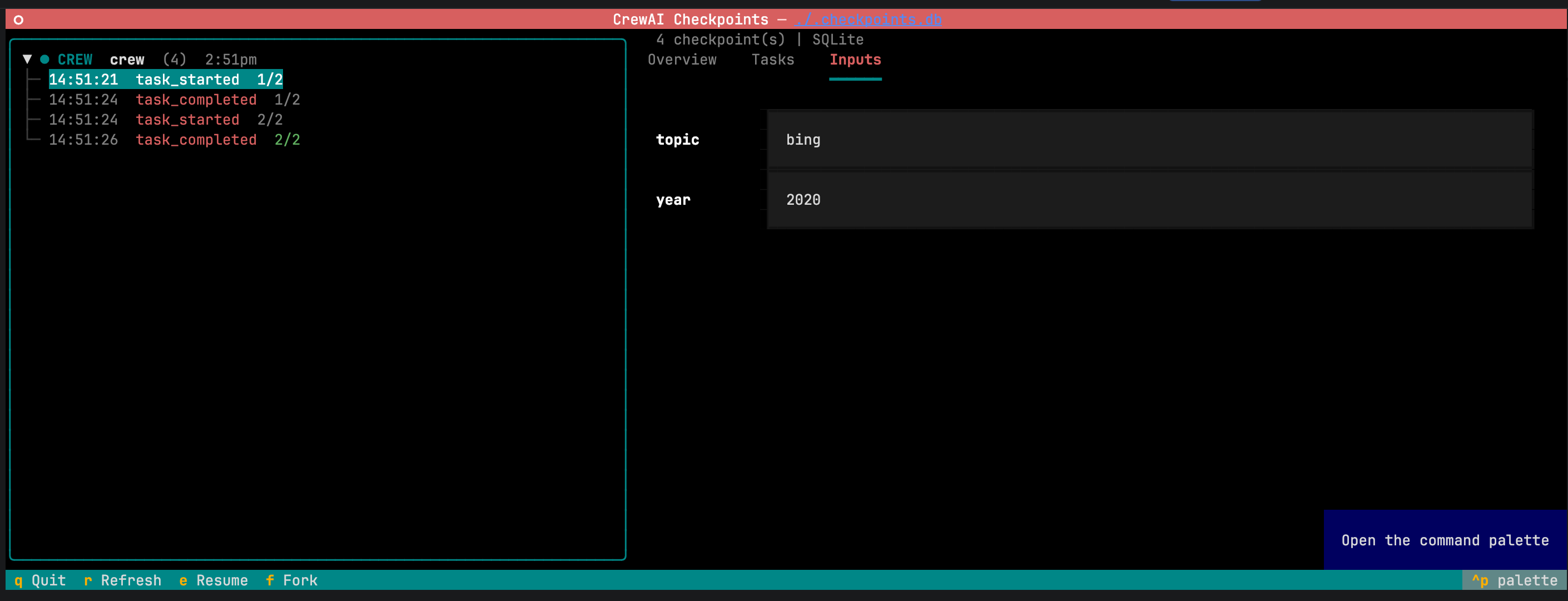
The documented SQLite checkpoint interface displays topic=bing and year=2020. The selected event is task_started; the left tree also lists later events. This previews editable inputs, not completed task output. The exact documented SQLite launch command is supplied below, separately from the two-agent recovery tutorial.
Exemple d’entrée
crewai checkpoint --location ./.checkpoints.dbLicence
Full original source license/copyright retained. Complete selected inputs preserve source values; narrative headings are editorially explained. No source script, model request, browser crawl or installation executed. Recovery tutorial MDX wrappers become readable step labels and common code indentation is normalized, without deleting Python statements. Checkpoint screenshot and tutorial are separate documented examples, not a proven common run. Original PNG converted to native-resolution lossless WebP with identical decoded RGBA; no crop, retouch or upscaling.
Copyright (c) 2025 crewAI, Inc.

Permission is hereby granted, free of charge, to any person obtaining a copy
of this software and associated documentation files (the "Software"), to deal
in the Software without restriction, including without limitation the rights
to use, copy, modify, merge, publish, distribute, sublicense, and/or sell
copies of the Software, and to permit persons to whom the Software is
furnished to do so, subject to the following conditions:

The above copyright notice and this permission notice shall be included in all
copies or substantial portions of the Software.

THE SOFTWARE IS PROVIDED "AS IS", WITHOUT WARRANTY OF ANY KIND, EXPRESS OR
IMPLIED, INCLUDING BUT NOT LIMITED TO THE WARRANTIES OF MERCHANTABILITY,
FITNESS FOR A PARTICULAR PURPOSE AND NONINFRINGEMENT. IN NO EVENT SHALL THE
AUTHORS OR COPYRIGHT HOLDERS BE LIABLE FOR ANY CLAIM, DAMAGES OR OTHER
LIABILITY, WHETHER IN AN ACTION OF CONTRACT, TORT OR OTHERWISE, ARISING FROM,
OUT OF OR IN CONNECTION WITH THE SOFTWARE OR THE USE OR OTHER DEALINGS IN THE
SOFTWARE.crewAI: resume a two-task crew from a checkpoint
This complete source tutorial defines a researcher and writer, enables checkpointing, interrupts after the first task and supplies the restore call. The timestamp/UUID path remains a placeholder to replace with an actual saved checkpoint. MDX wrappers and common indentation are formatted as readable steps; all Python statements are preserved. No task, model call or recovery was executed here.
Exemple d’entrée
Step 1: Create the crew with checkpointing enabled

```python
from crewai import Agent, Crew, Task

researcher = Agent(role="Researcher", goal="Research", backstory="Expert")
writer = Agent(role="Writer", goal="Write", backstory="Expert")

crew = Crew(
    agents=[researcher, writer],
    tasks=[
        Task(description="Research AI trends", agent=researcher, expected_output="bullets"),
        Task(description="Write a summary", agent=writer, expected_output="paragraph"),
    ],
    checkpoint=True,
)
```

Step 2: Run it and interrupt after the first task

```python
result = crew.kickoff()
```

Press `Ctrl+C` after the first task finishes. Look in `./.checkpoints/` — a file named `<timestamp>_<uuid>.json` is the checkpoint.

Step 3: Resume from the checkpoint

```python
from crewai import CheckpointConfig

result = crew.kickoff(
    from_checkpoint=CheckpointConfig(
        restore_from="./.checkpoints/<timestamp>_<uuid>.json",
    ),
)
```Licence
Full original source license/copyright retained. Complete selected inputs preserve source values; narrative headings are editorially explained. No source script, model request, browser crawl or installation executed. Recovery tutorial MDX wrappers become readable step labels and common code indentation is normalized, without deleting Python statements. Checkpoint screenshot and tutorial are separate documented examples, not a proven common run.
Copyright (c) 2025 crewAI, Inc.

Permission is hereby granted, free of charge, to any person obtaining a copy
of this software and associated documentation files (the "Software"), to deal
in the Software without restriction, including without limitation the rights
to use, copy, modify, merge, publish, distribute, sublicense, and/or sell
copies of the Software, and to permit persons to whom the Software is
furnished to do so, subject to the following conditions:

The above copyright notice and this permission notice shall be included in all
copies or substantial portions of the Software.

THE SOFTWARE IS PROVIDED "AS IS", WITHOUT WARRANTY OF ANY KIND, EXPRESS OR
IMPLIED, INCLUDING BUT NOT LIMITED TO THE WARRANTIES OF MERCHANTABILITY,
FITNESS FOR A PARTICULAR PURPOSE AND NONINFRINGEMENT. IN NO EVENT SHALL THE
AUTHORS OR COPYRIGHT HOLDERS BE LIABLE FOR ANY CLAIM, DAMAGES OR OTHER
LIABILITY, WHETHER IN AN ACTION OF CONTRACT, TORT OR OTHERWISE, ARISING FROM,
OUT OF OR IN CONNECTION WITH THE SOFTWARE OR THE USE OR OTHER DEALINGS IN THE
SOFTWARE.
Présentation du produit
crewAI combines a Python framework for role-based agent teams and stateful Flows with a hosted platform for building and operating enterprise agents.
Texte original de la source · ENCe que propose crewAI
- 01Define agents, tools and dependent tasks using JSONC or Python
- 02Orchestrate stateful Flows and restore execution checkpoints
- 03Use hosted visual building, tracing and governance where available
Ce qui le distingue
The MIT-licensed framework can be self-hosted, while visual building and enterprise governance are part of the hosted offering. Teams supply their own model-provider access, tools and runtime configuration.
Texte original de la source · ENÀ qui il convient
- Developers orchestrating multi-agent Python workflows
- Teams evaluating governed enterprise agent operations
Points à vérifier
- Tester une vraie tâche et comparer le résultat à ses besoins.
- Vérifier quelles données sont conservées, partagées ou utilisées pour l’entraînement.
- Confirmer les tarifs, limites d’usage et conditions de résiliation sur le site officiel.
Lien officiel vérifié le 24 oct. 2026. Les fonctionnalités n’ont pas été testées indépendamment.