Documento originale
GPT Image 2 · en
{
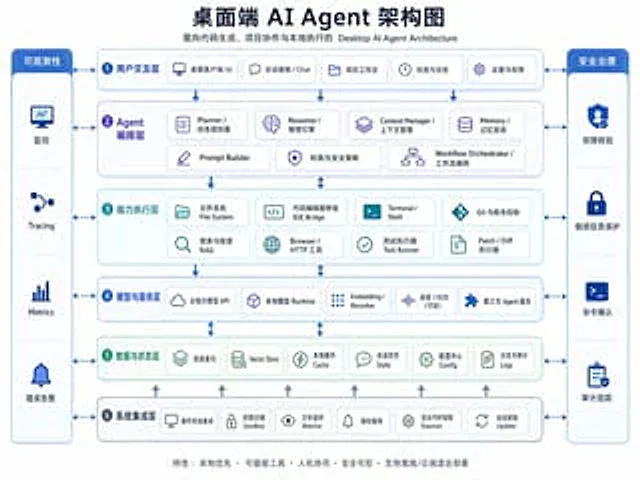
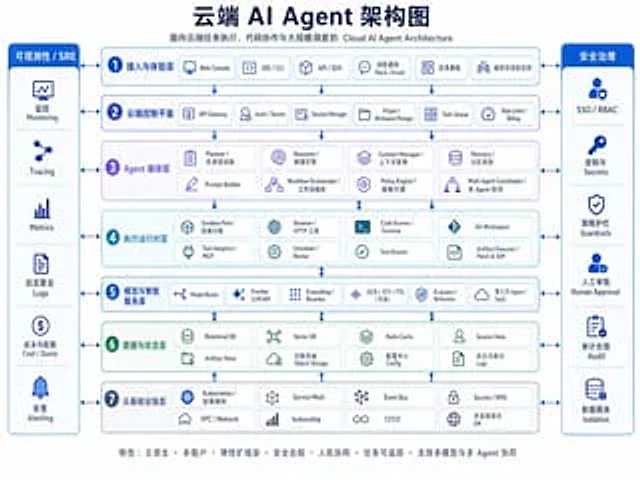
  "type": "Enterprise-grade cloud AI architecture infographic",
  "style": "A clean corporate vector graphic with a white background, a blue and cyan color palette, rounded rectangles, thin blue outlines, soft shadows, bilingual labels primarily in Chinese with smaller English subheadings, a symmetrical layout, and presentation-quality graphics.",
  "canvas": {
    "aspect_ratio": "4:3",
    "resolution": "1024x768"
  },
  "title_block": {
    "headline": "{argument name=\"headline text\" default=\"Cloud AI Agent Architecture Diagram\"}",
    "subtitle": "Cloud AI Agent Architecture for Cloud Task Execution, Code Collaboration, and Large-Scale Scheduling",
    "position": "top center"
  },
  "layout": {
    "center": {
      "type": "Stacked architecture layers",
      "count": 7,
      "numbered": true,
      "layers": [
        {
          "index": 1,
          "title": "Access and Experience Layer",
          "english": "access and experience layer",
          "count": 5,
          "items": [
            "Web Console",
            "IDE / CLI",
            "API / SDK",
            "Notifications via Slack/Email",
            "Task Kanban organization and project space"
          ]
        },
        {
          "index": 2,
          "title": "Cloud Control Plane",
          "english": "cloud control plane",
          "count": 6,
          "items": [
            "API Gateway",
            "Auth / Tenant",
            "Session Manager",
            "Project / Workspace Manager",
            "Task Queue",
            "Rate Limit / Billing"
          ]
        },
        {
          "index": 3,
          "title": "Agent orchestration layer",
          "english": "agent orchestration layer",
          "count": 8,
          "items": [
            "Planner / Task Planner",
            "Reasoner / Reasoning Engine",
            "Context Manager",
            "Memory / Memory System",
            "Prompt Builder",
            "Workflow Orchestrator",
            "Policy Engine",
            "Multi-Agent Coordinator"
          ]
        },
        {
          "index": 4,
          "title": "Execute runtime layer",
          "english": "execution runtime layer",
          "count": 8,
          "items": [
            "Sandbox Pool / Container Sandbox",
            "Browser / HTTP Tools",
            "Code Runner / Terminal",
            "Git Workspace",
            "Tool Adapters / MCP",
            "Scheduler / Worker",
            "Test Runner",
            "Artifact Executor / Patch & Diff"
          ]
        },
        {
          "index": 5,
          "title": "Model and Intelligent Service Layer",
          "english": "model and intelligence services layer",
          "count": 6,
          "items": [
            "Model Router",
            "Frontier LLM API",
            "Embedding / Reranker",
            "OCR / STT / TTS (optional)",
            "Evaluator / Reflection",
            "Third-party Agent / SaaS"
          ]
        },
        {
          "index": 6,
          "title": "Data and State Layer",
          "english": "data and state layer",
          "count": 8,
          "items": [
            "Relational DB",
            "Vector DB",
            "Redis Cache",
            "Session State",
            "Artifact Store",
            "Object Storage",
            "Configuration Center",
            "Logs and Audit Logs"
          ]
        },
        {
          "index": 7,
          "title": "Cloud infrastructure layer",
          "english": "cloud infrastructure layer",
          "count": 8,
          "items": [
            "Kubernetes / Container Orchestration",
            "Service Mesh",
            "Event Bus",
            "Secrets / KMS",
            "VPC / Network",
            "Autoscaling",
            "CI/CD",
            "Multi-regional disaster recovery (DR)"
          ]
        }
      ]
    },
    "left_sidebar": {
      "title": "Observability/SRE",
      "position": "left",
      "count": 6,
      "items": [
        "Monitoring",
        "Tracing",
        "Metrics",
        "Logs aggregation",
        "Cost and Quota",
        "Alerting"
      ]
    },
    "right_sidebar": {
      "title": "Security Management",
      "position": "right",
      "count": 6,
      "items": [
        "SSO / RBAC",
        "Keys and Secrets",
        "Strategy Guardrails",
        "Human Approval",
        "Audit Compliance",
        "Data Isolation"
      ]
    },
    "connectors": "The double-headed blue arrows connecting the sidebars to each central layer, and the vertical arrows between the architectural layers."
  },
  "visual_details": {
    "icons": "Each box contains a simple blue line icon, one icon per module.",
    "boxes": "White card with rounded corners against a light blue or light cyan background",
    "section_colors": {
      "layers_1_2_5_7": "light blue",
      "layer_3": "Light purple",
      "layer_4": "Light blue",
      "layer_6": "Light green",
      "sidebars": "Deep sapphire blue title bar, white text"
    },
    "typography": "Bold dark navy blue Chinese headings, smaller gray-blue subheadings, medium-weight Chinese section labels, and compact bilingual project labels."
  },
  "footer": {
    "position": "bottom center",
    "text": "{argument name=\"footer text\" default=\"Features: Cloud-native • Multi-tenant • Elastic scaling • Security and compliance • Human-machine collaboration • Task traceability • Support for multi-model and multi-agent collaboration\"}"
  },
  "quality": "Clear infographics, balanced layout, high readability; professional enterprise architecture diagrams suitable for Keynote, documents, and product marketing."
}
Come usare
- Copia tutto il prompt originale, inclusi i parametri.
- Adatta soggetto, testo e composizione alle tue esigenze.
- Usa uno strumento esterno compatibile; verifica accesso e risultato.
Prima di iniziare
- Controlla se serve un’immagine di riferimento. La compatibilità non prova il modello usato per l’esempio.
- Verifica nomi, numeri e testi; i risultati cambiano con le versioni del modello.