Documento originale
GPT Image 2 · en
{
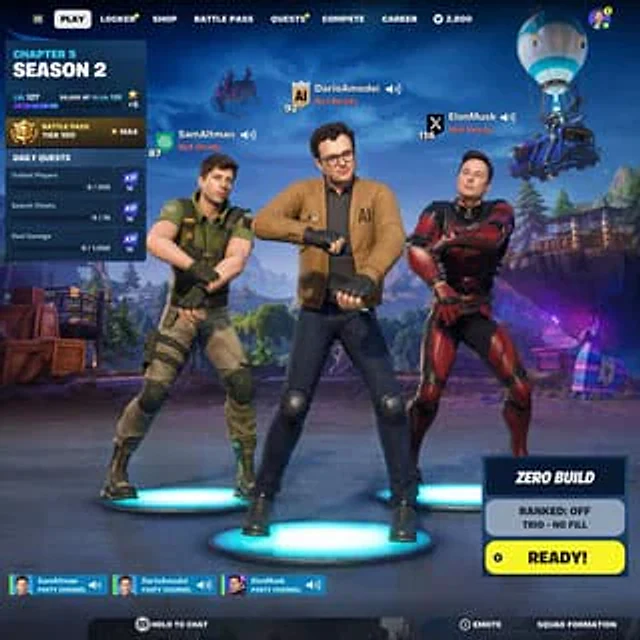
  "type": "Battle Royale Game Lobby UI",
  "characters": [
    {
      "name": "{argument name=\"left character name\" default=\"SamAltman\"}",
      "outfit": "Green tactical shirt, khaki trousers",
      "pose": "Dancing with arms crossed on the blue platform",
      "ui": "Level 87, OpenAI icon, not ready"
    },
    {
      "name": "{argument name=\"center character name\" default=\"DarioAmodei\"}",
      "outfit": "Brown jacket with the word \"AI\" printed on it, glasses, and jeans.",
      "pose": "Dancing with arms crossed on the blue platform",
      "ui": "Level 92, AI shield icon, not ready"
    },
    {
      "name": "{argument name=\"right character name\" default=\"ElonMusk\"}",
      "outfit": "Futuristic armor in red and black",
      "pose": "Dancing with arms crossed on the blue platform",
      "ui": "Level 114, X icon, not ready"
    }
  ],
  "background": "Stylized landscapes, flying combat buses, purple alpaca pinata",
  "ui": {
    "top_nav": [
      "Start Game",
      "lockers",
      "shop",
      "Battle Pass",
      "Task",
      "sports",
      "career"
    ],
    "left_panel": {
      "title": "{argument name=\"season text\" default=\"Chapter 5, Season 2\"}",
      "stats": "Level 127, Battle Pass Level 100",
      "daily_quests": 3
    },
    "bottom_right": {
      "mode": "{argument name=\"game mode\" default=\"Zero-Building Mode\"}",
      "status": "Ranked Matches: Off, Trio - No Fill Roles",
      "button": "Ready!"
    },
    "bottom_bar": {
      "party_channels": 3,
      "prompts": [
        "Press and hold to chat",
        "Facial expressions and gestures",
        "Squad Formation"
      ]
    }
  }
}
Come usare
- Copia tutto il prompt originale, inclusi i parametri.
- Adatta soggetto, testo e composizione alle tue esigenze.
- Usa uno strumento esterno compatibile; verifica accesso e risultato.
Prima di iniziare
- Controlla se serve un’immagine di riferimento. La compatibilità non prova il modello usato per l’esempio.
- Verifica nomi, numeri e testi; i risultati cambiano con le versioni del modello.