Documento originale
GPT Image 2 · en
{
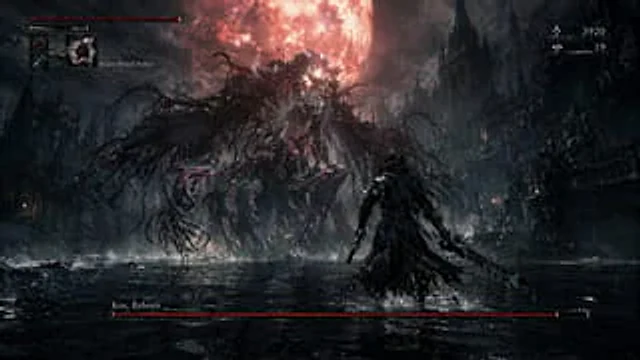
  "type": "video game screenshot",
  "setting": "A dark fantasy gothic city, with towering spires rising from shallow waters, and a huge orb hanging above them.{argument name=\"moon color\" default=\"Blood red\"} moon",
  "characters": {
    "player": "The hunter wore{argument name=\"player outfit\" default=\"Dark trench coat and tricorn hat\"} Holding a serrated knife and a pistol, with his back to the camera.",
    "boss": "{argument name=\"boss appearance\" default=\"A gigantic Cthulhu-style monster composed of tangled black tentacles and emitting a red glow from within.\"}"
  },
  "layout": {
    "sections": [
      {
        "title": "Player Status HUD",
        "position": "top-left",
        "count": 3,
        "labels": [
          "Red health bar",
          "Green stamina bar",
          "Inventory (Potions: 20, Ammo: 20){argument name=\"selected item\" default=\"Monster Blood Pill\"} :7)"
        ]
      },
      {
        "title": "Currency HUD",
        "position": "top-right",
        "count": 2,
        "labels": [
          "Currency icon: 3920",
          "Eye icon: 19"
        ]
      },
      {
        "title": "Boss Health Bar",
        "position": "bottom-center",
        "count": 1,
        "labels": [
          "{argument name=\"boss name\" default=\"Reborn Kos\"}"
        ]
      }
    ],
    "centerpiece": "An epic confrontation between players and the boss in the water."
  }
}
Come usare
- Copia tutto il prompt originale, inclusi i parametri.
- Adatta soggetto, testo e composizione alle tue esigenze.
- Usa uno strumento esterno compatibile; verifica accesso e risultato.
Prima di iniziare
- Controlla se serve un’immagine di riferimento. La compatibilità non prova il modello usato per l’esempio.
- Verifica nomi, numeri e testi; i risultati cambiano con le versioni del modello.