综合应用场景图

综合应用场景图

Documento originale

GPT Image 2 · en

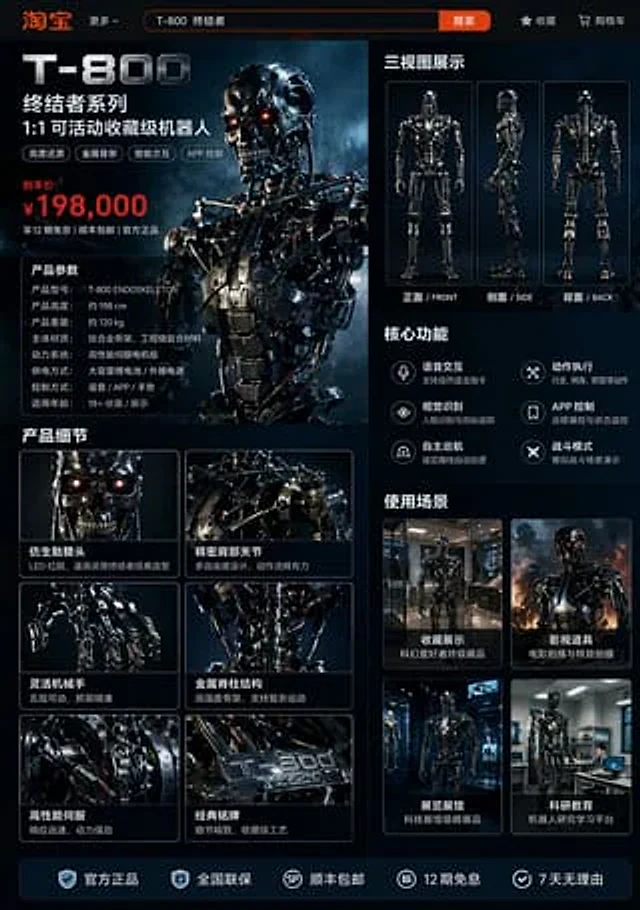
A {argument name="platform" default="Taobao"} product detail page for {argument name="robot model" default="T-800 robot"}, displaying: front, side, and back three-view drawings of the robot, product price, product details, functions, and usage scenarios, etc.

Come usare

  1. Copia tutto il prompt originale, inclusi i parametri.
  2. Adatta soggetto, testo e composizione alle tue esigenze.
  3. Usa uno strumento esterno compatibile; verifica accesso e risultato.

Prima di iniziare

  • Controlla se serve un’immagine di riferimento. La compatibilità non prova il modello usato per l’esempio.
  • Verifica nomi, numeri e testi; i risultati cambiano con le versioni del modello.
Esempi simili

综合应用场景图
GPT Image 2en

A {argument name="platform" default="Taobao"} product detail page for {argument name="robot model" default="T-800 robot"}, displaying: front, side, and back three-view drawings of the robot, product price, product details, functions, and usage scenarios, etc.

综合应用场景图
GPT Image 2en

A {argument name="platform" default="Taobao"} product detail page for {argument name="robot model" default="T-800 robot"}, displaying: front, side, and back three-view drawings of the robot, product price, product details, functions, and usage scenarios, etc.

综合应用场景图
GPT Image 2en

A {argument name="platform" default="Taobao"} product detail page for {argument name="robot model" default="T-800 robot"}, displaying: front, side, and back three-view drawings of the robot, product price, product details, functions, and usage scenarios, etc.