Documento originale
GPT Image 2 · en
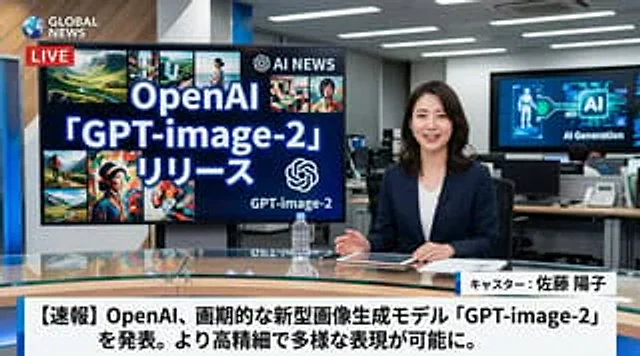
A hyper-realistic television news broadcast scene, with one person in the frame.{argument name="anchor appearance" default="Japanese female news anchor wearing a dark blue suit jacket with a white top"} She sat at the glass table in a modern news studio. Smiling, she looked directly at the camera, her hands resting beside a tablet, documents, and a clear water bottle. To her left, a large monitor displayed…{argument name="screen main text" default="OpenAI 「GPT-image-2」リリース"} The text reads "AI," next to an AI logo and eight smaller, diverse AI-generated image collages. In the top left corner is a channel logo that reads "...".{argument name="news channel name" default="GLOBAL NEWS"} The text is accompanied by a red "LIVE" logo. The background shows a busy office with computers and a wall screen displaying "AI Generation." At the bottom of the screen is a standard news graphic showing the anchor's name.{argument name="anchor name" default="Anchor: Yoko Sato"} "And a breaking news headline"{argument name="main headline text" default="[Breaking News] OpenAI announces groundbreaking new image generation model "GPT-image-2," enabling higher resolution and more diverse image expression."} (Displayed in bold Japanese text).Come usare
- Copia tutto il prompt originale, inclusi i parametri.
- Adatta soggetto, testo e composizione alle tue esigenze.
- Usa uno strumento esterno compatibile; verifica accesso e risultato.
Prima di iniziare
- Controlla se serve un’immagine di riferimento. La compatibilità non prova il modello usato per l’esempio.
- Verifica nomi, numeri e testi; i risultati cambiano con le versioni del modello.