
Documento originale
Nano Banana · en
{
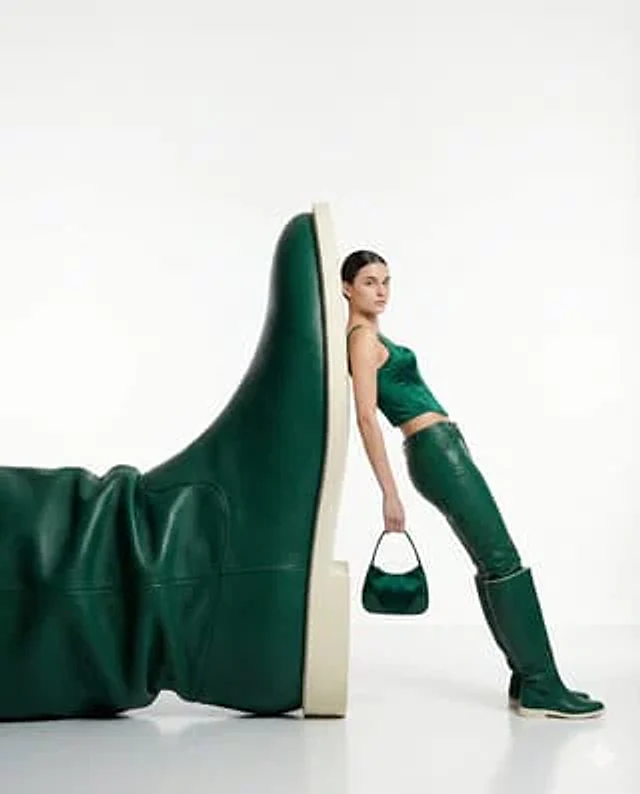
  "style": "high-fashion editorial, minimalist surrealism",
  "subject": "a confident woman leaning casually against an oversized green leather boot sculpture",
  "pose": "relaxed yet powerful stance, body slightly angled, one arm holding a small handbag",
  "outfit": {
    "top": "emerald green fitted sleeveless top",
    "bottom": "matching green leather pants",
    "footwear": "knee-high green leather boots",
    "accessories": "small structured green handbag"
  },
  "composition": {
    "scale": "dramatic contrast between human figure and oversized object",
    "framing": "full body shot, centered subject with negative space",
    "background": "pure white seamless studio backdrop",
    "floor": "glossy white reflective surface"
  },
  "lighting": {
    "type": "soft studio lighting",
    "mood": "clean, premium, editorial",
    "shadows": "subtle, natural, controlled"
  },
  "color_palette": "monochromatic green tones with neutral white",
  "camera": {
    "angle": "eye-level",
    "lens": "85mm fashion lens",
    "depth_of_field": "sharp focus on subject, smooth background"
  },
  "vibe": "luxury fashion campaign, modern, confident, surreal elegance",
  "quality": "ultra-high resolution, crisp details, magazine-ready"
}
Come usare
- Copia tutto il prompt originale, inclusi i parametri.
- Adatta soggetto, testo e composizione alle tue esigenze.
- Usa uno strumento esterno compatibile; verifica accesso e risultato.
Prima di iniziare
- Controlla se serve un’immagine di riferimento. La compatibilità non prova il modello usato per l’esempio.
- Verifica nomi, numeri e testi; i risultati cambiano con le versioni del modello.