Documento originale
GPT Image 2 · en
{
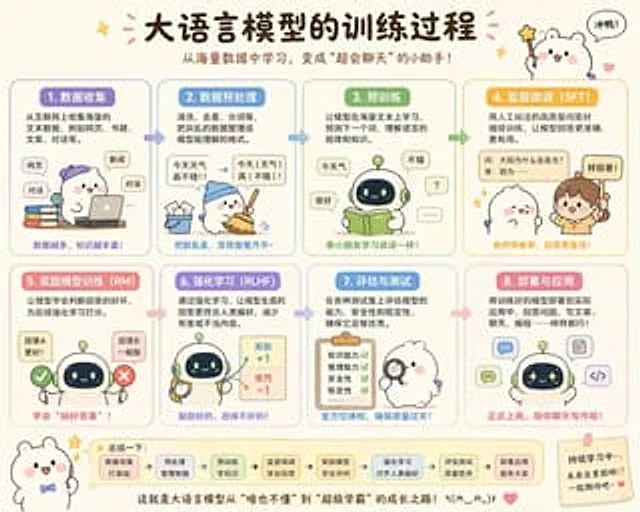
  "type": "Cute Educational Infographic Posters",
  "topic": "{argument name=\"headline text\" default=\"Training process of large language models\"}",
  "subtitle": "{argument name=\"subtitle text\" default=\"Learn from massive amounts of data and become a super chatty assistant!\"}",
  "style": {
    "overall": "Adorable Chinese science posters, a soft classroom infographic style, rounded corners, a cream-colored background, hand-drawn cartoon aesthetics, simple vector illustrations, and a warm and friendly educational tone.",
    "palette": [
      "Cream",
      "Lavender Purple",
      "Sky blue",
      "Mint Green",
      "Yellow Orange",
      "pink",
      "Soft brown"
    ],
    "rendering": "High-quality flat illustrations with delicate shadows, clear Chinese typography, sticker-style decorations, stars, hearts, arrows, and speech bubbles."
  },
  "layout": {
    "format": "Horizontal poster",
    "grid": {
      "rows": 2,
      "columns": 4,
      "count": 8
    },
    "sections": [
      {
        "title": "1. Data Collection",
        "position": "Top left corner",
        "count": 1,
        "labels": [
          "Web page",
          "news",
          "dialogue"
        ]
      },
      {
        "title": "2. Data Preprocessing",
        "position": "Top row, second column",
        "count": 1,
        "labels": [
          "The weather is so nice today!!",
          "The weather is really nice today!!"
        ]
      },
      {
        "title": "3. Pre-training",
        "position": "Top row, third column",
        "count": 1,
        "labels": [
          "Today's weather",
          "very good",
          "good",
          "?",
          "......"
        ]
      },
      {
        "title": "4. Supervised Fine-tuning (SFT)",
        "position": "Top right corner",
        "count": 1,
        "labels": [
          "Q: Why does the sun emit light?",
          "A: Because...",
          "Good answer!"
        ]
      },
      {
        "title": "5. Reward Model Training (RM)",
        "position": "bottom row, first column",
        "count": 1,
        "labels": [
          "Answer A is better!",
          "Answer B is so-so."
        ]
      },
      {
        "title": "6. Reinforcement Learning (RLHF)",
        "position": "bottom row, second column",
        "count": 1,
        "labels": [
          "Reward +1",
          "Punishment -1"
        ]
      },
      {
        "title": "7. Evaluation and Testing",
        "position": "bottom row, third column",
        "count": 1,
        "labels": [
          "Knowledge and Ability",
          "Reasoning ability",
          "Security",
          "stability"
        ]
      },
      {
        "title": "8. Deployment and Application",
        "position": "bottom right corner",
        "count": 1,
        "labels": [
          "chat",
          "Write code",
          "Writing articles"
        ]
      }
    ],
    "topDecorations": {
      "count": 4,
      "items": [
        "The small flash in the upper left corner",
        "Pink confetti around the title",
        "The cute white mascot holding a star wand in the upper right corner",
        "A speech bubble that says \"Go for it!\""
      ]
    },
    "bottomDecorations": {
      "count": 4,
      "items": [
        "The small white mascot wearing a bow tie in the bottom left corner",
        "Summary column containing 7 rounded squares and arrows",
        "Concluding remarks centered at the bottom",
        "A sticky note with encouraging words and a heart in the bottom right corner."
      ]
    }
  },
  "characters": {
    "main mascots": {
      "count": 4,
      "types": [
        "A round, white bear mascot with pink cheeks",
        "Small round robot with a dark face screen and green antenna",
        "A human teacher girl with a ponytail",
        "A furry white character holding a magnifying glass"
      ]
    },
    "recurring_robot_design": "A short, cute robot with a rounded body, a light green and cream-colored shell, a dark blue facial display with glowing eyes, and tiny limbs."
  },
  "sectionDetails": [
    {
      "title": "1. Data Collection",
      "panelColor": "Lavender Purple",
      "scene": "A white mascot wearing a purple hat sits beside a pile of colorful books, using a laptop; floating rounded labels indicate the internet source.",
      "caption": "The more data you have, the more knowledge you gain!"
    },
    {
      "title": "2. Data Preprocessing",
      "panelColor": "Sky blue",
      "scene": "The mascot, wearing a blue hat, swept the scattered scraps of paper into a bin; jumbled sentences were transformed into clearly structured text, complete with arrows.",
      "caption": "Transform the dirty and messy into a neat and tidy place."
    },
    {
      "title": "3. Pre-training",
      "panelColor": "Mint Green",
      "scene": "The robot is reading an open green book, with speech bubbles around it displaying simple words and responses, suggesting a language learning process.",
      "caption": "Just like a child learning to speak!"
    },
    {
      "title": "4. Supervised Fine-tuning (SFT)",
      "panelColor": "Golden yellow",
      "scene": "The teacher pointed to a labeled question-and-answer card, with a cute mascot listening attentively; emphasizing the high-quality question-and-answer pairs with manual annotations.",
      "caption": "Learning with a teacher leads to more reliable answers!"
    },
    {
      "title": "5. Reward Model Training (RM)",
      "panelColor": "pink",
      "scene": "The robot stands between a green checkmark and a red cross, comparing the two answer options to determine which is better.",
      "caption": "Learn to \"choose the right answer\"!"
    },
    {
      "title": "6. Reinforcement Learning (RLHF)",
      "panelColor": "Lavender Blue",
      "scene": "The robot holds tools, and the reward items display positive and negative score feedback with arrows.",
      "caption": "Encourage the good and correct the bad!"
    },
    {
      "title": "7. Evaluation and Testing",
      "panelColor": "blue",
      "scene": "A furry, white-clad examiner stands next to a checklist with four green checkmarks, holding a magnifying glass.",
      "caption": "Comprehensive medical examination to ensure quality!"
    },
    {
      "title": "8. Deployment and Application",
      "panelColor": "Soft pink",
      "scene": "Icons for applications such as chat, writing, code, and documents appeared around the robot, showcasing a real-world deployment scenario.",
      "caption": "Officially on duty, here to chat and write with you!"
    }
  ],
  "bottomSummary": {
    "title": "In summary:",
    "count": 7,
    "steps": [
      "Laying a solid foundation for data collection",
      "Preprocessing and organizing data",
      "Pre-training knowledge",
      "Supervisory fine-tuning school answers",
      "Reward models learn to judge",
      "Reinforcement learning aligns with human preferences",
      "Evaluation and testing quality control"
    ],
    "closingText": "{argument name=\"closing sentence\" default=\"This is the growth path of the large language model from "knowing nothing" to "super learner"! ٩(๑^o^๑)۶\"}"
  },
  "language": "Simplified Chinese",
  "quality": "Beautifully designed infographics suitable for social media posting, with a balanced layout, clear and easy-to-read Chinese text, an appealing style, and high shareability."
}
Come usare
- Copia tutto il prompt originale, inclusi i parametri.
- Adatta soggetto, testo e composizione alle tue esigenze.
- Usa uno strumento esterno compatibile; verifica accesso e risultato.
Prima di iniziare
- Controlla se serve un’immagine di riferimento. La compatibilità non prova il modello usato per l’esempio.
- Verifica nomi, numeri e testi; i risultati cambiano con le versioni del modello.