Documento originale
GPT Image 2 · en
{
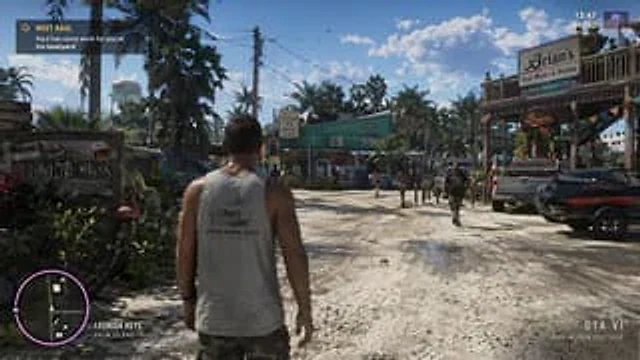
  "type": "video game screenshot mockup",
  "perspective": "third-person over-the-shoulder",
  "character": {
    "description": "male protagonist seen from behind",
    "clothing": "grey tank top with graphic '{argument name=\"shirt graphic\" default=\"LEONIDA MARINE CENTER\"}', camouflage cargo shorts"
  },
  "environment": {
    "setting": "tropical coastal town, dirt road, sunny daytime with scattered clouds",
    "left_side": "wooden welcome sign reading 'Welcome to {argument name=\"location name\" default=\"LEONIDA KEYS\"} YOUR PARADISE', pink plastic flamingo, tropical foliage, distant water tower",
    "center": "green building with 'FISH' sign and marlin graphic, sign reading 'BAIT TACKLE ICE BEER WINE', pedestrians walking",
    "right_side": "two-story wooden building 'Brian's Boat Works & Marina', 'Brian's Bar' neon sign, parked pickup truck, jet skis on a trailer"
  },
  "ui_elements": {
    "count": 5,
    "components": [
      {
        "position": "top-left",
        "type": "mission objective",
        "text": "{argument name=\"mission title\" default=\"MEET RAUL\"}\n{argument name=\"mission description\" default=\"Raul has some work for you at his boatyard\"}"
      },
      {
        "position": "top-right",
        "type": "status HUD",
        "text": "13:47\n$1,142",
        "icon": "pink palm tree"
      },
      {
        "position": "bottom-left",
        "type": "minimap",
        "description": "circular map with purple border, white map icons including 'N' for north"
      },
      {
        "position": "bottom-left, right of minimap",
        "type": "location text",
        "text": "{argument name=\"location name\" default=\"LEONIDA KEYS\"}\nPALM ISLAND"
      },
      {
        "position": "bottom-right",
        "type": "watermark",
        "text": "{argument name=\"game title\" default=\"GTA VI\"}\nPRE-ALPHA FOOTAGE"
      }
    ]
  }
}
Come usare
- Copia tutto il prompt originale, inclusi i parametri.
- Adatta soggetto, testo e composizione alle tue esigenze.
- Usa uno strumento esterno compatibile; verifica accesso e risultato.
Prima di iniziare
- Controlla se serve un’immagine di riferimento. La compatibilità non prova il modello usato per l’esempio.
- Verifica nomi, numeri e testi; i risultati cambiano con le versioni del modello.