Documento originale
GPT Image 2 · zh
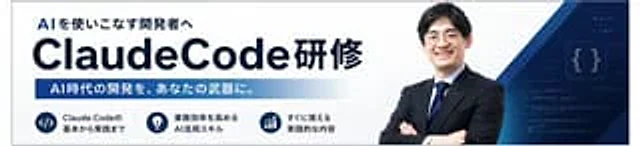
Create a sophisticated Japanese corporate training banner in a wide, horizontal web ad format. The background is a gradient from deep navy to dark blue, adorned with subtly glowing network nodes and connecting lines at the top and center, creating a high-tech AI and business atmosphere. On the right, place a confident half-length portrait of a businessman wearing a deep navy suit, white shirt, and blue striped tie, arms crossed, facing forward; the top and right edges are partially cropped. Establish a strong typographic hierarchy on the left, with a small cyan headline at the top containing the following text:{argument name="headline text" default="Acquire AI-powered development skills in the shortest possible time."} This was followed by a very large, bold white main title, the content of which was:{argument name="main title" default="ClaudeCode Training"} In the lower left area, three rounded rectangular function boxes are placed, with bright cyan borders and dark interiors, each accompanied by a cyan icon: the first box displays a terminal/code icon and the text "Claude Codeの基本と応用" (Claude Code's Basics and Application); the second box displays a rocket icon and the text "开発スピードを飞跃的に向上" (To fly upwards with development skills); and the third box displays a two-person/team icon and the text "现场ですぐに活かせるスキル" (To live at the scene). On the far right, a large cyan tilted polygonal annotation panel is overlaid, containing two lines of bold, dark text:{argument name="callout text" default="Experience something that will change your development process starting tomorrow."} The design utilizes a clean, modern sans-serif Japanese font, emphasizing high contrast, sophisticated marketing design, neat spacing, bright cyan accents, and the visual appeal of a high-end AI seminar advertisement.Come usare
- Copia tutto il prompt originale, inclusi i parametri.
- Adatta soggetto, testo e composizione alle tue esigenze.
- Usa uno strumento esterno compatibile; verifica accesso e risultato.
Prima di iniziare
- Controlla se serve un’immagine di riferimento. La compatibilità non prova il modello usato per l’esempio.
- Verifica nomi, numeri e testi; i risultati cambiano con le versioni del modello.