Documento originale
GPT Image 2 · en
{
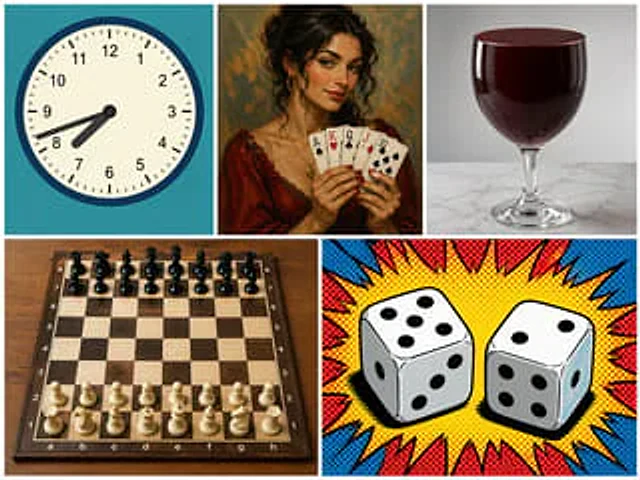
  "type": "5 Panel Collage",
  "layout": "A grid containing 3 top panels and 2 bottom panels.",
  "panels": [
    {
      "position": "Top left",
      "subject": "Analog clock",
      "details": "Cyan background, time displayed{argument name=\"clock time\" default=\"7:42\"}",
      "style": "Flat vector illustration"
    },
    {
      "position": "Upper-middle",
      "subject": "A woman holding playing cards",
      "details": "Holding 5 cards:{argument name=\"card hand\" default=\"Ace of Spades, King of Hearts, Queen of Clubs, Jack of Diamonds, Ten of Spades\"}",
      "style": "Classic oil portrait"
    },
    {
      "position": "Top right",
      "subject": "A glass of red liquid",
      "details": "{argument name=\"glass type\" default=\"goblet\"} The marble surface is filled with a deep red liquid.",
      "style": "Photorealistic photography"
    },
    {
      "position": "Bottom left",
      "subject": "Chessboard",
      "details": "The wooden project contains 32 pieces in standard initial positions.",
      "style": "Photorealistic high-angle shots"
    },
    {
      "position": "Bottom right",
      "subject": "Two dice",
      "details": "The top of the dice on the left shows{argument name=\"left die top\" default=\"5\"} The top of the die on the right shows{argument name=\"right die top\" default=\"2\"}",
      "style": "Pop art comic halftone style with red and blue explosion effects"
    }
  ]
}
Come usare
- Copia tutto il prompt originale, inclusi i parametri.
- Adatta soggetto, testo e composizione alle tue esigenze.
- Usa uno strumento esterno compatibile; verifica accesso e risultato.
Prima di iniziare
- Controlla se serve un’immagine di riferimento. La compatibilità non prova il modello usato per l’esempio.
- Verifica nomi, numeri e testi; i risultati cambiano con le versioni del modello.