Documento originale
GPT Image 2 · en
{
  "type": "infographic",
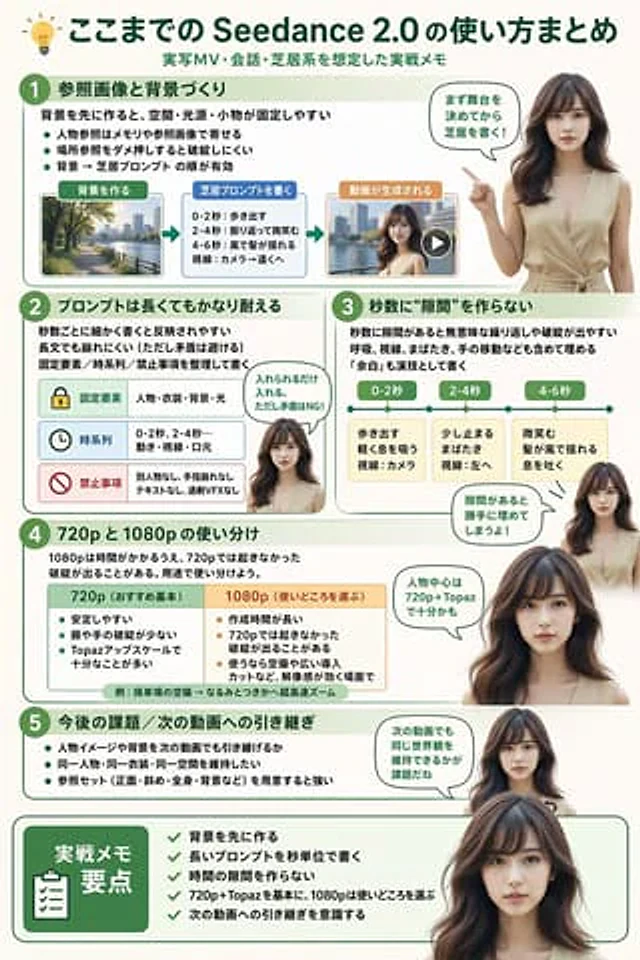
  "style": "Simple, modern, and professional, it uses soft green and beige tones and incorporates realistic figures.",
  "header": {
    "icon": "lightbulb",
    "title": "{argument name=\"main title\" default=\"Seedance 2.0 User Guide Summary\"}",
    "subtitle": "{argument name=\"subtitle\" default=\"Practical notes on live-action music video shooting, dialogue, and performance scenes\"}"
  },
  "presenter_character": "{argument name=\"presenter description\" default=\"A young Japanese woman with a realistic style, long dark brown hair, wearing a beige sleeveless top.\"}",
  "total_presenter_cutouts": 6,
  "layout": {
    "sections": [
      {
        "number": 1,
        "title": "{argument name=\"section 1 title\" default=\"Reference Images and Background Creation\"}",
        "elements": "Three key points, one horizontal three-step flowchart, including thumbnails (city view, text box, video player).",
        "presenter_pose": "The flowchart points to the left and features speech bubbles."
      },
      {
        "number": 2,
        "title": "{argument name=\"section 2 title\" default=\"Long prompts can also maintain good results\"}",
        "elements": "Two key points, one table with three rows of content, and icons (lock, clock, prohibition sign).",
        "presenter_pose": "Neutral expression, looking straight ahead, accompanied by speech bubbles."
      },
      {
        "number": 3,
        "title": "Ensure there are no \"gaps\" between the seconds.",
        "elements": "Two key points, and one horizontal timeline graph containing three segments.",
        "presenter_pose": "Pointing upwards, with the gaze slightly to the left, accompanied by a speech bubble."
      },
      {
        "number": 4,
        "title": "Differences in usage between 720p and 1080p",
        "elements": "Text description, 1 two-column comparison table (green column, orange column)",
        "presenter_pose": "Look straight ahead, accompanied by speech bubbles."
      },
      {
        "number": 5,
        "title": "Future topics / Connection to the next video",
        "elements": "4 key points",
        "presenter_pose": "The gaze is slightly to the right, accompanied by speech bubbles."
      },
      {
        "type": "summary_box",
        "title": "Key points of practice notes",
        "elements": "Clipboard icon, 5 list items marked with green checkmarks.",
        "presenter_pose": "Large portraits from the chest up, looking directly at the viewer."
      }
    ]
  }
}
Come usare
- Copia tutto il prompt originale, inclusi i parametri.
- Adatta soggetto, testo e composizione alle tue esigenze.
- Usa uno strumento esterno compatibile; verifica accesso e risultato.
Prima di iniziare
- Controlla se serve un’immagine di riferimento. La compatibilità non prova il modello usato per l’esempio.
- Verifica nomi, numeri e testi; i risultati cambiano con le versioni del modello.