Documento originale
GPT Image 2 · en
{
  "image_style": "surreal, dark cinematic, ethereal",
  "subject": {
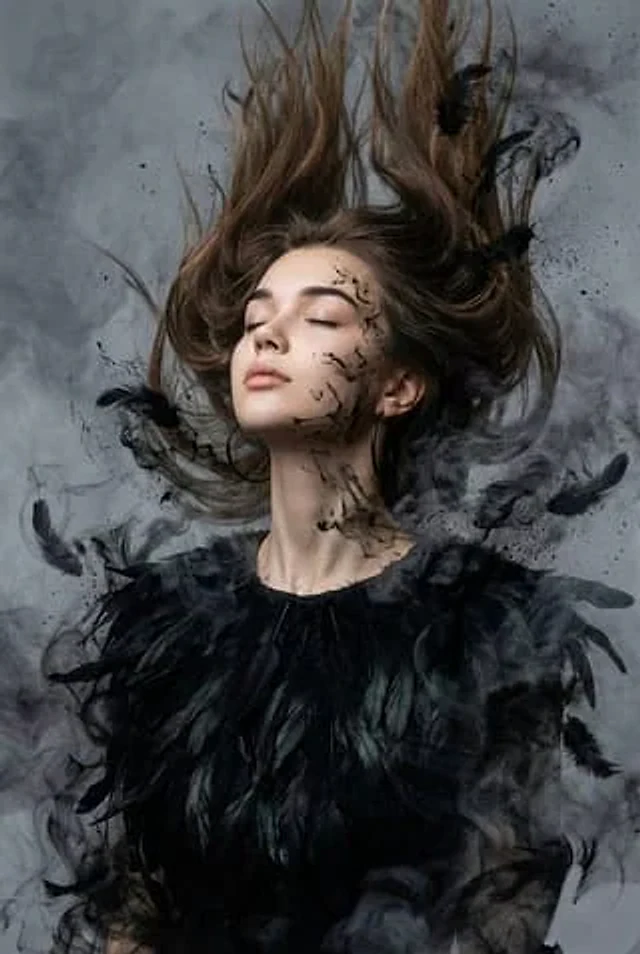
    "person": "woman with features of reference image",
    "pose": "head tilted back, eyes closed, expression of freedom and release",
    "framing": "close-up portrait from chest upward",
    "clothing": "long-sleeve blouse made of organic, layered deep matte black raven feathers",
    "accessories": "large black hoop earrings"
  },
  "visual_effects": {
    "hair": "loose, dynamically suspended, blowing upward and forward by wind",
    "dissolving_elements": [
      "feathers and hair merging with black ink splatters",
      "charcoal dust",
      "wisps of dark smoke"
    ],
    "face_details": "fine black ink splatters and wisps spreading across face and neck"
  },
  "environment": {
    "background": "smoky gray, moody atmosphere",
    "elements": "thick, dense, layered smoke swirling throughout the frame"
  },
  "technical_aspects": {
    "resolution": "high-resolution",
    "lighting": "cinematic, moody, diffused through smoke"
  }
}
Come usare
- Copia tutto il prompt originale, inclusi i parametri.
- Adatta soggetto, testo e composizione alle tue esigenze.
- Usa uno strumento esterno compatibile; verifica accesso e risultato.
Prima di iniziare
- Controlla se serve un’immagine di riferimento. La compatibilità non prova il modello usato per l’esempio.
- Verifica nomi, numeri e testi; i risultati cambiano con le versioni del modello.