Documento originale
GPT Image 2 · en
{
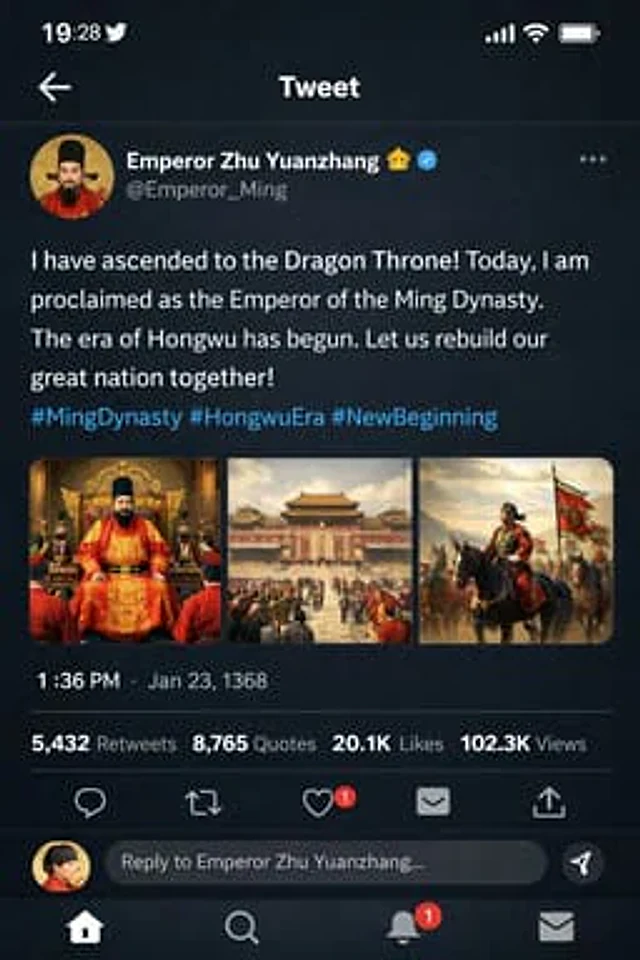
  "type": "mobile social media app UI mockup",
  "platform": "Twitter/X dark mode",
  "header": {
    "status_bar": "time 19:28, bird icon, signal, wifi, battery",
    "navigation": "back arrow, 'Tweet' title"
  },
  "post": {
    "author": {
      "avatar": "portrait of a Chinese emperor in red robes and black hat",
      "display_name": "{argument name=\"display name\" default=\"Emperor Zhu Yuanzhang\"} 👑 [verified badge]",
      "handle": "{argument name=\"handle\" default=\"@Emperor_Ming\"}"
    },
    "content": {
      "text": "{argument name=\"tweet text\" default=\"I have ascended to the Dragon Throne! Today, I am proclaimed as the Emperor of the Ming Dynasty. The era of Hongwu has begun. Let us rebuild our great nation together!\"}",
      "hashtags": "#MingDynasty #HongwuEra #NewBeginning",
      "media_grid": {
        "count": 3,
        "images": [
          "emperor seated on an ornate golden throne in red and gold robes",
          "wide shot of a grand Chinese palace courtyard with a large crowd",
          "emperor on horseback leading an army with a red dragon banner"
        ]
      }
    },
    "metadata": {
      "timestamp": "{argument name=\"timestamp\" default=\"1:36 PM · Jan 23, 1368\"}",
      "engagement": "5,432 Retweets, 8,765 Quotes, 20.1K Likes, 102.3K Views"
    },
    "actions": "reply, retweet, like (red heart with '1'), share, upload"
  },
  "footer": {
    "reply_bar": {
      "avatar": "woman in red",
      "placeholder": "Reply to Emperor Zhu Yuanzhang..."
    },
    "navigation_bar": "home, search, notifications (red '1' badge), messages"
  }
}
Come usare
- Copia tutto il prompt originale, inclusi i parametri.
- Adatta soggetto, testo e composizione alle tue esigenze.
- Usa uno strumento esterno compatibile; verifica accesso e risultato.
Prima di iniziare
- Controlla se serve un’immagine di riferimento. La compatibilità non prova il modello usato per l’esempio.
- Verifica nomi, numeri e testi; i risultati cambiano con le versioni del modello.