

Guarda in azione
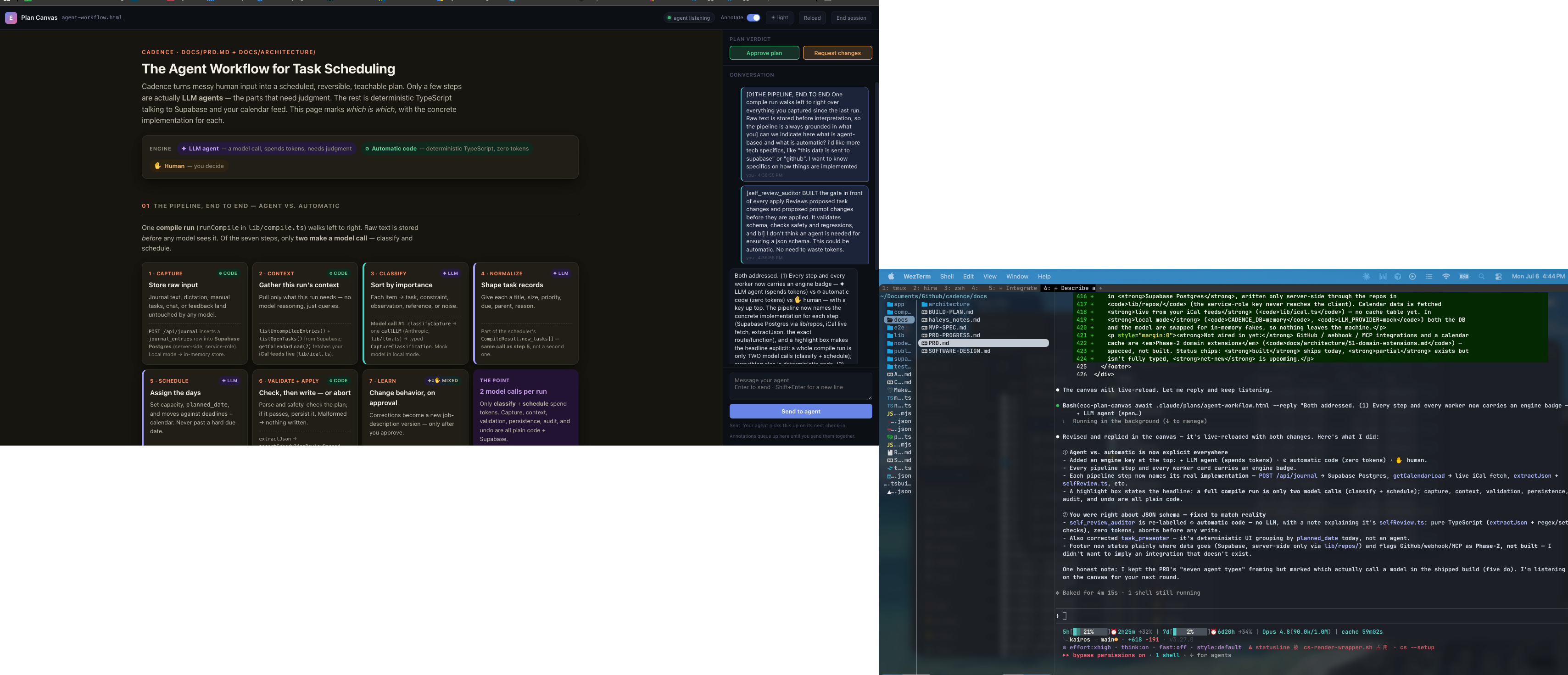
Plan Canvas: annotate a plan beside the agent terminal
Original author screenshot from the design notes, showing an HTML task-scheduling plan, anchored conversation and Approve plan / Request changes controls alongside the terminal. It is a composite source screenshot of the review workflow, distinct from the separate ECC 2.1 release-demo plan. The task-specific integrations shown are not asserted as tested ECC integrations.
Licenza
Lossless WebP at native resolution; visible pixels and transparency verified identical. Original composition, labels and benchmark/sample context retained; no crop or upscaling.
MIT License

Copyright (c) 2026 Affaan Mustafa

Permission is hereby granted, free of charge, to any person obtaining a copy
of this software and associated documentation files (the "Software"), to deal
in the Software without restriction, including without limitation the rights
to use, copy, modify, merge, publish, distribute, sublicense, and/or sell
copies of the Software, and to permit persons to whom the Software is
furnished to do so, subject to the following conditions:

The above copyright notice and this permission notice shall be included in all
copies or substantial portions of the Software.

THE SOFTWARE IS PROVIDED "AS IS", WITHOUT WARRANTY OF ANY KIND, EXPRESS OR
IMPLIED, INCLUDING BUT NOT LIMITED TO THE WARRANTIES OF MERCHANTABILITY,
FITNESS FOR A PARTICULAR PURPOSE AND NONINFRINGEMENT. IN NO EVENT SHALL THE
AUTHORS OR COPYRIGHT HOLDERS BE LIABLE FOR ANY CLAIM, DAMAGES OR OTHER
LIABILITY, WHETHER IN AN ACTION OF CONTRACT, TORT OR OTHERWISE, ARISING FROM,
OUT OF OR IN CONNECTION WITH THE SOFTWARE OR THE USE OR OTHER DEALINGS IN THE
SOFTWARE.
Plan feedback: the documented annotation and verdict JSON
A complete usage snippet from the original Skill documentation. The JSON is a documented response shape with sample feedback, not a transcript produced by this site. The local artifact file must exist before these commands can review it.
Input di esempio
ecc-plan-canvas open .claude/plans/feature.plan.md
ecc-plan-canvas await .claude/plans/feature.plan.md
Risultato di esempio
{
  "status": "feedback",
  "items": [
    { "kind": "annotation", "text": "Split this into two phases",
      "anchor": { "selector": "h2:nth-of-type(3)", "tag": "h2", "snippet": "Phase 2: Migration" } },
    { "kind": "verdict", "verdict": "request-changes" }
  ]
}Licenza
MIT License

Copyright (c) 2026 Affaan Mustafa

Permission is hereby granted, free of charge, to any person obtaining a copy
of this software and associated documentation files (the "Software"), to deal
in the Software without restriction, including without limitation the rights
to use, copy, modify, merge, publish, distribute, sublicense, and/or sell
copies of the Software, and to permit persons to whom the Software is
furnished to do so, subject to the following conditions:

The above copyright notice and this permission notice shall be included in all
copies or substantial portions of the Software.

THE SOFTWARE IS PROVIDED "AS IS", WITHOUT WARRANTY OF ANY KIND, EXPRESS OR
IMPLIED, INCLUDING BUT NOT LIMITED TO THE WARRANTIES OF MERCHANTABILITY,
FITNESS FOR A PARTICULAR PURPOSE AND NONINFRINGEMENT. IN NO EVENT SHALL THE
AUTHORS OR COPYRIGHT HOLDERS BE LIABLE FOR ANY CLAIM, DAMAGES OR OTHER
LIABILITY, WHETHER IN AN ACTION OF CONTRACT, TORT OR OTHERWISE, ARISING FROM,
OUT OF OR IN CONNECTION WITH THE SOFTWARE OR THE USE OR OTHER DEALINGS IN THE
SOFTWARE.
Come usare
- Copia il comando e controlla il pacchetto prima di installarlo nel tuo ambiente agente.
- Controlla strumenti, credenziali e ambienti richiesti nel documento originale.
- Descrivi input e risultato desiderato; confronta l’output con le fonti.
npx skills add https://github.com/affaan-m/ecc --skill plan-canvasPrima di iniziare
- L’installazione non include abbonamenti, quote API o accesso ai file.
- Stelle e installazioni indicano attività, non un test indipendente di qualità o sicurezza.
Contenuto dal repository con titoli, esempi, codice, tabelle, link e immagini preservati.
Plan Canvas
Review loop for plans and visual artifacts: you write the artifact, the human reviews it in the browser — annotating the exact element they mean, chatting, and delivering an Approve plan / Request changes verdict — while you block on a single CLI call that returns their feedback as JSON.
Inspired by lavish-axi; rebuilt ECC-native around the /plan confirmation gate, with zero dependencies.
When to Use
- You just wrote a plan artifact (
.claude/plans/*.plan.mdfrom/plan) and
need the CONFIRM/approve decision — the canvas verdict replaces a typed "yes/proceed".
- The user should point at what to change: reviewing designs, comparisons,
reports, or any local .md / .html artifact.
- The user asks for
/plan-canvas, a visual review, or "open it in the browser".
Do NOT use for: code review of diffs (/code-review), running web apps, or remote URLs. The canvas serves local artifact files only.
How It Works
Invoke the CLI as ecc-plan-canvas — the bin shipped by the ecc-universal package (on PATH after a global/plugin install; node "$CLAUDE_PLUGIN_ROOT/scripts/plan-canvas.js" also works for plugin installs). Run it from the project you are reviewing in; it works from any working directory. It manages a detached loopback server (127.0.0.1:4517) shared by all sessions, keyed by artifact path — no session ids to track.
The workflow is a plain CLI-plus-JSON loop, so it is model- and harness-agnostic: any agent that can run a shell command and read stdout drives it the same way (Claude Code, Codex, Cursor, Gemini, OpenCode, Copilot). Trigger it however your harness surfaces skills — e.g. /plan-canvas in Claude Code, $plan-canvas in Codex — or just run the ecc-plan-canvas commands directly.
# 1. Open the artifact in the user's browser (returns immediately)
ecc-plan-canvas open .claude/plans/feature.plan.md

# 2. Block until the human responds. Leave running; re-run if interrupted:
#    queued feedback is never lost.
ecc-plan-canvas await .claude/plans/feature.plan.md
Stay listening, or the human talks to an empty chair
Feedback only reaches you while an await is actually parked on the session. If your turn ends with nothing listening, the message sits in the queue and, from the human's side of the glass, sending appears to do nothing at all.
So run `await` as a background task when your harness supports one (in Claude Code, a Bash call with run_in_background: true). It exits the moment feedback arrives and the harness hands you the JSON, which keeps the loop alive across turns instead of dying with the foreground call. A foreground await works too, but only until the harness time-limits it.
Two backstops exist, and neither is an excuse to skip the above:
ecc-plan-canvas pendinglists feedback queued with no listener. Check it
whenever you are unsure whether you missed something.
- The
stop:plan-canvas-pendinghook blocks your turn from ending while canvas
feedback is undelivered, and hands you the messages. If you are reading feedback from that hook, you stopped listening too early.
await prints JSON when the human acts:
{
  "status": "feedback",
  "items": [
    { "kind": "annotation", "text": "Split this into two phases",
      "anchor": { "selector": "h2:nth-of-type(3)", "tag": "h2", "snippet": "Phase 2: Migration" } },
    { "kind": "verdict", "verdict": "request-changes" }
  ]
}
kind: "chat"— freeform message; answer in the canvas, not the terminal.kind: "annotation"— feedback anchored to an element (anchor.selector,
anchor.snippet show what they pointed at; anchor.textRange.text when they highlighted a passage).
kind: "verdict"—approvemeans the plan is CONFIRMED: stop polling,
end the session, and start implementing. request-changes means revise the artifact (the canvas live-reloads it) and keep the loop going.
3. Always respond in the canvas, then keep listening. One command does both:
ecc-plan-canvas await <file> --reply "Split Phase 2 as requested. Take a look."Every human message gets a reply in the canvas, even a one-liner like "On it, rewriting the risk table now." Silence in the chat panel is indistinguishable from a broken canvas, which is exactly the failure this loop exists to prevent. Answer there, not only in the terminal.
While you work, keep the chat honest with the activity indicator:
# animated "agent is thinking..." bubble; refresh it during long work
ecc-plan-canvas typing <file> --state thinking
# switch to "agent is typing..." just before a reply lands
ecc-plan-canvas typing <file> --state typing
await sets thinking for you the moment it hands you a batch, and --reply clears it. Both states self-expire, so a crashed agent decays to an honest "queued" instead of leaving the human watching dots forever. Refresh thinking if a revision takes more than a minute.
4. End when review concludes: ecc-plan-canvas end <file>.
Diagrams (Mermaid)
When part of the plan is a flow, architecture, sequence, state machine, ER model, or dependency graph, author it as a fenced mermaid block instead of ASCII art or a wall of prose — the canvas renders it as a themed diagram the human can point at. Reach for it when a picture reads faster than a paragraph; skip it for simple lists or tables.
flowchart LR A[Market resolves] --> B{Watchers?} B -->|yes| C[Enqueue jobs] --> D[Fan-out worker]
Diagrams render in the ECC dark theme with the accent palette. Mermaid loads in the browser from a pinned CDN; if that is unavailable (offline), the block degrades to showing its source, so the review is never blocked. Point a local mirror at ECC_PLAN_CANVAS_MERMAID_URL for air-gapped use.
Rules
- Markdown artifacts render in ECC's plan template (including Mermaid blocks);
.html artifacts render as-is with the annotation layer injected. For HTML authoring guidance use the frontend-design-direction and artifact-design skills.
- Edit the artifact file to revise — the canvas live-reloads on save. Never
re-run open to refresh.
{"status": "ended", "endedBy": "user"}(orsessionEnded: trueon a
feedback batch) means the user closed the review: stop polling, deliver remaining updates in chat, and do not reopen. A plain open on that session is refused; pass --reopen only when the user asks to resume.
- Sibling assets (images, CSS) must sit next to the artifact and be
referenced by relative path.
- The server is loopback-only and exits after 30 idle minutes
(ECC_PLAN_CANVAS_IDLE_MS); stop shuts it down explicitly. State lives in ~/.claude/plan-canvas/ (ECC_PLAN_CANVAS_STATE_DIR).
Examples
Plan approval flow — /plan writes .claude/plans/notifications.plan.md and must WAIT for confirmation:
ecc-plan-canvas open .claude/plans/notifications.plan.md
ecc-plan-canvas await .claude/plans/notifications.plan.md
# → {"status":"feedback","items":[{"kind":"verdict","verdict":"approve"}]}
ecc-plan-canvas end .claude/plans/notifications.plan.md
# plan is confirmed — begin implementation
Revision loop — feedback arrives, you edit the file, reply, keep listening:
# await returned annotations → edit the .plan.md (canvas live-reloads)
ecc-plan-canvas await <file> --reply "Reworked the risk table."
# → blocks again until the next response
Anti-Patterns
- Polling with
--timeout-msin a loop. It exists for tests. Leave the plain
await running instead.
- Ending your turn with no
awaitlistening while the review is still open.
That is the one failure the human experiences as "I sent a message and nothing happened".
- Reading the feedback but answering only in the terminal. The human is looking
at the canvas.
- Reopening after a user-initiated end "just to show" something.
- Pasting the whole plan into chat and opening a canvas — pick the canvas
and keep the terminal summary to one line.
- Parsing the canvas chat from state files — everything you need arrives via
await.
Design notes and origin: docs/design/plan-canvas.md.


