

Contenuto dal repository con titoli, esempi, codice, tabelle, link e immagini preservati.
Duo
One fixed 1448×1086 @ 30fps composition: a photo of two hands holding an open foldable, with both screens blanked. You fill the two screen slots with HTML (live video, a mock chat, a scrolling feed, anything HyperFrames renders) and the rig masks it to the phone's true rounded-corner geometry.
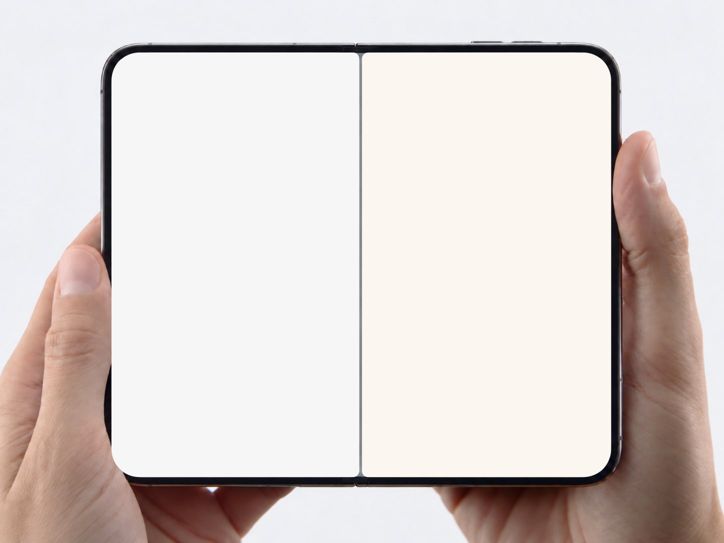
The phone and hands are a photograph, not something you build. assets/plate.png IS the device. Never recreate, redraw, or CSS-model the foldable, its bezel, the hinge, or the hands, and never substitute a different image. build.mjs copies the plate into every project; if it is missing, stop and reinstall the skill rather than improvising a phone.
Do not edit the rig. The two .screen rects, their corner radii and the hinge divider were measured from that photo pixel by pixel. Every visual change you make happens inside #screen-left .content and #screen-right .content, plus the one shared GSAP timeline.
When to use / when not to
- Use for any "two things side by side on a phone" beat: app vs app, feed vs
feed, two chats answering the same prompt, two versions of a product.
- Do not use when the user wants a single phone, a laptop, or a real device
bezel they supply — this skill is one specific photo. For a different device plate you would re-measure geometry the same way (see references/screen-geometry.md) rather than stretch this one.
Requirements
- Node 18+ and the HyperFrames CLI via
npx hyperframes@latest(@latestis
mutable; pin a version for byte-identical re-renders).
- Load your motion doctrine first if your workspace has one. The rig's only
built-in motion is one slow camera push; everything inside the screens must perform (scrolls, swipes, typing, taps), never idle-wobble.
Network and side effects (complete list)
registry.npmjs.org— the HyperFrames CLI itself, vianpx.cdn.jsdelivr.net— the composition loads GSAP (pinned3.14.2) at
preview/render time. Rendering is not fully offline.
- Anything YOU add to the screens (video clips, avatars, fonts) is your side
effect: fetching a site, downloading media, or scraping UI happens only if the user's request calls for real content, and only from sources they are entitled to use. references/sourcing-real-ui.md documents how, and the rights caveat.
No credentials, no paid operations, no telemetry. build.mjs writes only inside --out and refuses to write through symlinks.
Flow
<SKILL_DIR> is this skill's installed directory (e.g. ~/.claude/skills/duo).
- Scaffold a project:
node <SKILL_DIR>/scripts/build.mjs --out ./foldable-meme --duration 10 --icons tiktok,instagram--icons is optional; it copies the real TikTok / Instagram glyph sheets (assets/icons-*.svg, extracted from the live mobile sites) into the project.
- Decide what each screen does for the length of the clip, in writing,
before touching HTML. The pause test: at any second, something inside at least one screen must be mid-motion (a swipe landing, a video playing, text arriving). Two static screenshots is not a video.
- Author the screens. Inside each
.contentyou have a normal DOM
viewport: left 495×849, right 498×849. Position against those, never the root. Patterns (full-screen snap feed, drag→fling swipe, like-tap, chat typing) are in references/feed-recipes.md. Rules:
<video class="clip" data-start data-duration muted playsinline>for
every clip; HyperFrames owns playback. Overlap the windows of an outgoing and incoming clip across a swipe so both are decoded mid-transition.
- One timeline. Add your tweens to
tlinside the marked hook; do not create
a second gsap.timeline or register another window.__timelines key.
- No
repeat: -1, noMath.random, no clocks — the render seeks. - Status bar: the photo's original screens showed
9:41top-left of the left
screen and wifi/battery top-right of the right screen. Reproduce that split if your apps show a status bar; it sells the "one device" read.
- Check and snapshot:
npx hyperframes@latest check ./foldable-meme
npx hyperframes@latest snapshot ./foldable-meme --at 1,4,7 --no-end
Lint must be 0 errors. Layout/contrast warnings about text passing under a fixed header, or white UI text over video, are expected for app UIs; read the frames instead and confirm (a) content reaches every rounded corner with no gap, (b) the gray hinge divider is visible between the screens, (c) nothing from one screen leaks over the hinge.
- Render only when the user asks (ask first if your harness gates renders):
npx hyperframes@latest render ./foldable-meme -o ./foldable-meme/renders/v1.mp4Verify success
check passes lint with 0 errors; snapshot frames show both screens filled edge to edge inside the phone with the divider intact; the MP4 is the requested duration at 1448×1086 and, on a pause at any second, something on screen is moving. Pull frames from the rendered MP4 (not the preview) for the final QC.
Rules
- Never resize, move, or re-radius the screens to "fit" content. Fit content to
the slots. If a mock app looks too big, scale the app's internal type, not the screen.
- Real content must be real: if the user asks for TikTok or Instagram, pull the
actual UI glyphs and layout metrics from the live site and use real posts (with their real usernames and counts), not invented ones. Invented handles are only for fictional / parody screens the user explicitly wants.
- Keep the camera push as the only rig motion. Do not add drift, breathe, or
glow loops anywhere; fill time with story inside the screens instead.
- Output stays 1448×1086 (the plate's native 4:3). Offer a 16:9 or 1:1 crop as a
follow-up render rather than resizing the rig.
Files
assets/plate.png— the clean plate, screens blanked to neutral (1448×1086).assets/screen-spec.json— measured rects, radii, hinge, status-bar split.assets/icons-tiktok.svg,assets/icons-instagram.svg—<symbol>sheets of
the real mobile-web glyphs (like, comment, share, nav bars…).
template/index.template.html— the locked rig with two empty slots.scripts/build.mjs— scaffolder.references/screen-geometry.md— how the geometry was measured and how to
re-measure for a new plate.
references/feed-recipes.md— snap feed, swipe physics, like tap, chat typing.references/sourcing-real-ui.md— pulling real app UI and clips, and the
rights caveat.
Provenance and licensing
- The plate is derived from a photo posted publicly on X by @A_Kapustin
(status 2097769962936868872, a foldable showing ChatGPT and Claude side by side); the two screens were blanked so it can carry any content. It is redistributed here as a meme template; users of this skill publish results at their own judgment and should credit the source where appropriate.
- The icon sheets reproduce TikTok's and Instagram's own UI glyphs (extracted
from their public mobile web DOM) so mock screens look like the real apps. They are trademarks of their owners and are included for parody / commentary use only.
- GSAP is loaded from jsDelivr under its standard license; it is not vendored.
