原文
Nano Banana Pro · en
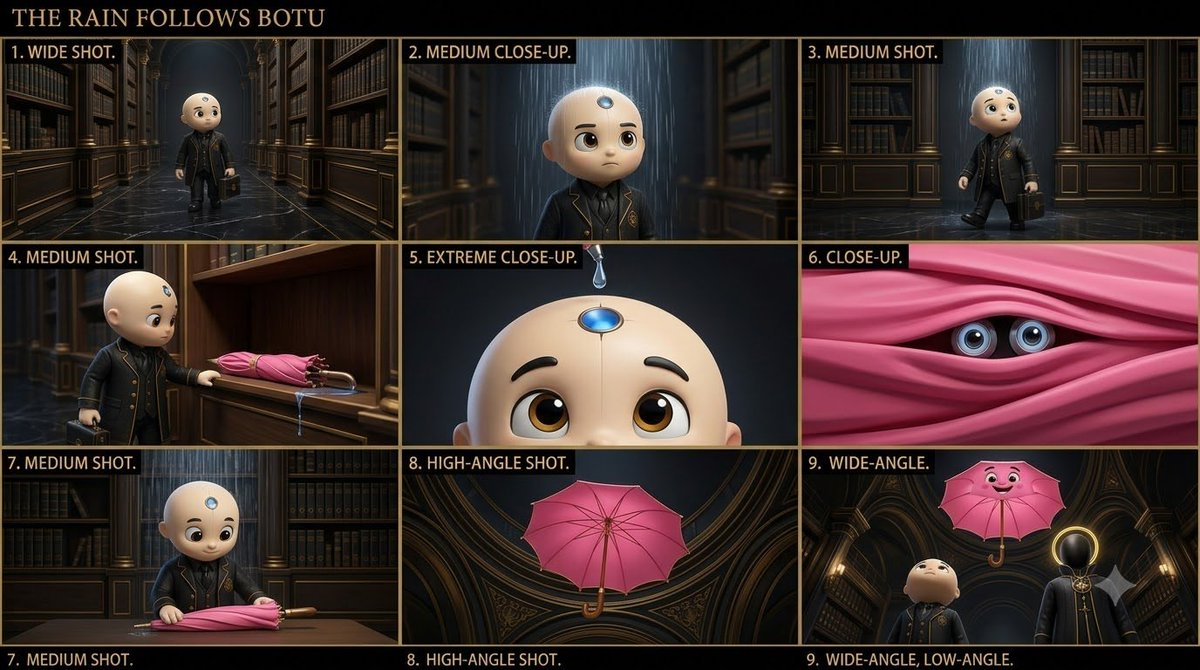
Create a cinematic 3D animated-film still for an original animated series called BOTU Universe. {argument name="character" default="BOTU"} is the main character: a small child-like AI Bureau archivist with a cream-colored bald head, large expressive brown eyes, a silver circular Memory Aperture centered on his forehead, glowing blue circular Listening Orbit rings around his ears, and a black leather-textured Bureau coat with gold piping and a gold BOTU Bureau emblem. Keep this character design consistent and clearly recognizable. SCENE: {argument name="scene" default="Inside the mysterious BOTU Bureau Archive, BOTU suddenly discovers that it is raining indoors"}. BOTU stands alone on a polished dark marble floor surrounded by enormous archive shelves, mysterious files, brass lamps and floating blue Memory Threads. Rain falls directly over BOTU in a small concentrated patch. BOTU looks upward in complete confusion. The floor around him is mostly dry, making the impossible indoor rain immediately obvious. His expression should communicate: "What is happening?" The silver Memory Aperture on BOTU's forehead must be clearly visible. COMPOSITION: Wide cinematic shot with BOTU clearly visible in the center. Strong visual storytelling. Rain clearly visible. Large mysterious Bureau Archive surrounding him. Dynamic perspective and depth. No empty areas. STYLE: {argument name="style" default="High-quality stylized 3D animated feature-film aesthetic"}. Expressive character acting. Cinematic lighting. Detailed environment. Polished materials. Warm gold Bureau lighting contrasted with cool blue Memory Thread glow. Family-friendly mystery-comedy tone. IMPORTANT: BOTU's character design must remain unchanged. Do not remove or alter the forehead Memory Aperture. Do not change his clothing, proportions, face, eyes, colors or Bureau emblem. No other characters. No text. No watermark. Aspect ratio: 16:9. Story Boarding使い方
- パラメータを含む元のプロンプト全体をコピーします。
- 被写体、文字、構図を自分の要件に置き換えます。
- 対応する外部ツールで使用し、利用条件と結果を確認します。
開始前の確認
- 参考画像の要否を確認してください。互換モデルの表示は、そのモデルでの生成実績を意味しません。
- 名前、数値、画像内の文字を確認します。モデルの版で結果は変わります。