原文
GPT Image 2 · en
{
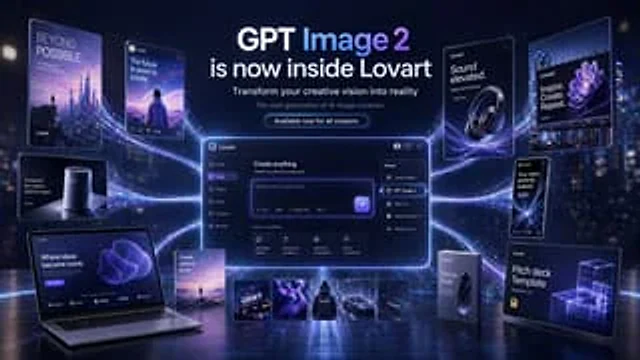
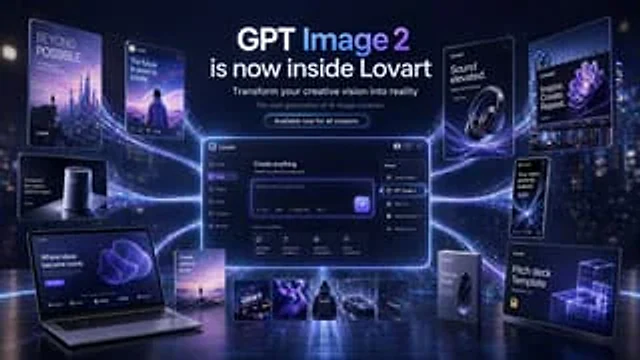
  "type": "Futuristic AI Product Launch Marketing Main Visual Banner",
  "style": "High-end 3D advertising compositing, featuring cinematic neon lighting, exquisite UI mockups, floating product cards, and a glossy, technologically advanced presentation aesthetic.",
  "theme": {
    "primary colors": [
      "Deep Navy Blue",
      "Electric Violet",
      "indigo",
      "white"
    ],
    "mood": "Innovative, high-end, futuristic, and marketing-ready.",
    "lighting": "Dramatic blue-violet halo, rim light, luminous particle trails, soft halo, and ground reflections."
  },
  "canvas": {
    "aspect_ratio": "16:9",
    "background": "A blurred background of a dark, futuristic city nightscape, subtly incorporating skyscraper lights and atmospheric haze."
  },
  "headline_block": {
    "position": "Centered at the top",
    "count": 4,
    "lines": [
      "GPT Image 2",
      "Now available on Lovart",
      "Turn your creative vision into reality",
      "Next-generation AI image creation"
    ],
    "cta": "All creators are now available.",
    "typography": "A clean, modern sans-serif font, bold white headings, smaller white and light gray subheadings, and glowing rounded buttons."
  },
  "layout": {
    "centerpiece": "A large, centrally located, floating, glowing desktop application interface with purple rim lighting; curved energy trails connect all surrounding elements.",
    "sections": [
      {
        "title": "Floating posters and equipment on the left",
        "position": "Left side",
        "count": 5,
        "labels": [
          "BEYOND POSSIBLE vertical sci-fi poster, featuring a futuristic skyline and small figures.",
          "Social media-style card with the text \"The future is yours to create.\", accompanied by a picture of a person facing a surreal landscape.",
          "The product card for the small smart speaker reads, \"Designed for creators. Born to make an impact.\"",
          "An open laptop mockup with the text \"Creativity Becomes a Landmark\" and purple abstract graphics on the screen.",
          "Small vertical cards with the text \"Unlimited Creation\" and a miniature landscape scene."
        ]
      },
      {
        "title": "Central Application UI",
        "position": "middle",
        "count": 1,
        "labels": [
          "The Lovart creation interface features tooltips and a dropdown menu for open models."
        ]
      },
      {
        "title": "Model menu items",
        "position": "UI inside the middle right side",
        "count": 5,
        "labels": [
          "Lovart Image 1",
          "GPT Image 2",
          "DALL·E 3",
          "Stable Diffusion XL",
          "Midjourney v6"
        ]
      },
      {
        "title": "Feature cards",
        "position": "Lower middle UI interior",
        "count": 4,
        "labels": [
          "Ultra-high quality",
          "Precise text rendering",
          "Advanced Composition",
          "Brand Consistency"
        ]
      },
      {
        "title": "Bottom Material Bar",
        "position": "Centered at the bottom",
        "count": 5,
        "labels": [
          "Lovart logo card",
          "Abstract purple fabric-like visual effect",
          "Black hoodie mockup",
          "sports car rendering",
          "Dark Lovart Card"
        ]
      },
      {
        "title": "Floating poster and packaging on the right",
        "position": "right side",
        "count": 5,
        "labels": [
          "The headphone advertisement features the tagline \"Immersive Sound Experience\".",
          "A billboard-style poster with the text \"Inspiration. Creation. Repetition.\" accompanied by an image of purple flowers.",
          "A mobile phone-style card with the text \"Your vision, perfectly realized\".",
          "The product packaging box is large, with the text \"Focus Fuel\" on it.",
          "The project, labeled \"Presentation Template,\" features a glowing wireframe cube."
        ]
      }
    ]
  },
  "ui_details": {
    "app_brand": "Lovart",
    "main_panel_title": "Create everything",
    "prompt_placeholder": "Describe your creative vision...",
    "left_sidebar_count": 6,
    "left_sidebar_labels": [
      "Lovart",
      "front page",
      "creation",
      "project",
      "material",
      "template"
    ],
    "top_right_user_label": "Creator Pro Plan"
  },
  "composition": "The symmetrical marketing layout features a central dashboard that is larger than all other elements, connected to surrounding posters and product mockups by multiple flowing, luminous ribbons. All objects are positioned above a reflective surface, with clear, legible text, showcasing a high-end aesthetic for product launch announcements.",
  "quality": "Ultra-precise and sharp typography, realistic reflections, minimalist interface design, and commercial-grade product visualization."
}
使い方
- パラメータを含む元のプロンプト全体をコピーします。
- 被写体、文字、構図を自分の要件に置き換えます。
- 対応する外部ツールで使用し、利用条件と結果を確認します。
開始前の確認
- 参考画像の要否を確認してください。互換モデルの表示は、そのモデルでの生成実績を意味しません。
- 名前、数値、画像内の文字を確認します。モデルの版で結果は変わります。