原文
GPT Image 2 · zh
{
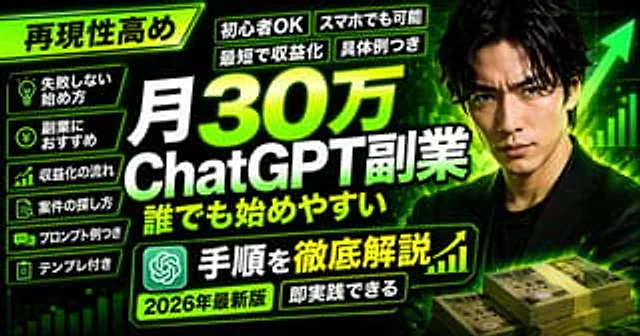
  "type": "YouTube thumbnail",
  "style": "High-impact, neon green and black color scheme, cyber business aesthetic",
  "background": "Dark with glowing green grid, upward chart lines, large green arrow",
  "subject": {
    "description": "{argument name=\"subject description\" default=\"Serious Japanese man in a black suit\"}",
    "position": "Right side",
    "props": "Stacks of 10,000 Yen bills in bottom right"
  },
  "layout": {
    "main_title": {
      "text": "{argument name=\"main title\" default=\"月30万 ChatGPT副業 誰でも始めやすい\"}",
      "position": "Center, huge bold white and green gradient text"
    },
    "top_left_badge": {
      "text": "{argument name=\"top left badge\" default=\"再現性高め\"}",
      "style": "Angled neon green box"
    },
    "top_tags": {
      "count": 4,
      "labels": ["初心者OK", "スマホでも可能", "最短で収益化", "具体例つき"]
    },
    "left_bullet_points": {
      "count": 6,
      "style": "Dark boxes with neon green borders and icons",
      "items": [
        "Lightbulb icon: 失敗しない始め方",
        "Yen coin icon: 副業におすすめ",
        "Chart icon: 収益化の流れ",
        "Search icon: 案件の探し方",
        "Chat icon: プロンプト例つき",
        "Clipboard icon: テンプレ付き"
      ]
    },
    "bottom_banner": {
      "text": "{argument name=\"bottom banner text\" default=\"手順を徹底解説\"}",
      "icons": "ChatGPT logo left, upward chart right"
    },
    "bottom_tags": {
      "count": 2,
      "labels": ["{argument name=\"year tag\" default=\"2026年最新版\"}", "即実践できる"]
    }
  }
}
使い方
- パラメータを含む元のプロンプト全体をコピーします。
- 被写体、文字、構図を自分の要件に置き換えます。
- 対応する外部ツールで使用し、利用条件と結果を確認します。
開始前の確認
- 参考画像の要否を確認してください。互換モデルの表示は、そのモデルでの生成実績を意味しません。
- 名前、数値、画像内の文字を確認します。モデルの版で結果は変わります。