原文
GPT Image 2 · en
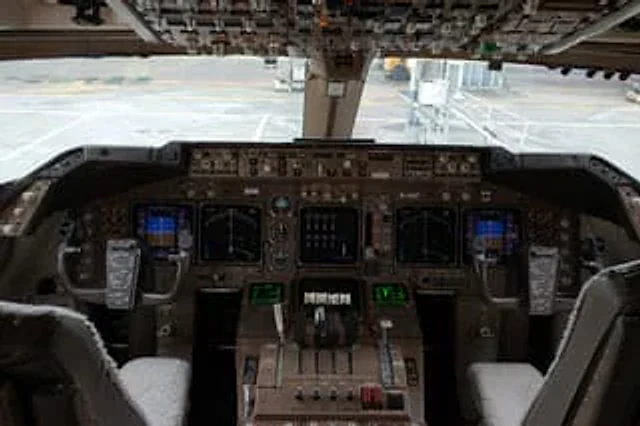
Hyperrealistic interior photography works showcasing{argument name="aircraft model" default="Boeing 747"} The cockpit. The view is centered and perfectly symmetrical, positioned between the two pilot seats, showcasing the main instrument panel, central console, dual control sticks, and overhead switch panel at the top edge. The cockpit is empty; the two pilot seats are visible in the foreground, fitted with light gray or off-white sheepskin covers. Each control stick has a dark rectangular checklist or electronic note item clipped to it. The main panel is densely packed with realistic-looking avionics, analog dials, autopilot controllers, and radio panels, totaling six illuminated displays: two large central navigation displays, one smaller blue-toned flight display on each side, and two green text/data screens below the central console. The center contains four throttle levers, as well as additional flaps and system control sticks, rotary knobs, shielded switches, and the weathered brown-gray metallic surface typical of wide-body aircraft cockpits. The overhead panel should be covered with rows of switches, toggles, and indicator lights, some in shadow but clearly detailed. Through the windshield, a blurred airport gate scene is displayed, including the light-colored concrete tarmac, ground markings, and passenger boarding bridges connecting to or near the aircraft. The lighting is natural sunlight from outside, with soft lighting inside the cockpit, realistic shadows, subtle reflections on the glass screens, and documentary-style color gradation. It emphasizes extreme detail, realism, the true complexities of aerospace engineering, and image quality indistinguishable from real photographs. Shot with a full-frame camera, eye-level perspective, 24–28mm wide-angle lens, full depth of field on the instrument panel, high dynamic range, no people, no exaggerated stylization, and no illustration style.使い方
- パラメータを含む元のプロンプト全体をコピーします。
- 被写体、文字、構図を自分の要件に置き換えます。
- 対応する外部ツールで使用し、利用条件と結果を確認します。
開始前の確認
- 参考画像の要否を確認してください。互換モデルの表示は、そのモデルでの生成実績を意味しません。
- 名前、数値、画像内の文字を確認します。モデルの版で結果は変わります。