原文
GPT Image 2 · en
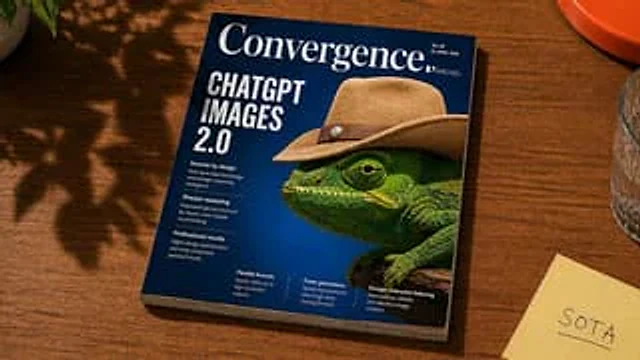
A photorealistic scene depicting the editorial lifestyle, shot from a slightly elevated three-quarter angle, shows a glossy magazine tilted at an angle on a warm, medium-brown wooden table. The magazine is the clear visual focus, occupying most of the frame. The cover background is a deep cobalt to navy blue, featuring a large close-up portrait of a bright green chameleon facing left, with clearly visible macro details—scale textures, bright eyes, and wearing a tan suede cowboy hat with a brown leather belt and small silver studs. The magazine title at the top is displayed in an elegant white large serif font.{argument name="magazine title" default="Convergence"} On the left side of the cover, a prominent stacked white sans-serif title is displayed.{argument name="headline text" default="CHATGPT IMAGES 2.0"} The magazine includes seven smaller cover text blocks: three brief feature summaries in a column below the title on the left, and four compact preview summaries at the bottom edge. Small, realistic magazine details are added to the upper right corner, including the price, date, and short lines of code, all in extremely small white font. The scene should evoke a snapshot of a casually arranged desktop in natural afternoon sunlight, with soft shadows of leaves and windows casting patterns on the wood and parts of the magazine. Around the magazine are four desktop elements: a partial view of a potted plant extending into the upper left corner, a partial view of an orange plate or bowl at the upper right edge, a multifaceted glass with a truncated right edge, and a piece of paper with handwritten text in the lower right corner.{argument name="sticky note text" default="SOTA"} The pale yellow sticky notes emphasize the authentic print quality, subtle cover reflections, the thickness of the paper on the magazine spine and bottom, warm shadows, and a sophisticated, modern product photography style.使い方
- パラメータを含む元のプロンプト全体をコピーします。
- 被写体、文字、構図を自分の要件に置き換えます。
- 対応する外部ツールで使用し、利用条件と結果を確認します。
開始前の確認
- 参考画像の要否を確認してください。互換モデルの表示は、そのモデルでの生成実績を意味しません。
- 名前、数値、画像内の文字を確認します。モデルの版で結果は変わります。