

実際の例を見る
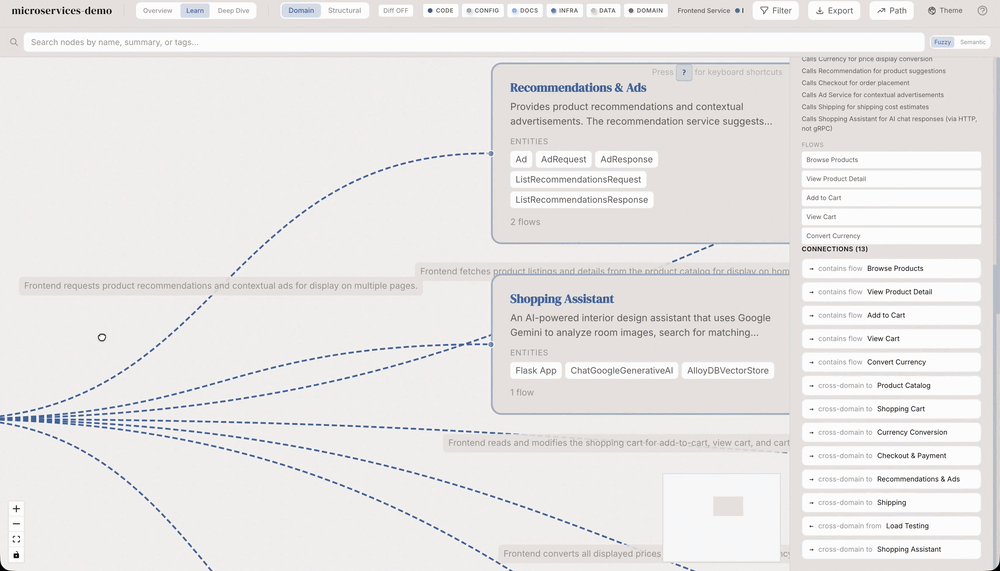
Domain view: recommendations, ads and shopping flows
Still frame from the publisher’s original domain-view animation for the microservices-demo sample, showing domain entities, business-flow connections and a detail panel. The documented command extracts or derives a domain graph from project context. Labels are source-generated analysis, not independently verified business behavior or a live transaction trace.
入力例
/understand-domainライセンス
Original source GIF, frame 71 of 142, 14200 ms from the start, decoded at native 1000×571 then stored as a lossless still. No crop, upscaling, invented animation or model regeneration.
MIT License

Copyright (c) 2026 Yuxiang Lin
Copyright (c) 2026 Infinite Universe, Inc.

Permission is hereby granted, free of charge, to any person obtaining a copy
of this software and associated documentation files (the "Software"), to deal
in the Software without restriction, including without limitation the rights
to use, copy, modify, merge, publish, distribute, sublicense, and/or sell
copies of the Software, and to permit persons to whom the Software is
furnished to do so, subject to the following conditions:

The above copyright notice and this permission notice shall be included in all
copies or substantial portions of the Software.

THE SOFTWARE IS PROVIDED "AS IS", WITHOUT WARRANTY OF ANY KIND, EXPRESS OR
IMPLIED, INCLUDING BUT NOT LIMITED TO THE WARRANTIES OF MERCHANTABILITY,
FITNESS FOR A PARTICULAR PURPOSE AND NONINFRINGEMENT. IN NO EVENT SHALL THE
AUTHORS OR COPYRIGHT HOLDERS BE LIABLE FOR ANY CLAIM, DAMAGES OR OTHER
LIABILITY, WHETHER IN AN ACTION OF CONTRACT, TORT OR OTHERWISE, ARISING FROM,
OUT OF OR IN CONNECTION WITH THE SOFTWARE OR THE USE OR OTHER DEALINGS IN THE
SOFTWARE.
使い方
- インストールコマンドをコピーし、自分の環境へ導入する前にソースを確認します。
- 必要なツール、認証情報、対応環境を原文で確認します。
- 入力と成果物を指定し、出力を資料と照合します。
npx skills add https://github.com/egonex-ai/understand-anything --skill understand-domain開始前の確認
- 導入にはモデル契約、API枠、ファイルへのアクセス許可は含まれません。
- スター数や導入数は活動の指標であり、独立した品質・安全性試験ではありません。
見出し、例、コード、表、リンク、参照画像を含む原文を表示しています。
/understand-domain
Extracts business domain knowledge — domains, business flows, and process steps — from a codebase and produces an interactive horizontal flow graph in the dashboard.
How It Works
- If a knowledge graph already exists (
.ua/knowledge-graph.json, or the legacy.understand-anything/knowledge-graph.jsonwhen that directory is present), derives domain knowledge from it (cheap, no file scanning) - If no knowledge graph exists, performs a lightweight scan: file tree + entry point detection + sampled files
- Use
--fullflag to force a fresh scan even if a knowledge graph exists
Instructions
Phase 0: Resolve PROJECT_ROOT
Set PROJECT_ROOT to the current working directory.
Worktree redirect. If PROJECT_ROOT is inside a git worktree (not the main checkout), redirect output to the main repository root. Worktrees managed by Claude Code are ephemeral — the data directory (.ua/, or legacy .understand-anything/) written there is destroyed when the session ends, taking the domain graph with it (issue #133). Detect a worktree by comparing git rev-parse --git-dir against git rev-parse --git-common-dir; in a normal checkout or submodule they resolve to the same path, in a worktree they differ and the parent of --git-common-dir is the main repo root.
COMMON_DIR=$(git -C "$PROJECT_ROOT" rev-parse --git-common-dir 2>/dev/null)
GIT_DIR=$(git -C "$PROJECT_ROOT" rev-parse --git-dir 2>/dev/null)
if [ -n "$COMMON_DIR" ] && [ -n "$GIT_DIR" ]; then
  COMMON_ABS=$(cd "$PROJECT_ROOT" && cd "$COMMON_DIR" 2>/dev/null && pwd -P)
  GIT_ABS=$(cd "$PROJECT_ROOT" && cd "$GIT_DIR" 2>/dev/null && pwd -P)
  if [ -n "$COMMON_ABS" ] && [ "$COMMON_ABS" != "$GIT_ABS" ]; then
    MAIN_ROOT=$(dirname "$COMMON_ABS")
    if [ -d "$MAIN_ROOT" ] && [ "${UNDERSTAND_NO_WORKTREE_REDIRECT:-0}" != "1" ]; then
      echo "[understand-domain] Detected git worktree at $PROJECT_ROOT"
      echo "[understand-domain] Redirecting output to main repo root: $MAIN_ROOT"
      echo "[understand-domain] (Set UNDERSTAND_NO_WORKTREE_REDIRECT=1 to keep PROJECT_ROOT as the worktree.)"
      PROJECT_ROOT="$MAIN_ROOT"
    fi
  fi
fi
Use $PROJECT_ROOT (not the bare CWD) for every reference to "the current project" / <project-root> in subsequent phases.
Resolve the data directory `$UA_DIR`. All Understand-Anything artifacts live in the project's data directory. Resolve it once, now that $PROJECT_ROOT is known, and reuse $UA_DIR for every read and write in later phases:
UA_DIR="$PROJECT_ROOT/$([ -d "$PROJECT_ROOT/.understand-anything" ] && echo .understand-anything || echo .ua)"This keeps the legacy .understand-anything/ directory when it already exists (existing projects keep working with no migration) and uses the new .ua/ otherwise. Because each phase may run in a fresh shell, carry $UA_DIR forward like $PROJECT_ROOT, re-resolving it with the line above if a later command block needs it.
Important: do not assume the plugin root is simply two directories above the skill path string. In many installations ~/.agents/skills/understand-domain is a symlink into the real plugin checkout. Prefer runtime-provided plugin roots first (for Claude), then fall back to universal symlinks, skill symlink resolution, and common clone-based install paths.
Resolve the plugin root like this. Substitute <SKILL_DIR> with this skill's directory (the base directory your platform reported when loading this skill) — this is how plugin installs with no fixed location, such as Devin's, are found:
SKILL_DIR_RELATIVE=$(cd -P "<SKILL_DIR>" 2>/dev/null && cd ../.. && pwd || echo "")
SKILL_REAL=$(realpath ~/.agents/skills/understand-domain 2>/dev/null || readlink -f ~/.agents/skills/understand-domain 2>/dev/null || echo "")
SELF_RELATIVE=$([ -n "$SKILL_REAL" ] && cd "$SKILL_REAL/../.." 2>/dev/null && pwd || echo "")
COPILOT_SKILL_REAL=$(realpath ~/.copilot/skills/understand-domain 2>/dev/null || readlink -f ~/.copilot/skills/understand-domain 2>/dev/null || echo "")
COPILOT_SELF_RELATIVE=$([ -n "$COPILOT_SKILL_REAL" ] && cd "$COPILOT_SKILL_REAL/../.." 2>/dev/null && pwd || echo "")

PLUGIN_ROOT=""
for candidate in \
  "${CLAUDE_PLUGIN_ROOT}" \
  "${DEVIN_PLUGIN_ROOT}" \
  "$SKILL_DIR_RELATIVE" \
  "$HOME/.understand-anything-plugin" \
  "$SELF_RELATIVE" \
  "$COPILOT_SELF_RELATIVE" \
  "$HOME/.codex/understand-anything/understand-anything-plugin" \
  "$HOME/.opencode/understand-anything/understand-anything-plugin" \
  "$HOME/.pi/understand-anything/understand-anything-plugin" \
  "$HOME/understand-anything/understand-anything-plugin"; do
  if [ -n "$candidate" ] && [ -f "$candidate/package.json" ] && [ -f "$candidate/pnpm-workspace.yaml" ]; then
    PLUGIN_ROOT="$candidate"
    break
  fi
done

if [ -z "$PLUGIN_ROOT" ]; then
  echo "Error: Cannot find the understand-anything plugin root."
  echo "Checked:"
  echo "  - ${CLAUDE_PLUGIN_ROOT:-<unset CLAUDE_PLUGIN_ROOT>}"
  echo "  - ${DEVIN_PLUGIN_ROOT:-<unset DEVIN_PLUGIN_ROOT>}"
  echo "  - ${SKILL_DIR_RELATIVE:-<unresolved path derived from the skill directory>}"
  echo "  - $HOME/.understand-anything-plugin"
  echo "  - ${SELF_RELATIVE:-<unresolved path derived from ~/.agents/skills/understand-domain>}"
  echo "  - ${COPILOT_SELF_RELATIVE:-<unresolved path derived from ~/.copilot/skills/understand-domain>}"
  echo "  - $HOME/.codex/understand-anything/understand-anything-plugin"
  echo "  - $HOME/.opencode/understand-anything/understand-anything-plugin"
  echo "  - $HOME/.pi/understand-anything/understand-anything-plugin"
  echo "  - $HOME/understand-anything/understand-anything-plugin"
  echo "Make sure the plugin is installed correctly."
  exit 1
fi
Use $PLUGIN_ROOT for every reference to agent definitions in subsequent phases.
Phase 1: Detect Existing Graph
- Check if
$UA_DIR/knowledge-graph.jsonexists - If it exists AND
--fullwas NOT passed, check freshness before deriving from it:
- Read
project.gitCommitHashfrom the graph metadata asGRAPH_COMMIT_RAW. Change to$PROJECT_ROOT, resolve it as a commit before using it in any Git diff, compare the resolved commit withgit rev-parse HEAD, and inspect project-scoped committed and working-tree changes:
     GRAPH_COMMIT=$(git rev-parse --verify --end-of-options "${GRAPH_COMMIT_RAW}^{commit}" 2>/dev/null)
     git rev-parse HEAD
     git diff --name-only "$GRAPH_COMMIT" HEAD -- .
     git diff --cached --name-only -- .
     git diff --name-only -- .
git ls-files --others --exclude-standard -- .- The
-- .pathspec is required: commits that only touch a sibling monorepo project must not make this graph stale. A hash mismatch alone is not stale when the project diff is empty. - Ignore the selected data directory (
.ua/or legacy.understand-anything/) in every command's output because it contains generated graph artifacts, not project source drift. - If the committed diff or any working-tree command reports project files, warn that domain extraction may omit those changes. Suggest: Run
/understandto refresh the knowledge graph. - Run the commit diff only when
GRAPH_COMMIT_RAWresolves successfully. If the graph commit or Git metadata is missing, invalid, or unavailable, give a brief best-effort warning and continue instead of blocking.
- After that preflight, proceed to Phase 3 (derive from graph).
- Otherwise, proceed to Phase 2 (lightweight scan). When
--fullis used, skip this preflight because the command performs a fresh scan instead of consuming the existing graph.
Phase 2: Lightweight Scan (Path 1)
The preprocessing script does NOT produce a domain graph — it produces raw material (file tree, entry points, exports/imports) so the domain-analyzer agent can focus on the actual domain analysis instead of spending dozens of tool calls exploring the codebase. Think of it as a cheat sheet: cheap Python preprocessing → expensive LLM gets a clean, small input → better results for less cost.
- Run the preprocessing script bundled with this skill, passing
$PROJECT_ROOTfrom Phase 0:
python ./extract-domain-context.py "$PROJECT_ROOT"This outputs $UA_DIR/intermediate/domain-context.json containing:
- File tree (respecting
.gitignore) - Detected entry points (HTTP routes, CLI commands, event handlers, cron jobs, exported handlers)
- File signatures (exports, imports per file)
- Code snippets for each entry point (signature + first few lines)
- Project metadata (package.json, README, etc.)
- Read the generated
domain-context.jsonas context for Phase 4 - Proceed to Phase 4
Phase 3: Derive from Existing Graph (Path 2)
- Read
$UA_DIR/knowledge-graph.json - Format the graph data as structured context:
- All nodes with their types, names, summaries, and tags
- All edges with their types (especially
calls,imports,contains) - All layers with their descriptions
- Tour steps if available
- This is the context for the domain analyzer — no file reading needed
- Proceed to Phase 4
Phase 4: Domain Analysis
- Read the domain-analyzer agent prompt from
$PLUGIN_ROOT/agents/domain-analyzer.md - Dispatch a subagent with the domain-analyzer prompt + the context from Phase 2 or 3
- The agent writes its output to
$UA_DIR/intermediate/domain-analysis.json
Phase 5: Validate and Save
- Read the domain analysis output
- Validate using the standard graph validation pipeline (the schema now supports domain/flow/step types)
- If validation fails, log warnings but save what's valid (error tolerance)
- Save to
$UA_DIR/domain-graph.json - Clean up
$UA_DIR/intermediate/domain-analysis.jsonand$UA_DIR/intermediate/domain-context.json
Phase 6: Launch Dashboard
- Auto-trigger
/understand-dashboardto visualize the domain graph - The dashboard will detect
domain-graph.jsonand show the domain view by default
