원본 문서
GPT Image 2 · en
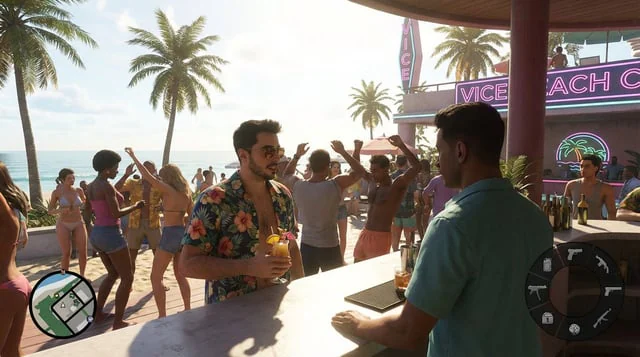
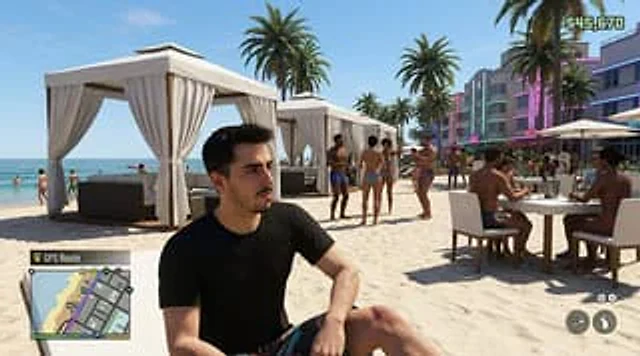
Create a hyper-realistic screenshot of an open-world crime video game, inspired by a modern Miami beach club scene, set in a bright afternoon sun with a clear blue sky. Use a third-person perspective composition, with a seated figure in the foreground.{argument name="character description" default="A young man with short, dark hair and fair skin was wearing a plain black T-shirt and printed swim trunks."} He sits casually on the light-colored sand, his body slightly turned to one side, as if the player's perspective has stopped beside him. Positioning him slightly off-center on the left side of the screen, occupying a large proportion, his posture is natural and relaxed. Behind him, a high-end beach club is depicted, with three white pavilions with flowing curtains clearly visible on the beach, planted with several tall palm trees. To the left is turquoise water, and to the right is a row of Art Deco hotels with soft-toned exteriors and neon decorations. The beach is filled with 12 people in swimwear in the background: some are standing and chatting, some are walking along the shore, and two are sitting at a table on the right enjoying a meal. The scene includes white casual furniture and parasols, creating a sophisticated social party atmosphere. A realistic game HUD interface is added: in the lower left corner is a sign {argument name="map label" default="GPS route"} The small square map displays weapon and control icons in the bottom right corner and the amount in the top right corner.{argument name="money amount" default="$45,670"} The money counter. The overall look is similar to screenshots from the next-gen game *Grand Theft Auto VI*, with a cinematic feel and a distinct in-game texture. It boasts rich detail, realistic shadows, vibrant color gradations, and a lively coastal atmosphere, while also possessing {argument name="city setting" default="Vice City"} The subtle irony of luxurious beaches.사용 방법
- 매개변수를 포함한 전체 원본 프롬프트를 복사하세요.
- 주제, 문구, 구도를 자신의 요구에 맞게 바꾸세요.
- 호환되는 외부 도구에서 사용하고 이용 조건과 결과를 확인하세요.
시작 전 확인
- 참조 이미지가 필요한지 확인하세요. 호환 표시는 해당 모델로 이 예시를 생성했다는 뜻이 아닙니다.
- 이름, 수치, 이미지 속 문구를 확인하세요. 모델 버전에 따라 결과가 다를 수 있습니다.