원본 문서
GPT Image 2 · en
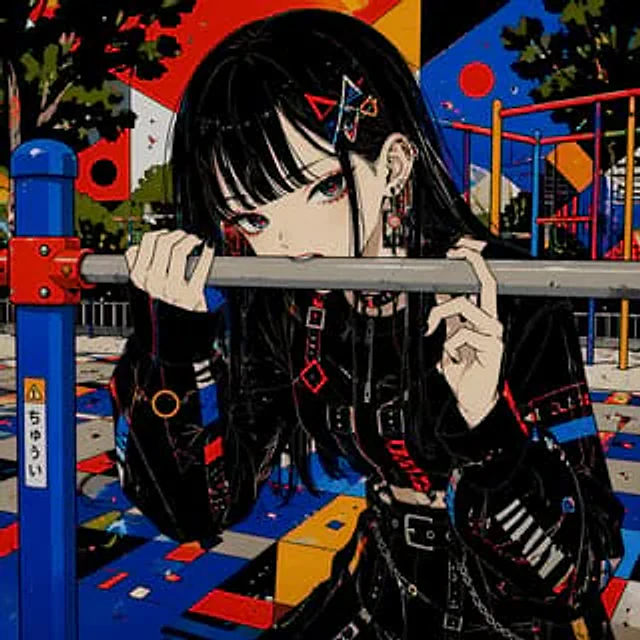
A richly detailed anime-style illustration depicts a fair-skinned gothic girl in a brightly colored urban amusement park. The image is shot in a close-up to medium shot; she leans forward, biting a horizontal metal railing, her expression mischievous and slightly rebellious. She has long, straight hair, the color of which is {argument name="hair color" default="pitch black"} She has bangs, bright red eyes, and a delicate face with her small mouth lightly pressed against the railing. Three geometric hair clips adorn the right side of her hair: a red triangle, a blue angular one, and a small gold hoop. She wears multiple earrings, including several studs and dangling industrial-style earrings. She's dressed in a black, functional gothic outfit, comprising five key pieces: a short black jacket with red and blue stripes, a black choker, a black belted top or dress with a front clasp, a wide belt with metal hardware, and a hanging waist chain. Her sleeves are wide and long, with white striped detailing on one forearm. Her hands grip the railing tightly, one close to her mouth, the other extending to the side, creating a pose that is both intimate and confrontational. The background is an amusement park with brightly colored facilities, including blue pillars, red connectors, yellow and red climbing poles, and a rubber surface composed of bold geometric blocks of blue, red, yellow, white, and black. The background features dark green trees and a dramatic, graphic sky with large, flat shapes in red, orange, blue, black, and white, as well as circular sun-shaped dots, giving the scene a poster-like pop art style. A vertical warning sticker with Japanese text and small warning icons is located on the blue pillar on the left. The composition employs crisp celluloid shadows, sharp lines, subtle glitch textures, oversaturated colors, high contrast, a melancholic cyberpunk gothic atmosphere, and a dynamic composition focusing on the girl's intense gaze and the metal railings.사용 방법
- 매개변수를 포함한 전체 원본 프롬프트를 복사하세요.
- 주제, 문구, 구도를 자신의 요구에 맞게 바꾸세요.
- 호환되는 외부 도구에서 사용하고 이용 조건과 결과를 확인하세요.
시작 전 확인
- 참조 이미지가 필요한지 확인하세요. 호환 표시는 해당 모델로 이 예시를 생성했다는 뜻이 아닙니다.
- 이름, 수치, 이미지 속 문구를 확인하세요. 모델 버전에 따라 결과가 다를 수 있습니다.