원본 문서
GPT Image 2 · en
{
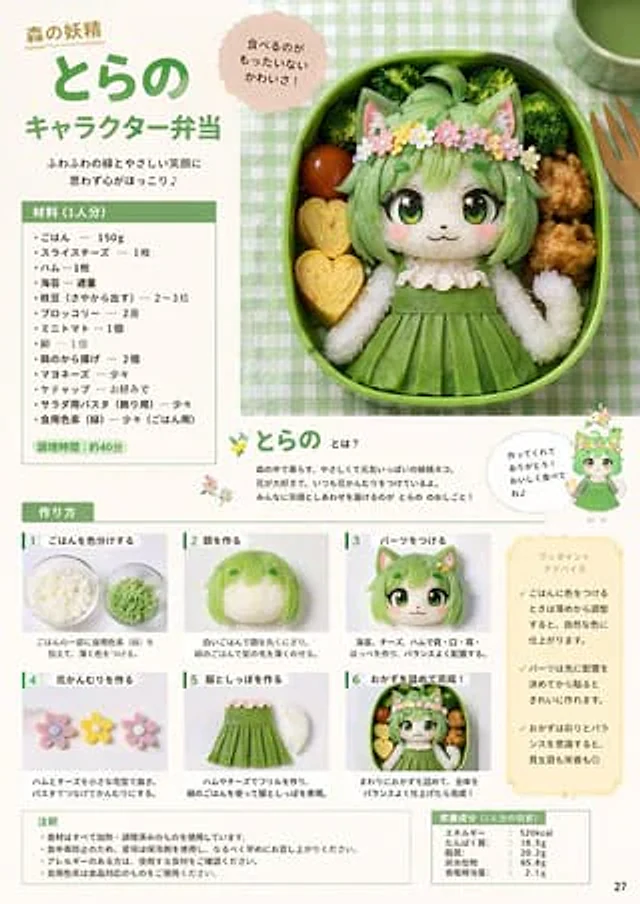
"type": "Recipe magazine page",
"theme": "Cartoon Bento",
"header": {
"title": "Forest Spirit{argument name=\"character name\" default=\"Little Tiger\"}{argument name=\"dish type\" default=\"Cartoon Bento\"}",
"subtitle": "The fluffy green leaves and gentle smiles instantly warm my heart♪",
"speech_bubble": "So cute you won't want to eat them!"
},
"main_image": {
"position": "Top right corner",
"description": "A top-down view of a green oval bento box containing a catgirl character made of rice.{argument name=\"main color theme\" default=\"green\"} Her hair and skirt, adorned with a flower wreath, surrounded by broccoli, cherry tomatoes, heart-shaped eggs, and fried chicken."
},
"layout": {
"sections": [
{
"title": "Ingredients (for 1 person)",
"position": "Top left corner",
"count": 14,
"labels": [
"rice",
"Sliced cheese",
"Ham",
"seaweed",
"Edamame",
"broccoli",
"Cherry Tomato",
"egg",
"fried chicken",
"mayonnaise",
"Tomato sauce",
"Salad Pasta",
"Food coloring (green)",
"Cooking time:{argument name=\"prep time\" default=\"Approximately 40 minutes\"}"
]
},
{
"title": "About Xiaohu",
"position": "Middle right",
"description": "2D anime illustrations of characters with speech bubbles",
"labels": [
"Thank you for making this for me! Please enjoy it! ♪"
]
},
{
"title": "Production steps",
"position": "lower half",
"count": 6,
"labels": [
"1. Separate the rice by color",
"2. Create the face",
"3. Installation accessories",
"4. Make a wreath",
"5. Make clothes and a tail",
"6. Add the side dishes, and you're done!"
]
},
{
"title": "Tips",
"position": "bottom right corner",
"count": 3
},
{
"title": "Remark",
"position": "bottom left corner",
"count": 4
},
{
"title": "Nutritional information (reference values for 1 person)",
"position": "bottom right corner",
"count": 5,
"labels": [
"energy:{argument name=\"calories\" default=\"520kcal\"}",
"protein",
"Fat",
"carbohydrate",
"Equivalent amount of salt"
]
}
]
}
}사용 방법
- 매개변수를 포함한 전체 원본 프롬프트를 복사하세요.
- 주제, 문구, 구도를 자신의 요구에 맞게 바꾸세요.
- 호환되는 외부 도구에서 사용하고 이용 조건과 결과를 확인하세요.
시작 전 확인
- 참조 이미지가 필요한지 확인하세요. 호환 표시는 해당 모델로 이 예시를 생성했다는 뜻이 아닙니다.
- 이름, 수치, 이미지 속 문구를 확인하세요. 모델 버전에 따라 결과가 다를 수 있습니다.